live_tv
Livestream Starting Soon
00
Hours
:
00
Minutes
:
00
Seconds
Up next in 10

Angular ngx-editor to Build Floating Wysiwyg Editor Menu on HTML Elements in Browser Using TS
Jan 30, 2025

Get the full source code of application here:
https://codingshiksha.com/angular/angular-ngx-editor-to-build-floating-wysiwyg-editor-menu-on-html-elements-in-browser-using-ts/
Hi Join the official discord server to resolve doubts here:
https://discord.gg/cRnjhk6nzW
Visit my Online Free Media Tool Website
https://freemediatools.com/
Buy Premium Scripts and Apps Here:
https://procodestore.com/
Show More Show Less View Video Transcript
0:00
uh hello guys welcome to this video so
0:02
in this video I will show you a package
0:04
inside angular where you can integrate
0:07
this inline floating Vivic editor so
0:10
whenever you select any text out there
0:12
this Vivic editor will show and Rich
0:15
text editor with all these controls you
0:17
will be able to change your text to bold
0:19
italic underline strike through so it
0:24
basically whenever you select any text
0:26
inside the page it is not fixed so the
0:30
real advantage of using this package is
0:32
that if you select any text this inline
0:35
editor will appear at that location
0:37
itself so you can be at any location in
0:40
the page you just select the text and
0:41
then side by side this viic editor will
0:44
show up you can just see which actually
0:47
have all these controls out there you
0:50
just need to select and thereby you can
0:52
make your editing you can edit the text
0:55
according to the controls which are
0:56
there in this visic editor so actually
0:59
the name of the package is if you go to
1:01
npmjs.com just type here ngx editor so
1:05
this is actually the package that we are
1:08
using right here so this is actually the
1:10
command I've already installed it and
1:13
it's almost having 40,000 weekly
1:16
downloads so on my website I have
1:18
written a complete step by-step blog
1:20
post on this topics with full source
1:22
code that I will be using in this video
1:24
so the link is given in the description
1:27
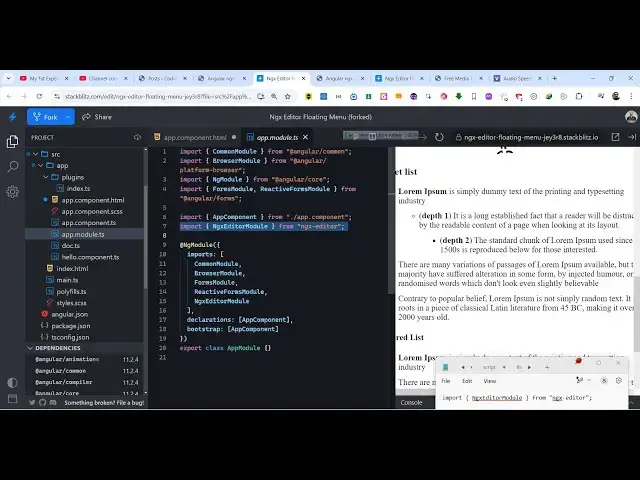
so now to get started you need to move
1:29
to your app module. typescript file of
1:32
your angular project and simply import
1:35
this line we just need to say
1:39
import
1:41
ngx editor module and it will be coming
1:45
from this package ngx editor so we
1:48
simply need to require this line ngx
1:50
editor module from ngx editor and then
1:53
go to the import s and simply add this
1:56
import line NG editor module this is all
1:59
the configuration code is necessary now
2:02
you simply need to use this so just go
2:04
to your app. component. HTML file so
2:07
wherever you are embedding this so we
2:11
will simply in order to do this we
2:14
simply go right here and we use this
2:17
directive ngx
2:23
editor and inside this we actually pass
2:26
a property here which is the editor
2:28
option so this editor we will create it
2:32
inside our typescript so as soon as you
2:34
do this you will see this editor will
2:36
pop in and U we also need to give a form
2:41
control name property as
2:44
well this will be editor
2:50
content so now all the text will appear
2:53
so if you just select any text now for
2:56
that floating menu to show right inside
2:59
this you will write this ngx
3:02
editor Dash floating menu so this is
3:05
actually your ending and closing
3:11
tag so now to show that we just need to
3:14
directly attach a property right here
3:16
which is the same
3:18
editor property it
3:21
takes that's all that we need to do and
3:24
now if you select any text you will see
3:26
this visic inline editor will appear
3:29
side by side so that you can clearly
3:31
edit your text change to bold italic
3:33
underline so you can be at any location
3:36
in the page you just need to select the
3:38
text and side by side this visic editor
3:41
will show up this is actually the
3:43
package you require this inside your app
3:45
module. TS then you come to the template
3:48
file just ngx editor this is a directive
3:51
and inside this you put NG editor
3:53
floating menu and now the types script
3:56
code we have this editor object if you
3:58
see we have initializing this editor
4:01
this actually takes an object right here
4:04
we passing the appropriate plugins the
4:06
history option keyboard shortcuts to
4:08
True input rules to true so
4:11
these we this editor is coming from this
4:14
package which is ngx editor so we are
4:16
just requiring it so the full source
4:19
code of this example which is a working
4:21
example I've given in the description of
4:23
the video with full step by-step
4:25
explanation inside my blog post so if
4:27
you need the full source code of this
4:29
example you can go to the description
4:30
link and now you can use this package
4:33
ngx editor which is the inline floating
4:36
viic Rich Text Editor for editing your
4:39
text inside angular so thank you very
4:41
much guys for watching this video and
4:43
also check out my website as well free
4:46
mediat tools.com uh which contains
4:48
thousands of tools regarding audio video
4:50
and image and I will be seeing you guys
4:52
in the next video
#Programming
#Other