Up next in 10

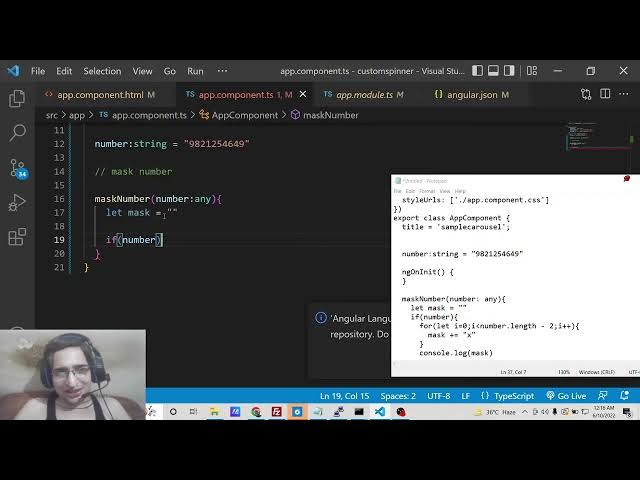
Angular 13 Mask 10 Digit Mobile or Phone Number Using Slice() Method in TypeScript
Dec 22, 2025

Buy the full source code of application here:
https://procodestore.com/index.php/product/angular-13-mask-10-digit-mobile-or-phone-number-using-slice-method-in-typescript/
Show More Show Less View Video Transcript
0:07
Uh hello friends, today in this tutorial
0:08
I will be showing you that how to mask
0:12
or hide
0:14
digits inside your phone number or any
0:16
sort of mobile number inside Angular 13.
0:20
So basically you have seen this inside
0:21
applications where they hide uh phone
0:24
numbers very secret information like
0:27
this using we can hide this using any
0:30
symbol you can hide it with x you can
0:32
hide it with any alphabetic symbol or
0:35
number. So you can see we are only
0:38
showing the last two digits of the
0:39
number mobile number and phone number.
0:42
This is actually called as masking or
0:44
hiding the number. So you are not
0:47
revealing the full number. You are just
0:49
showing the last two digits of the
0:52
number. So it's a 10 10 digit number. So
0:55
we are only showing the last two digits
0:57
which is 49. You can also customize this
1:00
accordingly. If you want to show you the
1:04
last four digits, you can customize this
1:07
code that I will show you. So now
1:09
basically it will show you the last four
1:10
digits of the number and rest of the
1:13
number will be hidden. So you have seen
1:15
this inside the many applications if you
1:18
come across.
1:20
So we will try to implement this inside
1:22
angular 13 and we will not be using any
1:24
third party library. So this will be
1:27
done entirely in angular using a very
1:30
simple function called as slice in
1:32
JavaScript. So if you know any sort of
1:34
JavaScript vanilla JavaScript you will
1:37
know this function which is a slice
1:38
function which is a built-in function
1:41
inside JavaScript. It's a basically a
1:43
array function which uh used to remove
1:46
elements inside the array. So we will
1:48
make use of this slice method inside our
1:50
JavaScript in order to write this inside
1:53
the TypeScript in in order to implement
1:56
this inside Angular 13. So if you want
1:58
to get all this source code for this
2:00
application, you can go to the video
2:02
description link. I have written a
2:03
complete blog post where I have given
2:06
all the source code. So just go to the
2:08
edit option and uh just go to the
2:12
description of the video and you can
2:15
download all the source code. So now
2:17
let's get started. If you have joining
2:19
it for the very first time then please
2:20
hit the like button, subscribe the
2:22
channel as well. So
2:26
first of all guys what we need to do is
2:28
that let me just delete all this source
2:31
code and start from scratch
2:34
and also here also. So right here we
2:38
need to write a simple function for
2:40
this. So right here you can uh uh take
2:44
the number as dynamic also from the user
2:46
itself. But for the simple example I
2:49
will be taking it as static. So we will
2:51
be declaring a number variable which
2:53
will be of the type string. And here we
2:55
will I will take my own number which is
2:57
you all know my number. So this is the
3:00
10digit mobile number. You will see this
3:02
9821.
3:04
So we now now need to mask it or hide
3:07
some of the digits. So now what we can
3:10
do is that ng on in it.
3:14
So this is a life cycle method. So when
3:16
the component renders for the very first
3:18
time this function executes. So we don't
3:20
need this function. So you can delete
3:22
this. So we will be masking this number
3:27
using this function which is called as
3:29
mask number. So basically we will be
3:31
expecting a number which will be passed
3:33
to this function whenever you call this
3:35
function. So we are taking the number as
3:38
a argument. So we are passing it as any.
3:42
So this can be as integer, string,
3:44
anything. So you need you need to
3:46
explicitly tell what is the type of this
3:50
parameter in Typescript.
3:52
So after this you need to declare a
3:54
variable of mask which will be empty by
3:57
default. And after that we will check if
4:00
the number is not
4:03
is not empty then in that case only we
4:05
will execute this if block. So here we
4:08
will run a simple for loop and first of
4:11
all we will calculate the number of
4:13
digits present inside the number. So we
4:15
will use a simple for loop which will go
4:18
from zero up till
4:21
number.length how much is the digits. So
4:24
we can uh easily calculate this using
4:28
dotlength. This is the array syntax and
4:31
we need to subtract it by two. If you
4:34
want to show only last two digits of the
4:36
number. So depending upon that this
4:38
logic will work. If you want to show
4:41
four digits you will minus minus 4. So
4:44
in this case I need to show only last
4:46
two digits. So I will minus 2 and then I
4:49
will say I ++ and inside this for loop
4:52
what we need to do is that we need to
4:55
increment this value. We need to append
4:57
to this variable which is empty by
4:59
default. So we can append this using
5:02
plus is equal to operator and we can
5:06
append this hide this using X symbol.
5:08
You can use any symbol of your choice A
5:11
B C D but uh by default we uses X for
5:14
masking the number. So after you do this
5:17
you can console log this or you can just
5:20
show it on the screen in the browser. So
5:22
we can return from this function
5:26
we can return the mask and also we need
5:29
to show the last two digits. For that we
5:31
can use the slice method on this number.
5:34
So slice what it does it only shows the
5:37
two digits that we want to show. So we
5:39
will mention their indexes. So 8 index
5:44
comma 10.
5:46
So there it will only show the last two
5:48
digits. So you will see that indexing
5:50
starts from zero. So that's why we are
5:52
saying 8 10. That's it. If the number is
5:56
null in that case we will return null.
5:59
That's it. So this is the whole logic of
6:01
this function guys. So here we are not
6:03
using third party dependency. We are
6:05
using our own generated method. We have
6:08
written all this logic on our own and
6:12
now we simply need to call this
6:13
functions inside this template inside a
6:16
div simply we will call this.
6:21
So
6:23
inside double curly brackets we will
6:25
call this function mask number.
6:27
That's it. And here we need to pass the
6:30
number which is initialized here. You
6:32
will see that number is statically typed
6:34
here which is this one. So we are
6:36
passing this as number. So now if you
6:40
see here it is compiled successfully. So
6:43
now if you reload this application you
6:44
will see that the last two digits of the
6:46
number is shown to you. You can actually
6:49
change the number to anything. 1 2 3 4 5
6:51
6 7 8 9 0. So now you will see that 9 0
6:56
will be shown to you.
6:59
If you want to show you uh last four
7:02
digits, you can say minus4
7:04
and then here you need to change six to
7:07
10. So now last four digits will be
7:10
shown to you. You will see that 1 2 3 4
7:14
5 6
7:17
digits are hidden and the last four
7:18
digits are shown. So this is all
7:20
customizable. You can customize this
7:22
code accordingly to your application
7:24
needs. So in this way you can simply
7:27
hide the number or mask the number in
7:30
angular 13 without any third party
7:32
dependency using the slice method. If
7:35
you like this video then please hit the
7:37
like button, subscribe the channel and I
7:39
will be seeing you in the next video.