0:00
Uh, hello guys. In this tutorial, I will
0:02
actually show you how to manually index
0:05
your webpage directly inside Google
0:09
If you're unable to index your page,
0:11
there is a manual way by which you can
0:13
force Google to index your page.
0:16
If you don't know about it, simply go to
0:23
simply copy the URL of whatever page
0:26
that you are facing issue. So,
0:28
discovered currently not indexed.
0:30
Basically, this is the pages which
0:32
Google ignore or never never come back
0:37
So, let me just take an example right
0:44
Let's suppose I this page.
0:46
I take an example. So, what you need to
0:48
do, you need to paste this URL directly
0:50
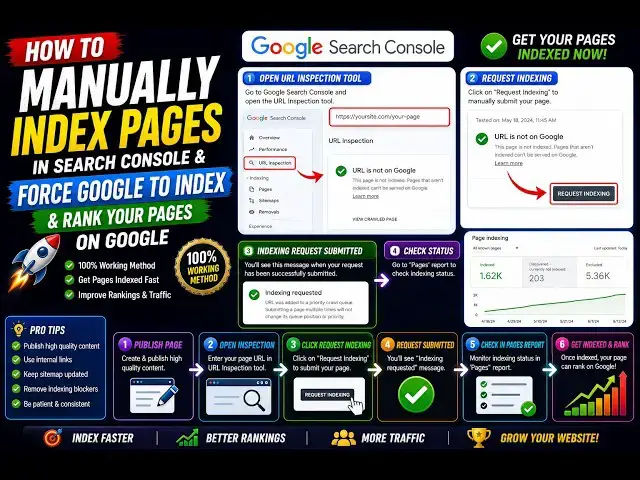
inside at the top, inspect any URL.
0:54
So, you paste the URL
0:56
of your website which you want to index.
1:01
exactly tell you whether the page is on
1:03
Google or not. So, in this case, as you
1:05
see, URL is not on Google.
1:12
It exactly tells you that page is not
1:14
indexed, discovered currently not
1:17
And as you see, crawling is also being
1:19
not done. So, this is the
1:22
thing that you can see, request
1:27
you can need to click on that to
1:29
actually communicate it to Google that
1:32
see this page and index it on Google.
1:36
And there is no 100% guarantee that
1:37
Google will index the page, but 99% of
1:40
the time, after 10 to 12 hours, you will
1:43
see this page will get indexed on
1:46
So, 99% of the time, I've done this
1:48
numerous times before.
1:51
Uh, before that, simply test this live
1:55
Click on this button. It will simply
1:58
Whether this URL can be indexed or not.
2:02
Before pressing that request indexing
2:04
button, it is safe to actually click the
2:08
So then it will exactly tell you the URL
2:10
is available to Google.
2:12
Page availability, page can be indexed.
2:15
So after that, you come to this and
2:18
click on this button request indexing.
2:21
So as soon as you do this guys, the
2:24
indexing will be requested. URL as you
2:26
see was added to priority crawl queue.
2:30
Don't submit multiple times, it will not
2:32
change anything. Simply submit one time
2:35
and just wait. Wait for 10 to 12 hours
2:39
and then just go to Google, simply copy
2:45
if you do want to check if the URL is
2:46
indexed, simply paste the URL
2:49
and enter it. And if the URL comes on
2:53
the first page, then it is 100% sure
2:56
that your page has been indexed.
2:58
So as I already requested the indexing,
3:01
it will crawl to my website to this page
3:03
and after 10 to 12 hours, your page will
3:07
So this is the manual indexing guys, how
3:10
you can do this in Google Search
3:11
Console. This was a short little
3:13
tutorial on how to do this.
3:16
So you need to open this URL in
3:18
inspection, just paste the URL
3:21
and you need to click this button
3:22
request again, request indexing.
3:25
That's all that you need to do.
3:29
99% of the time your page will be
3:31
indexed and this is the official way in
3:35
Google Search Console how you can index
3:38
So thank you very much for watching this
3:40
video. Please hit that like button,
3:42
subscribe the channel as well.