Up next in 10

ZMO.AI is the ULTIMATE Canva Alternative – INSANE 1 Click AI Image Generator & Background Remover!
Jul 22, 2025

Get the full source code of application here:
Show More Show Less View Video Transcript
0:00
Uh hello guys, welcome to this video. So
0:02
in this video, I'll show you another AI
0:04
platform. Uh this AI platform is called
0:07
as ZMO AI. So this is the ultimate AI
0:11
platform for editing your images or
0:13
generating images.
0:17
If you just type this on Google, the
0:19
very first ZMO.AI
0:23
AI art generator. So it has all the
0:27
tools available. You can generate
0:29
images, text to image, you can image
0:31
swap, everything is there. Image editor.
0:35
So you can basically log in right here.
0:38
Just sign up using your GitHub or Google
0:41
account. And after that you get 30 sign
0:44
up bonus credits by which you can
0:47
actually try this.
0:50
So after that simply select first of all
0:53
the AI image generator. Using this you
0:57
will be able to generate images. So I
0:59
will say
1:01
girl doing
1:05
coding in on laptop.
1:08
So simply click create and as soon as
1:11
you do this
1:23
person do it coding.
1:26
So you basically read the prompt
1:36
and after that you can even uh
1:39
basically
1:45
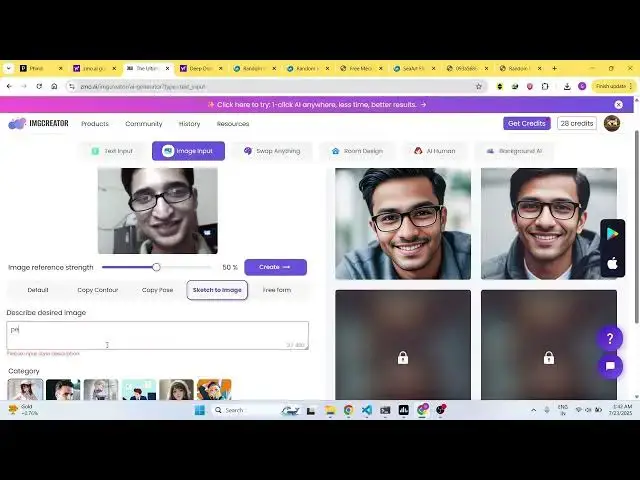
you can edit your images as well. Click
1:48
a
1:51
lookalike image. You can also simply
1:54
provide a input image and by default it
1:57
will create
1:59
a similar image to this. And uh
2:08
so as you can see it created this image.
2:16
You can also you can see it created
2:19
lookalike images sketch to image.
2:42
So this will take this input image and
2:45
just you write the prompt here person
2:47
doing coding on laptop and then it will
2:49
generate the image
2:52
to that exact thing that you mentioned.
2:54
The AI will do the magic for you.
2:59
So as you can see and you also have the
3:02
option to swap anything as well. AI
3:07
human as well.
3:11
You can generate any human. You can see
3:13
just give it a prompt background AI. So
3:17
if you want to remove background from
3:19
your image, simply do this and the AI
3:21
will do the magic for you. It will
3:24
remove background as well.
3:31
So using one click it will do the magic
3:33
for you. So your background is
3:35
automatically removed. you can download
3:38
the image.
3:41
So definitely try this guys website
3:45
zmo.ai AI
3:48
and also check out my website
3:50
freemediatools.com
3:53
uh which contains thousands of tools.
#Business & Productivity Software
#Multimedia Software