0:00
uh hello guys welcome to this video so
0:02
in this video I will show you how to
0:04
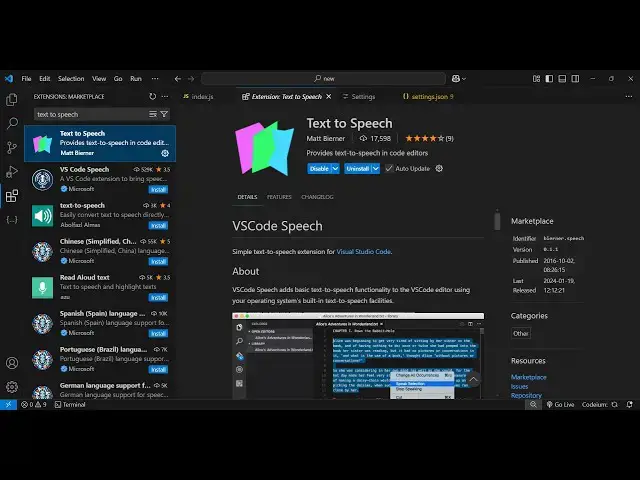
integrate or enable the text to speech
0:07
extension in vs code so there is this
0:09
custom extension which is made by some
0:11
developer if you go to extensions just
0:13
type here text to speech this is the
0:16
extension which comes it's got 177,000
0:20
uh installs so you just need to click
0:23
the install button and just activate
0:25
this extension so with the help of this
0:28
extension now if you have a bunch of of
0:30
text in the vs code you can simply
0:32
highlight the text here simply select
0:34
the text right click and automatically
0:37
you will see this option appearing which
0:42
selection so it will actually speak
0:44
these words and let me just turn off
0:51
here so by default if you don't if you
0:55
just enable this and just click Speak
0:57
solution India officially the Republic
1:00
of India j21 is a country in South Asia
1:03
it is the seventh largest country bya
1:06
the most populous you can even right
1:09
click stop the speaking as well and
1:11
again start India officially the
1:13
Republic of India j21 is a country in so
1:17
you can see that you can highlight any
1:18
code as well so let's suppose I
1:20
highlight this code here which is a
1:22
react component and then I if I want to
1:25
speak this import react from reacta
1:29
import react from Cod
1:37
console. so there is this you can also
1:40
control the speed as well so just
1:43
control shift p to open the command pet
1:46
and here you can go to the
1:48
settings user settings and here you can
1:51
add a setting which will be
1:54
for speech do speed so by default it is
1:59
set to one you can increase the speed of
2:02
the speaking so let's suppose I changed
2:04
this to 10 so once again if I
2:12
select so you can control how fastly the
2:15
speaker will speak those words by
2:17
putting this setting speech. speed in
2:19
the user settings file so by default the
2:22
setting is one so if you just SE now
2:25
India officially the Republic of India
2:29
actually use this plug-in guys text to
2:31
speech just install this if you want
2:34
this capability inside vs code
2:37
so thank you very much for watching this
2:39
video and also check out my website free
2:42
mediat tools.com which contains
2:44
thousands of tools regarding audio video
2:46
and image and I will be seeing you in