Up next in 10

Vue.js Video Editor: $1K/Month Cutter & Trimmer (FFMPEG WASM, Browser, JavaScript, AdSense, Ezoic)
Mar 5, 2026

Buy the full source code of application here:
https://procodestore.com/index.php/product/vue-js-video-editor-1k-month-cutter-trimmer-ffmpeg-wasm-browser-javascript-adsense-ezoic/
Live Demo of App:
https://freemediatools.com/videocutter/
Show More Show Less View Video Transcript
0:00
Hello guys, welcome to this video. So in
0:02
this video, I'll show you a video editor
0:04
that I developed inside Vue.js. It's a
0:07
single page application.
0:09
Uh it's like a software as a service
0:11
tool where you can earn a lot of revenue
0:12
by placing advertisement. So I've
0:15
deployed this tool here. You can try it
0:16
out. Uh I've given the link in the
0:19
description of the video. Check the full
0:21
description. So this is the interface of
0:23
the tool right here. You basically
0:25
choose your video file. All the
0:26
extensions are supported. You select a
0:29
video file. There is no restriction out
0:32
there. The video can be as long as
0:34
possible. So now we have these controls
0:37
here. You can select the starting
0:38
duration and the ending duration. So
0:41
here you can select the time to which
0:44
you need to trim or cut this video. And
0:47
then we have this button. Instantly
0:49
using FFMPG web assembly this video will
0:52
be cut and trimmed. And the result will
0:54
be shown to you in this video. You can
0:57
play the video
1:00
and then you can simply click this dot
1:03
and simply download this video. So now
1:06
your video is successfully cut and
1:08
trimmed. This is a full script.
1:13
Uh the project here is developed in
1:16
Vue.js and we have used ffmpg web
1:19
assembly library and if you are wanting
1:22
to purchase this source code the link is
1:24
given in the description. Uh this is all
1:28
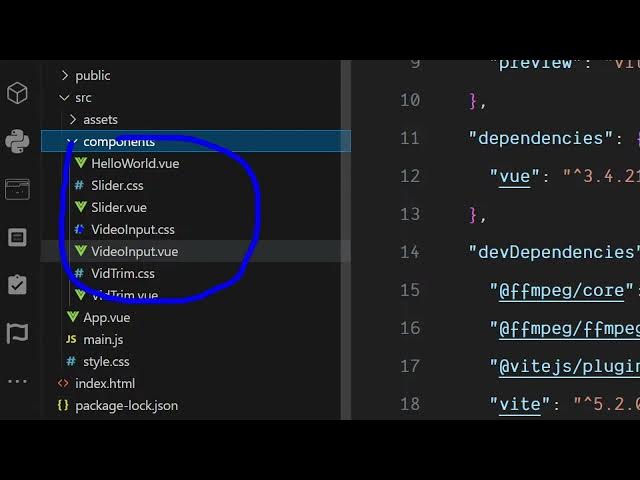
the components are divided here inside
1:30
the Vue.js files here. It's a complete
1:33
Vue.js project here and we have used
1:36
FMPPG web assembly library for cutting
1:39
the video directly in the browser. And
1:41
now after purchasing it you can simply
1:43
run this project by executing command
1:45
npm rundef. This will start the
1:48
development server. So here localhost
1:50
5173 we are running this project
1:53
locally. So before you purchase it, you
1:56
can try out this tool directly. I have
1:58
deployed this. So
2:02
using this tool, you can earn a lot of
2:04
advertisement revenue as well. Using
2:06
AdSense, I'm basically earning in last
2:09
three years, I have basically earned a
2:11
lot of revenue by placing advertisement.
2:13
Same through ISOIC as well, which is a
2:17
very famous ad network for monetizing
2:20
websites.
2:21
So if you're interested in purchasing
2:24
this script Vue.js video editor to trim
2:28
and your videos through ISOIC as well
2:32
and earning a lot of revenue. So you can
2:35
just see here the interface is quite
2:37
simple. You simply select whatever video
2:40
you are working with and then you select
2:42
the controls click on trim video and
2:45
instantly your video will be cut and the
2:48
result will be shown to you. So for this
2:52
if you don't know about fmppg web
2:54
assembly it's a solution by which you
2:57
can execute ffmppg directly in the
2:59
browser. So we have used this library
3:02
inside Vue.js in this complete project.
3:08
So this is the complete source code of
3:11
this project. Here you will see that
3:19
you can easily deploy this project as
3:21
well. Run it locally. The command is npm
3:24
run build. So this will build out your
3:27
project.
3:28
So if you like it, you can purchase the
3:32
source code and you can simply
3:35
run this demo here. The link is given in
3:37
the description.