0:00
uh hello guys welcome to this video so
0:02
in this video I will show you a very
0:04
cool little extension in vs code which
0:06
you will definitely like because if
0:08
you're working with Tailwind CSS you
0:11
must see you can see it's a complex
0:12
interface dashboard interface that I
0:14
built using Tailwind CSS the problem
0:17
with tailin CSS is that you will see a
0:20
lot of messy HTML because a lot of
0:23
classes are there you can see it's a
0:24
complete dashboard website that I built
0:27
but uh looking at the code here you will
0:29
see there are a lot of classes route
0:30
right here which makes the code little
0:32
bit messy so there is a plug-in in vs
0:35
code you can directly install it by
0:38
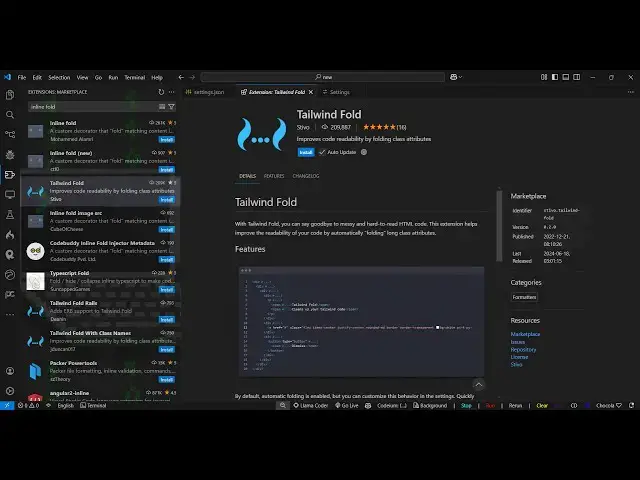
extensions so there is this plug-in
0:40
Tailwind CSS fold so just type here
0:45
Tailwind CSS fold so this is actually
0:48
the name of the plugin
0:49
here just search this and
0:56
uh just write Tailwind fold not Tailwind
1:00
CSS just Tailwind fold if you just write
1:03
this this is actually the extension so
1:06
what this this will do basically you you
1:08
are just seeing all these classes it
1:10
will hide this and the thing is that
1:13
just enable this plug-in first of all
1:15
click the install button and just
1:17
activate this you will see it's a very
1:19
popular plugin almost 210,000 installs
1:23
so now if you open your index.html file
1:25
you will actually see all the classes of
1:29
Tailwind are hidden done and now to
1:31
actually see this just click on the
1:32
individual element and just you will see
1:35
as you click the classes will be show
1:39
automatically and then it will hidden so
1:43
if you are working with a particular
1:44
element then only it will show that you
1:47
just need to click on any individual
1:49
element then only it will show that
1:51
classes of Tailwind here you can
1:53
actually change it or edit this so This
1:57
actually saves a lot of space because
2:00
it also improves readability as well
2:03
because if any other developer is
2:04
looking at your code it will save a lot
2:07
of space because they don't want to see
2:12
HTML and this extensions solves a lot of
2:16
problem I have this extension installed
2:19
whenever I'm just working with Tailwind
2:21
CSS you will see it actually hides those
2:24
classes so whenever you want to see them
2:27
just click on that IND individual
2:29
element as soon as you click it the
2:31
classes will show and once again it will
2:33
go away so if you're working with
2:36
Tailwind CSS this is a must extension in
2:38
vs code definitely install this just
2:40
activate this and as soon as you build
2:43
your thing it will hide those classes
2:47
and this is really helpful for larger
2:50
product projects so this
2:54
just uh improve the readability of the
2:57
codes so just activate this and it will
3:00
do this job automatically so thank you
3:03
very much for watching this video and
3:05
also check out my website free mediat
3:08
tools.com uh which contains thousands of
3:10
tools regarding audio video and image
3:13
and I will be seeing you in the next