0:00
uh hello guys welcome to this video so
0:02
in this video I will show you one other
0:05
extension which is used to take
0:07
screenshots of for your code while
0:09
you're coding in vs code this is one of
0:11
the popular extension if you go to
0:14
extensions tab just type
0:22
snapshot so if you just type this the
0:24
very first extension which comes this is
0:26
actually the extension it's got almost
0:28
2,000 installs so just click the install
0:32
button and just activate this extension
0:35
so after you activate this just select
0:38
whatever code that you want to take the
0:40
screenshot just first of all right click
0:43
and you will see this option appearing
0:44
code snapshot or you can hit the
0:47
shortcut key control shift p and then
0:52
snapshot and side by side the shortcut
0:55
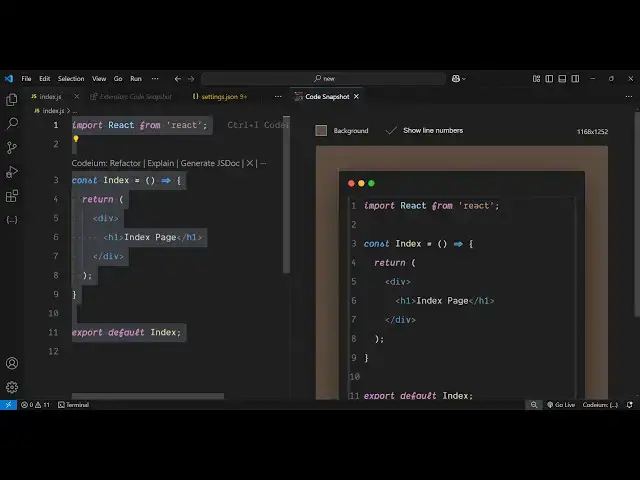
will be taken just highlight the code
0:57
here so you will see the
1:01
it will be highlighted and we have
1:03
couple of options right here you can
1:08
here if you want the full screens
1:10
screenshot you'll see the dimensions
1:12
will change right here as you resize it
1:16
apart from that we also have the option
1:19
to change the background so you can from
1:21
this Color Picker you can select any
1:24
color of your choice you can even adjust
1:27
the opacity of this color if you don't
1:29
don't need the background you can
1:31
completely turn off the
1:33
background but if you
1:36
need the color here you can just adjust
1:40
it and if you don't want the line
1:43
numbers you can toggle this
1:45
off and then we have this button if you
1:48
click this button you will see it will
1:50
ask you to give the location so now it
1:54
will save this as a PNG file so if you
1:56
open it so this is your screenshot
2:00
successfully taken and the image is
2:03
there this PNG image very simple
2:06
extension it's very easy to use so
2:09
whatever code you want to highlight
2:11
simply select the code
2:23
here so you can adjust the background
2:35
so in this way guys you can use this
2:36
extension to take a screenshot of your
2:40
score source code so thank you very much
2:42
for watching this video and also check
2:44
out my website free medat tools.com
2:46
which contains thousands of tools
2:48
regarding audio video and image and I
2:51
will be seeing you in the next video