Up next in 10

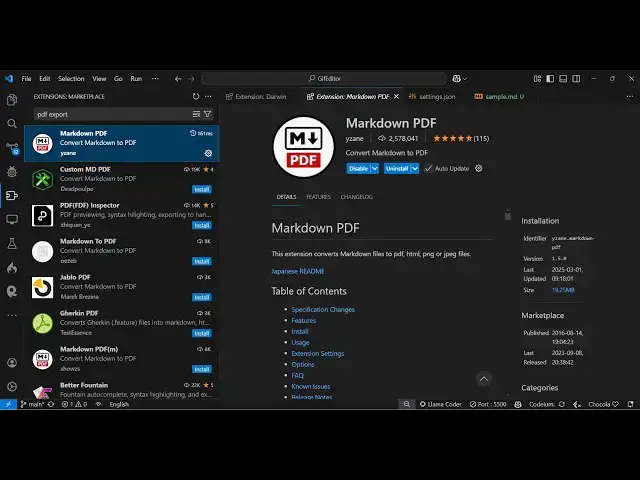
Transform Your Markdown in VS Code! Convert Markdown to PDF, HTML, PNG, JPG – All in One Tool!
Mar 7, 2025

Get the full source code of application here:
Watch My Visual Studio Code IDE Setup Video For Fonts,Themes & Extensions
https://youtu.be/Bon8Pm1gbX8
Hi Join the official discord server to resolve doubts here:
https://discord.gg/cRnjhk6nzW
Visit my Online Free Media Tool Website
https://freemediatools.com/
Buy Premium Scripts and Apps Here:
https://procodestore.com/
Show More Show Less View Video Transcript
0:00
uh hello guys welcome to this video so
0:02
in this video I will show you all-in-one
0:05
extension in vs code which allows you to
0:07
convert your markdown files directly to
0:09
PDF documents so this is my markdown
0:12
file here if I want to convert this to
0:14
PDF so there is an extension in vs code
0:17
so just go to the extensions tab just
0:19
write here markdown
0:21
PDF and this is the very first extension
0:24
which comes it's almost got 2.5 million
0:27
installs it's a fairly new extension or
0:30
very popular extension just click the
0:32
install button so as soon as you click
0:35
the install button it will install this
0:37
extension and activate this and in the
0:40
background it will install the Chromium
0:42
browser which is necessary for
0:45
converting the markdown to PDF you'll
0:47
see it is installing it you don't need
0:49
to do anything just click the install
0:51
button and it will do all these things
0:53
in the background so once it is done you
0:55
will be able to convert your markdown
0:57
file into PDF so now it's completed so
1:01
now come to your markdown
1:04
file and uh you can see chromium
1:07
installation succeeded you will get this
1:09
notification so just close this and
1:12
right here you will as you right click
1:14
this you will see this option here
1:18
markdown ex markdown PDF export PDF HTML
1:23
PNG jpg so all these options are
1:26
supported with allinone extension right
1:28
here you can convert your mark down to
1:30
PDF HTML PNG
1:34
jpg you can basically click this option
1:37
it will convert
1:39
everything this one option so if I
1:41
select this option it will first of all
1:43
convert this to PDF then HTML then
1:46
image it will create everything in the
1:49
same directory so you can see it is
1:51
actually creating it all the files you
1:53
will see your markdown file is converted
1:55
to this is actually your PDF file
2:00
so if I open this in the
2:03
browser so it will look something like
2:05
this we have this actual text right here
2:08
then we have this local image that we
2:10
are loading right here again this is
2:12
another local image that we embedded in
2:15
our markdown so it converted to
2:17
PDF so in this way guys you can see that
2:21
it
2:23
actually then we have this actual image
2:27
it actually converted all the markdown
2:29
into image image and same goes with the
2:31
HTML as well so it actually converted
2:34
your markdown into HTML so it's all in
2:37
one extension guys which actually does
2:39
multiple things at the same time you can
2:41
select your markdown file and convert
2:43
this to can see it has converted your
2:46
markdown file to HTML as well so this is
2:49
all-in-one extension you can directly
2:51
install it and whatever you right click
2:54
and you can select this option to
2:56
convert your markdown into p PDF HTML
3:01
PNG jpg all in once so this is a very
3:04
nice extension I basically use it daily
3:07
in my development because I do need to
3:09
convert the markdown file into all these
3:13
formats so it's an all-in-one
3:16
extension
3:17
uh this is actually the extension here
3:20
markdown PDF 2 million installs are
3:23
there so it's a fairly popular extension
3:27
and this is the first Way by which you
3:29
can do this inside your markdown file
3:31
simply right click and if you only want
3:34
to export PDF so there will be this
3:37
option so it will only create the PDF
3:39
file you can see that there is also
3:42
another shortcut key that you can use
3:45
control shift p if you press this on the
3:47
keyboard you can just type here marck
3:50
down so here also all these options will
3:53
come this is a second shortcut key
3:56
control shift p to actually open the
3:58
command pallet
4:00
so also you can right click go to
4:03
command pallet and here also just type
4:06
here markdown PDF and it will all these
4:08
options will come right here so this is
4:10
allinone extension guys to convert your
4:12
markdown files into PDF jpg image PNG
4:15
image or HTML file so you can directly
4:18
install this extension and thank you
4:20
very much for watching this video and
4:22
also check out my website free mediat
4:24
tools.com which contains thousands of
4:27
tools regarding audio video and image
4:29
and and I will be seeing you in the next
4:31
video
#Multimedia Software