Up next in 10

This WARP AI Terminal is REPLACING Every Developer's Terminal – INSANE Cursor + Claude Alternative!
Jul 22, 2025

Get the full source code of application here:
Show More Show Less View Video Transcript
0:00
Uh hello guys, welcome to this video. So
0:02
in this video I'll show you a source
0:04
code development tool which is called as
0:07
warp AI. So it's basically a AI platform
0:11
where it replaces your developer command
0:13
line with the AI command line. So you'll
0:16
make use of AI to basically generate the
0:18
commands and it will save you a lot of
0:20
time. So if you just type warp AI W A R
0:25
P AI the very first website which comes
0:28
this is a website and it's a complete
0:30
IDE something to claude and uh cursor
0:35
it's a great alternative and right now
0:38
it is available for download so if you
0:40
visit their website you can install them
0:43
for Windows machine simply click on
0:45
download and once you click download
0:48
your download will automatically start
0:51
and uh simply click on start download.
0:55
So as you can see it is downloading it.
0:58
It's only 44 MGB. So it's a very
1:01
lightweight application. So once you do
1:04
this simply run the setup. So it will
1:08
install in this location by default
1:13
and it's 199 191 mgabytes of free space
1:16
is required. So click on install and as
1:20
soon as you install this it will have
1:21
all the AI models right inside your
1:23
terminal and uh that's why most of the
1:27
developers are using it rather than the
1:29
conventional terminal to actually make
1:32
applications because it will suggest the
1:34
commands automatically for you.
1:38
So now as you launch this first of all
1:40
you need to sign up. So just sign up
1:43
with your Google account.
1:48
and just select and just allow the
1:52
permission. So after you sign up, you
1:54
will be redirected to the app.
1:59
So now this is your PowerShell. So here
2:02
you can actually use the AI instead of
2:05
manually typing the commands. So right
2:07
here in the type menu in the search bar,
2:10
you can ask any sort of thing. You can
2:12
basically tell it to make a snake game
2:14
in Python from scratch. So this is their
2:16
agent mode which is thinking and now it
2:19
will try to detect whether Python is
2:22
installed. It will automatically detect
2:25
that Python is installed and then it
2:27
will make the application for you.
2:32
So it will automatically tell if the
2:35
cursor's module is not available. So it
2:37
is installing that module for me
2:38
automatically.
2:40
So it is asking me the per permission
2:42
that okay if I run this command and read
2:45
the output. So I will say run.
2:48
So this will save you a lot of time guys
2:50
because you don't need to manually enter
2:53
the commands. It will automatically
2:56
run the command for you. And now you can
2:58
see it is automatically executing the
3:02
commands and uh writing the
3:04
documentation as well.
3:07
and instantly it will create my snake
3:10
game right in the terminal itself.
3:13
So it is using the AI models which are
3:17
claude Gemini all the latest models it
3:21
is using.
3:23
So just wait for the code to be
3:26
generated.
3:30
So now you can see it basically
3:32
generated the code for me. This is a
3:33
snake game. And click on next.
3:39
So click on apply changes.
3:42
So it's a complete terminal based game
3:44
that it generated. Perfect. Now let
3:47
let's test the game. So it is running
3:49
the application for me. So I simply
3:51
click the run button.
3:53
So,
3:58
so as you can see right here now it is
4:05
the biggest biggest advantage of using
4:07
this guys I haven't entered any credit
4:09
card details. It's completely free to
4:11
try and uh as opposed to cursor tools
4:16
basically it is not charging me any
4:18
money. So it's a great tool. You can see
4:22
it generated first of all it checked
4:24
whether Python is installed then
4:26
automatically installed the module for
4:28
me and automatically written this code
4:32
for me and now it is running the Python
4:35
code as you can see.
4:45
So in this easy way guys you can
4:47
actually
4:51
do this and uh
4:58
so this is your terminal. This is one
5:00
instance of the terminal that you can
5:02
see. You can create another instance of
5:03
it. Click on open new tab
5:07
and you can basically ask it anything.
5:10
So as you can see it is using the latest
5:13
auto claude 4 Sonet model. It has all
5:16
the models which are there GPT, Gemini
5:19
Pro all the models are there inside
5:21
this. So definitely install it and start
5:23
using it as well. And uh right here you
5:27
can
5:28
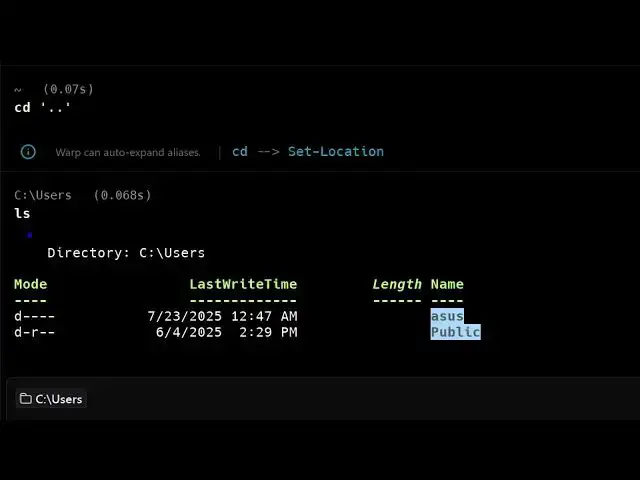
go to your project directory as well. So
5:32
we can go to your parent directory
5:37
and uh we can basically list out all the
5:40
files which are there. So you can say
5:42
list out all the files. It will give me
5:44
all the files which are present in the
5:46
directory.
5:50
So this is your snake game which is
5:51
ready. So R to restart. So you can play
5:55
your snake game right in the terminal
5:57
itself. So as you can see press Q to
6:00
quit.
6:05
Let me also create a simple launcher
6:07
script to make it even easier to run.
6:09
So,
6:13
so it automatically suggest the things
6:16
guys you can see I'm not doing anything.
6:18
It automatically suggesting me. So now
6:22
the game is fully functional and
6:23
requires no additional setup. Enjoy your
6:25
snake game.
6:27
So in this easy way you can
6:35
so this is your snake game which is
6:37
running.
6:45
So
6:47
you can basically it is automatically
6:49
suggesting me commands as well. So as
6:51
you can see what is the Python version.
6:56
So just go to my
7:03
directory. So you can even basically
7:06
write natural language and it will
7:09
automatically suggest a command.
7:13
So it will automatically suggest the
7:15
command. You simply write just go to my
7:17
directory and it will automatically run
7:20
the command for you. So now you are in
7:23
the directory. what sort of thing you
7:25
need to do. So I can simply say just
7:28
create a
7:30
folder here and create a
7:34
uh image to PDF application and run it
7:39
automatically
7:42
in browser. So I basically given the
7:45
this task here just create a folder here
7:48
and uh create a image to PDF web
7:50
application that runs automatically in
7:52
your browser. So first of all it tries
7:55
to create a folder
8:00
and then
8:01
cd into this.
8:06
So then it will create a HTML file. You
8:08
can even auto approve all the actions.
8:10
So now I don't need to manually click
8:13
the uh run button. So you can click on
8:15
that
8:16
and now it is creating that HTML file
8:18
for image to PDF generation.
8:22
So, it's a very fantastic tool, guys. I
8:24
recently discovered this and I'm just
8:26
loving this because I don't need to
8:28
manually code it. I don't want to
8:30
manually write the commands. The AI is
8:32
doing it for me.
8:35
And the nice thing is that it's
8:36
completely free to try this.
8:44
So, it created this empty folder right
8:46
here. It is now creating the code for
8:48
me. and then automatically it will open
8:50
it in the browser.
8:56
So this is different from the ordinary
8:59
terminal that you use.
9:01
This is different terminal. So this is
9:03
not this ordinary terminal. This is a
9:06
different terminal. So I just created
9:08
this file here. Now it's opening my
9:11
browser
9:14
as you can see.
9:25
It application has it.
9:31
Please start the development
9:36
server in VS code and serve the app.
9:43
So
9:48
first ensure you open it in the VS code.
9:51
So now it is.
9:54
So I will say yes.
10:02
So automatically it is now opening the
10:04
VS code for me. So it is all the actions
10:07
are automatic. So as you can see it
10:10
created this file and automatically
10:12
launching.
10:16
So it's a great tool guys. You can see
10:18
that
10:20
it is automatically
10:22
opening the application for me. So you
10:24
can see
10:29
if you're getting some error.
10:50
So now you can see it opened my
10:52
application. So now this is working. So
10:54
here you can select your image, click
10:56
convert to PDF and your application is
10:59
automatically built. I haven't written a
11:01
single line of code guys. You can see
11:02
automatically this is all automated. I
11:05
shown you step by step how to get
11:06
started and definitely install this tool
11:09
guys. Warp AI. It's a fantastic tool for
11:13
developers and programmers similar to
11:15
GitHub Copilot Claude and Gemini. And
11:18
the pricing, if you go to the pricing
11:20
right here, uh they do offer the free
11:23
trial here up to 150 AI request per
11:27
month and uh unlimited next command
11:31
suggestion. So this next command
11:33
suggestion will automatically come. It
11:35
has all the latest models which are
11:37
there
11:40
and the pro plan will start from $15. So
11:45
this will come 2500 AI request per
11:48
month.
11:51
So definitely check out this and also
11:56
check out my website
11:57
freemediatetosols.com
11:59
uh which contains thousands of tools.
#Scripting Languages