0:00
uh hello guys welcome to this video so
0:02
in this video I will show you a
0:04
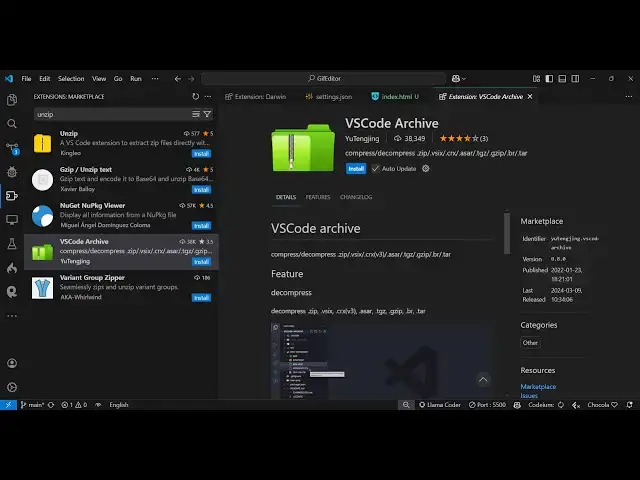
extension in vs code which you can
0:06
directly use to compress or decompress
0:10
zip files so there is this extension
0:13
here if you go to extensions tab just
0:14
type here vs code Arch this is the
0:17
extension which comes right here it's
0:20
39,000 installs so you just click the
0:23
install button and just activate this
0:25
extension and from the name itself it
0:27
can directly compress and de
0:30
compress zip files or all these
0:33
extensions that are listed here which is
0:37
zip all the very popular formats
0:41
here can can decum decompress compress
0:44
it all the two things it can do so if I
0:47
I'm there in my directory here if I want
0:49
to compress this I right click and there
0:52
will be this option which comes right
0:54
here you see the compress option and we
0:58
all these formats are supp it so once
1:01
you install this extension there will
1:02
this option come so here you can select
1:05
let me compress it to a zip file so now
1:08
what it does it directly compresses
1:10
within the vs code so your images folder
1:14
has been compressed here to
1:16
zip and now if you want to
1:20
extract the content of this
1:25
folder so you come to this ZIP file
1:28
right click this and there will be the
1:30
this option here to extract or
1:32
decompress it so you just need to select
1:36
this option so now it will decompress
1:38
everything which is there in the zip
1:40
folder it will create this folder images
1:44
so you contain all these
1:46
images so it basically support both the
1:49
operations you can extract you can
1:52
compress the actual files as well so now
1:56
if I want to compress it to a different
1:58
format let's suppose like select here
2:03
zit so just make sure that all these
2:06
formats are installed so it is telling
2:09
us that cannot find seven Z inside your
2:11
system so you need to install that first
2:14
so for the very majority of the time you
2:17
will be using zip file so which is the
2:19
most popular format here but all the
2:22
formats are also mentioned which is this
2:24
one images. t which is another an
2:27
extension for uh zipping your files
2:36
here so you can decompress compress
2:40
everything you can do with this
2:41
extension which will save you a lot of
2:43
time because you don't need to manually
2:45
open this folder in the file explorer
2:48
and then compress it you can directly do
2:52
this inside your VSS code so there will
2:55
be this extension vs code archive simply
2:58
install and activate this
3:00
extension so it will save you a lot of
3:03
time so thank you very much for watching
3:05
this video and also check out my website
3:08
freem mediat tools.com which contains
3:10
thousands of tools regarding audio video
3:12
nmh and I will be seeing you in the next