Up next in 10

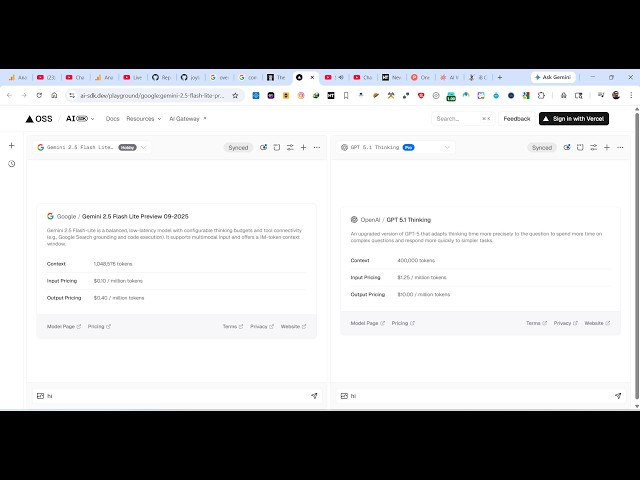
This Vercel ai-sdk.dev AI Playground to Compare AI Models in Realtime and Build Full Stack Apps FREE
Apr 11, 2026

Watch My Visual Studio Code IDE Setup Video For Fonts,Themes & Extensions
https://youtu.be/Bon8Pm1gbX8
Hi Join the official discord server to resolve doubts here:
https://discord.gg/cRnjhk6nzW
Visit my Online Free Media Tool Website
https://freemediatools.com/
Buy Premium Scripts and Apps Here:
https://procodestore.com/
Show More Show Less View Video Transcript
0:02
Uh hello guys, in this live stream I
0:05
will show you what some
0:07
a very popular company has released
0:09
their own AI platform.
0:11
It's called as AI-SDK.dev.
0:16
So, if you just search this on Google,
0:19
the very first website which comes So,
0:21
this is actually a ultimate AI
0:24
playground section where you can
0:26
actually compare different AI models
0:29
with each other.
0:30
So, once you go to this
0:33
you can also just sign in with your
0:35
Vercel account
0:37
and continue with
0:39
just sign up using your
0:43
Google
0:44
account here.
0:48
So, here it it has all the AI models
0:50
specifically for coding. You can compare
0:52
each model against each other. So, once
0:54
you authenticate
0:58
it will redirect you to the
1:01
dashboard area. So, just authenticate
1:04
yourself.
1:27
I think this is the website here AI-SDK.
1:31
dev.
1:38
So, you can also directly install this
1:41
NPM install AI.
1:44
>> [snorts]
1:48
>> So, it can actually generate text for
1:50
you, image generation, speech,
1:52
transcription, video generation, all
1:54
these things it can do.
1:56
So,
2:03
if you simply go to resources, you will
2:05
see this option playground.
2:07
So, you can go to the playground section
2:09
to actually try out all the models for
2:11
completely free.
2:13
So, this is a playground section. You
2:15
can compare different models like the
2:17
GPT
2:18
against the GPT 511. So, some are free,
2:21
some are
2:23
So,
2:24
inside the select list you have all the
2:27
models that are there.
2:29
So, you can compare any model here.
2:31
Let's suppose I compare this one.
2:34
Um against I need to compare it this
2:37
one.
2:39
So, from here you specify
2:42
any message. So, now to get started you
2:45
do need to sign up.
3:00
So, once you're logged in, you can send
3:02
out the message here
3:04
to both the models and compare
3:07
models
3:09
inside this platform. So, now the
3:11
playground section will respond to you.
3:14
So, Grok 4.1
3:16
is responding like this against Gemma 4.
3:20
So, again let's suppose I simply type a
3:22
prompt that I want a application image
3:24
to PDF web app in browser.
3:28
So, I send out this request to both the
3:30
models and now you will see this model
3:33
will actually
3:35
code for you
3:36
instantly.
3:42
So, as you can see clearly Grok model is
3:45
outperforming this
3:47
Gemma 4 model.
3:52
So, it is already completed this request
3:55
and this one is also
3:57
very slow as you can see that.
4:01
It generated a full stack coding
4:03
application for me which is Grok.
4:05
And in the similar way you can change
4:08
the model here.
4:40
So, again you compare as you see that.
4:49
So, different models are having
4:51
different speeds here as you can see
4:53
that.
4:54
So, this is actually a playground
4:56
section. Unlimited number of requests
4:58
you can do. You can even attach images
5:01
as well.
5:02
There is also this option.
5:07
So, I really like this platform to
5:09
compare different AI models. Some are
5:12
pro models as well. If you
5:15
want to use the pro model
5:18
then I think you do need to
5:22
upgrade. Yeah, so
5:24
to gain access to all the premium models
5:26
and more credits
5:28
you can upgrade to the pro version which
5:31
actually