Up next in 10

This Laravel VSCode Extension is INSANE – Intellisense & Autocomplete Snippets Like Never Before!
Aug 2, 2025

Get the full source code of application here:
Show More Show Less View Video Transcript
0:00
Uh hello guys, welcome to this video. So
0:02
in this video, I'll show you a VS code
0:04
extension which allows you to uh have
0:07
snippets of your Laravel code here. So
0:10
Laravel syntax highlighting autocomp
0:12
completion uh VS code extension. So if
0:15
you go to the extensions tab, simply
0:16
type Laravel and you will find these two
0:20
uh extensions. First of all, this
0:22
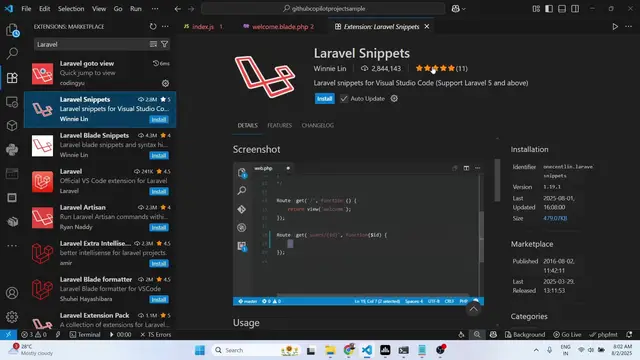
extension which is Laravel snippets.
0:24
It's got almost 2 million installs and
0:27
it supports uh all the Laravel versions
0:29
and it gives you autocomplete
0:31
suggestions for
0:33
some of the commonly used snippets of
0:35
Laravel.
0:36
So as you can see in the screenshot it
0:38
will show you in the drop-down
0:40
suggestions. So once you activate this
0:43
so simply click the install button and
0:45
activate this extension. So after it
0:48
activates now simply open your file
0:52
just inside your index dot php file. So
0:55
as you write here route you will see all
0:58
these suggestions will come right here
1:00
related to your larable. So whatever
1:03
thing you want need to create route you
1:06
select the suggestion and automatically
1:08
the code will be written for you. So it
1:10
will save a lot of time for you. Don't
1:12
need to write the full syntax of the re
1:16
larable. You simply type and
1:18
automatically the suggestions will come
1:22
as you write. You can select from the
1:26
snippets
1:28
and right here. Same goes for view as
1:32
well. You can simply select from all
1:35
these suggestions.
1:39
So in this easy way this is the first
1:41
extension. So just need to activate this
1:44
larable snippets. It's it's more than
1:46
enough. It will handle all the snippets
1:49
for you. Route views all this. So you
1:52
can see supported snippet prefix
1:55
broadcast.
1:57
So it supports all the modules which are
2:00
there in Laravel. So you simply write
2:02
them and automatically in the drop-down
2:04
sections you will see all the snippets
2:06
and suggestions will come right here.
2:10
same codes with blade files as well. So
2:12
if you just write here
2:16
this is a second one which is Laravel
2:18
blade snippets. So if you are working in
2:21
a blade file
2:23
so you can also install this extension
2:25
as well. So once you install this create
2:27
a file welcome blade.php
2:30
and if you try to write now it will give
2:32
you suggestions related to blade as
2:34
well. You can create a readym made
2:37
component
2:38
just right.
2:43
You can see that. So
2:46
these are two extensions in VS code
2:48
related to Laravel development which
2:50
will make your job way more easier. It
2:52
will show you the suggestions and auto
2:54
snippets which will appear as you type
2:57
and it will save you a lot of time. So
2:59
definitely install and activate these uh
3:01
extensions
3:04
and also check out my website
3:07
freemediatools.com
3:09
uh which contains thousands of tools.