Up next in 10

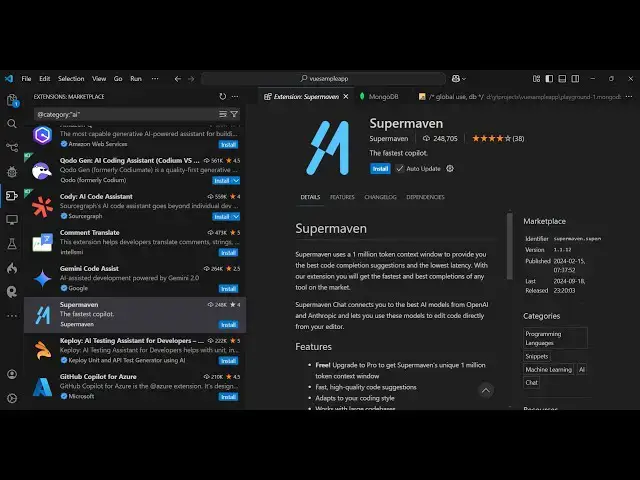
Supermaven VS Code Extension Tutorial to Speed Up Coding, AI Autocomplete & Productivity Hacks
Mar 2, 2025

Watch My Visual Studio Code IDE Setup Video For Fonts,Themes & Extensions
https://youtu.be/Bon8Pm1gbX8
Hi Join the official discord server to resolve doubts here:
https://discord.gg/cRnjhk6nzW
Visit my Online Free Media Tool Website
https://freemediatools.com/
Buy Premium Scripts and Apps Here:
https://procodestore.com/
Show More Show Less View Video Transcript
0:00
uh hello guys welcome to this video so
0:02
in this video I will show you a new
0:06
autocomplete vs code extension which is
0:09
called a super Maven uh it's very
0:11
popular guys it is similar to GitHub
0:14
co-pilot which is your coding assistant
0:17
uh this is actually their website super
0:19
maven.com and uh it's available for vs
0:22
code jet brains as well and uh if you go
0:25
to the vs code just type go to the
0:28
extensions tab just type here super
0:32
MAV and it basically uses AI artificial
0:37
intelligence so you can see this is
0:39
actually the extension over 250,000
0:42
weekly downloads so just click the
0:44
install button to just activate this
0:46
extension so trust publisher and install
0:49
so it's very similar to GitHub co-pilot
0:52
and it also provides you as soon as you
0:55
will see
1:00
so as soon as you install this you will
1:02
get this notification that super m is
1:04
installed
1:05
successfully and now you will actually
1:08
see if you see just hit this three dots
1:12
right here in vs code you will see this
1:14
super M will appear right here in the
1:16
sidebar just activate this and for
1:19
activating G guys they do provide a
1:21
7-Day trial I think for trying out all
1:25
their features for completely free and
1:27
you will see this activate button so
1:29
just click that activate button to
1:30
activate the free tile and you need to
1:33
link the super MAV you can sign up here
1:37
just create a free account with Google
1:39
let me sign up with my Google account
1:41
here click on continue and just grant
1:44
the permission so you can see your
1:45
successfully logged in and you will
1:48
actually see there will be a button
1:50
right here start free trial so just
1:53
click this button so as soon as you
1:55
click the start free trial button you
1:57
will see it will actually get give you
2:00
this uh 30 days free
2:04
trial so here you can actually add your
2:07
credit card and basically just start for
2:11
free you will not be charged in after 30
2:15
days if you are interested then you can
2:17
act just enroll with their Pro
2:21
Plan
2:23
so or if you don't want to activate this
2:26
you can just use the free version just
2:28
click the use free version and just uh
2:31
enter your email address right
2:38
here so using free Trav email you can
2:41
see now we have activated the free
2:43
version but if you are interested they
2:46
do offer a 30 days free trial as well so
2:49
I am not interested so I will just show
2:50
you the free version that it offers and
2:53
uh you can see as soon as we activate
2:56
this you will see inside the sidebar we
2:58
can initiate a new new conversation by
3:01
clicking this new chat
3:02
button and then we have this option
3:05
right here
3:08
to select any sort of model that you you
3:12
can type a message here make
3:16
a
3:18
calculator
3:21
in react using CDN so provide the index
3:27
HTML file so as soon as you ask the
3:30
question right here you will see it is
3:33
telling us that sign up for the super
3:35
MAV free trial so
3:40
just click on free
3:50
download so as soon as you write this
3:53
you will actually see
4:04
or if you only want to use the free
4:06
version guys what I will do is that you
4:09
need to just paste your open AI key if
4:14
you want to so if you don't want to
4:16
enroll with the paid version so open AI
4:19
does offer a API key so you can go to
4:23
your open AI account here and just login
4:47
so after I think you logged
4:51
in just select the API platform and then
4:55
it will actually go to settings option
4:58
and
5:00
just uh go to your this section which is
5:03
API
5:04
skis and here you can create a new
5:10
uh let me just say sample
5:17
key click on that and now your API key
5:20
will be created so just copy this and
5:23
just paste it right
5:26
here click on save so as soon as you
5:29
save
5:32
this if you now say build
5:37
a simple react
5:52
calculator okay you should have at least
5:55
some Kota left inside your open AI but
5:59
uh I think I think
6:01
uh you should activate this free trial
6:04
uh there is this button out there which
6:07
is start trial here
6:13
so you can activate this this actually
6:17
makes this for 30 days
6:22
free so what I will do I will just
6:25
activate this so just fit
6:32
let me enter the
6:33
OTP so I'm just doing live here so just
6:36
wait
7:02
uh let me just enter the OTP here
7:33
so you can basically see thank you for
7:35
your purchase and uh if you're
7:38
previously using the super M free Tri
7:41
and just see guys uh we are actually
7:44
enrolled in this so This is actually a
7:46
trial here you it actually gives you
7:49
this $5 credit right here and then you
7:52
can manage your subscription you can at
7:55
any time you can cancel this
7:56
subscription
7:59
so you'll see my trial will end on
8:02
exactly after 1 month which is March
8:05
29th and uh you can anytime just click
8:08
this button cancel subscription to
8:10
cancel your subscription now just go
8:20
to again build a just we ask build a
8:24
calculator and
8:33
so as soon as you do this let me
8:35
uninstall this and uninstall this once
8:38
again so as soon as you enroll in the
8:42
subscription once you
8:45
are you will actually see
9:15
so here you can select all the models
9:17
which are supported right here GPT
9:51
so just click activate now
10:00
so I think now we are ready to do build
10:05
a simple calculator
10:18
and I don't know why it is giving me
10:20
this error guys but uh it's a great
10:24
alternative to GitHub co-pilot guys you
10:26
can definitely use it for some reason I
10:30
don't know why it is giving me this
10:31
error I you can see that I activated my
10:34
account
10:37
here so you can even do that I showed
10:40
you step by step so what I will do I
10:42
will simply cancel the subscription
10:44
because I don't want to use this I
10:46
already have GitHub copilot so I will
10:49
just say just want to
10:58
cancel you can see I already submitted
11:01
but still it doesn't allow me to use
11:05
this so that's why can see now we we
11:10
have successfully canceled our
11:12
subscription so all in all guys it's a
11:14
great software but for me it doesn't
11:16
work I don't know what about you guys if
11:19
you already running this I showed you
11:22
step by step but uh in my system it
11:24
doesn't work so you can see it's a
11:26
negative review about this but I don't
11:30
want to say anything so this is actually
11:33
the extension right here it's very
11:35
simple to activate this just go to
11:37
extensions just type super M this will
11:40
come right
11:42
here so thank you very much for watching
11:45
this video and also visit my website
11:48
free mediat tools.com uh which contains
11:51
thousands of tools regarding audio video
11:53
and image and I will be seeing you in
11:56
the next video
#Software
#Business & Productivity Software
#Software Utilities
#Freeware & Shareware
#Intelligent Personal Assistants