Up next in 10


Get the full source code of application here:
Watch My Visual Studio Code IDE Setup Video For Fonts,Themes & Extensions
https://youtu.be/Bon8Pm1gbX8
Hi Join the official discord server to resolve doubts here:
https://discord.gg/cRnjhk6nzW
Visit my Online Free Media Tool Website
https://freemediatools.com/
Buy Premium Scripts and Apps Here:
https://procodestore.com/
Show More Show Less View Video Transcript
0:00
uh hello guys welcome to this video so
0:03
in in this video I will show you a very
0:05
useful vs code extension related to
0:08
regular Expressions while coding regular
0:11
expressions are a very difficult thing
0:13
to
0:14
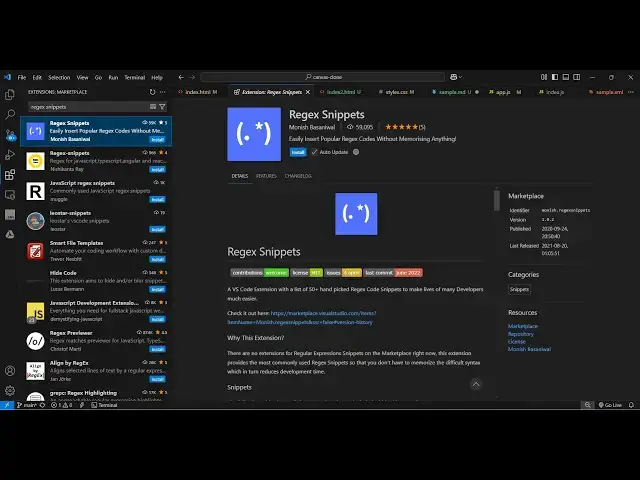
remember so there is an extension in vs
0:17
code that you can activate which is
0:19
regular expression Snippets r e g x and
0:24
then Snippets just go to extensions and
0:27
just type this regular expression
0:30
Snippets and this is actually the
0:32
extension which comes right here it's
0:34
called
0:36
60,000 installs you don't need to
0:39
memorize regular expression rather than
0:41
you can use this extension just click
0:44
the install button and just activate
0:46
this so now while coding you don't need
0:49
to every time go to stack Overflow and
0:52
then basically it has a bunch of
0:56
Snippets you can directly use let's
0:58
suppose
1:00
uh control shift V and
1:04
actually as soon as you will regular
1:09
expression
1:13
Snippets so this is my Javascript file
1:15
here so if you want to
1:18
now
1:22
say regular
1:27
expression I think they have yeah so
1:30
yeah so it has various Snippets right
1:32
here so email address validation so you
1:35
just need to type here add the rate and
1:41
then add theate and V so then it has a
1:46
bunch of Snippets available for you you
1:48
will
1:49
see bunch of regular expression for
1:52
validating different stuff this one is
1:54
for validating a base 64 string this
1:58
this regular expression so you will
2:01
see you can create a variable so let's
2:05
suppose validate and then you just need
2:08
to type here explanation mark and then V
2:12
so then it will this autoc complete will
2:14
come right here and you will be able to
2:16
select regular expressions of various
2:19
popular things that need to be validated
2:22
so if you want to validate a email
2:25
address you just type validate email
2:28
address so this will automatically pop
2:31
this regular expression for you so this
2:34
extension
2:36
personally from personal experience I
2:38
can tell you it will save you a lot of
2:40
time because in many times you need to
2:43
validate your email address using
2:44
regular Expressions so this will save
2:47
you a lot of time so you can see if you
2:50
want to validate a username this regular
2:52
expression is
2:54
there just need to type explanation mark
2:57
V and then from this drop down you can
3:00
select a bunch of regular
3:04
Expressions it validates a Facebook
3:07
profile you will see it will
3:08
automatically add facebook.com all
3:11
this messy uh regular Expressions
3:15
so you can't remember all these regular
3:19
expression that's why this developer has
3:21
created this extension which
3:24
actually you can see it has all the
3:27
Expressions very regular expression
3:30
validate HTML tag you will
3:34
see so this is the extension guys
3:37
regular expression Snippets uh it's
3:39
developed by this person 60,000 installs
3:42
are there so I personally use it very
3:45
lot because I can't remember regular
3:47
Expressions so that's why it helps me a
3:51
lot so thank you very much guys for
3:54
watching this video and also check out
3:56
my website free mediat tools.com which
3:59
contains thousands of tools regarding
4:01
audio video an image and I will be
4:03
seeing you in the next video