Up next in 10

Robots Exclusion Checker Google Chrome Extension – Verify Robots txt and Meta Tags
Aug 18, 2025

Get the full source code of application here:
Show More Show Less View Video Transcript
0:00
Uh hey guys, welcome to this video. So
0:02
in this video I'll show you SEO related
0:04
Google Chrome extension where you can
0:06
actually check the robots.txt file
0:09
whether that file is preventing your
0:11
website from crawling inside Google
0:13
search engines. So this is a very
0:16
important extension if you just want to
0:18
check your robots.txt or any other SEO
0:21
related information.
0:24
So simply
0:26
uh go to the extensions tab
0:33
and simply search for this extension
0:35
which is robot exclusion checker and
0:40
this extension it's used by 40,000
0:42
developers. So you simply add this
0:44
extension. After adding it, this will
0:46
show right here. And simply you need to
0:50
pin this extension robot.
0:57
So now you pin this and now if you visit
1:00
any website, let me visit my own website
1:02
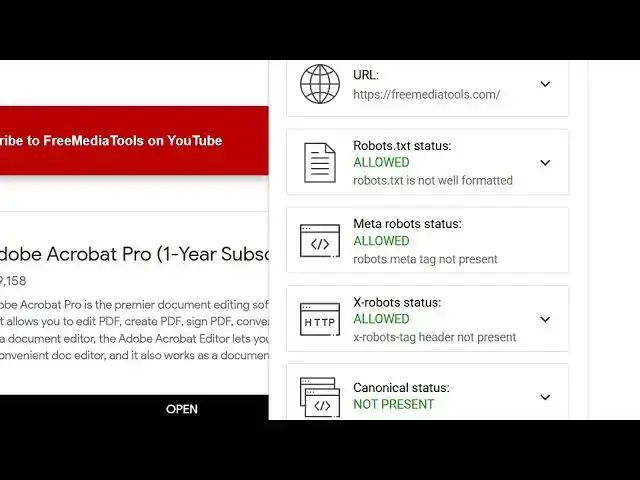
free media tools.com. So right here you
1:05
simply tap on that and it will show you
1:08
the URL the rewards.txt status allowed.
1:12
So this will significantly
1:14
improve your performance. You will check
1:16
the status of your remote.txt.
1:18
Remote.txt is not well formatted. So
1:22
here you can also check if you click
1:25
this button. So you will also see the
1:28
live robots.txt file.
1:32
So it's very simple. You click this
1:34
extension tab. So but the main thing is
1:37
that if it is in red color then you need
1:39
to fix it. But mine is green color. It's
1:42
all allowed here. So search engines are
1:47
are allowed on my website. So in this
1:50
easy way you can go to any website and
1:53
check the different file status such as
1:57
robot.txt with file.
2:02
So this is a very good SEO related
2:04
plug-in that you can install. So again
2:06
you see
2:09
can see the robots.txt of any website
2:13
right here using this extension. So it's
2:15
a very useful extension.
2:19
You click on that.
2:24
So you can even copy to clipboard this.
2:30
So very simple guys you can check the
2:32
robots.txt exclusion using this
2:34
extension. Simply install this.