Up next in 10

React.js Project to Render Social Media Login Buttons Using react-social- login-buttons Library
Jan 9, 2025

Buy the full source code of application here:
Show More Show Less View Video Transcript
0:00
uh hello guys welcome to this video so
0:02
in this video I will actually show you a
0:04
specific react CHS package which allows
0:07
you to render the social media login
0:10
buttons which includes Facebook Google X
0:13
Twitter Instagram Amazon LinkedIn uh
0:17
Discord Tik Tok and all these telegram
0:19
all these social media networks and if
0:21
you want to if you're building a web
0:22
application if you want to render this
0:24
login buttons so it's a very special
0:27
package that you can use for react shs
0:30
and the name of this package is if if
0:33
you just go to npmjs.com and
0:39
react let me cross check the name of the
0:41
module this is actually the module here
0:43
react social login buttons so this is
0:47
actually the specific package just
0:49
search in the search bar and the very
0:52
first link which come so this is a
0:55
social login buttons component it's
0:58
almost got 10,000 weekly down so this is
1:00
actually the command to install it I
1:02
have already installed this module so
1:04
now I will show you step by step how to
1:06
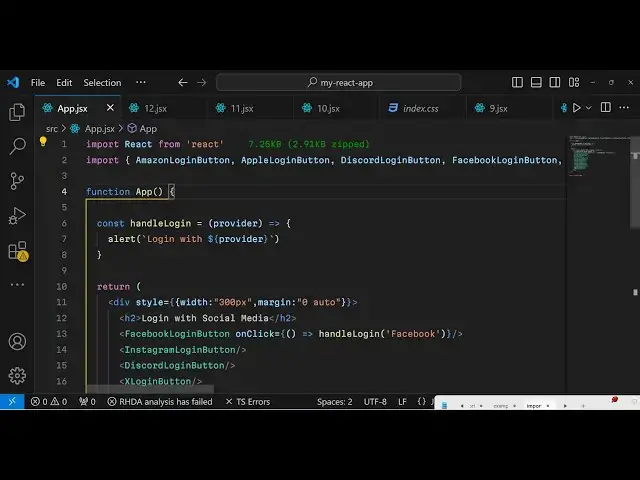
render this so just make a simple
1:09
functional component and right here if
1:12
you want to show the login
1:15
buttons so in the jsx we will
1:19
simply one by one render the buttons so
1:22
in this div
1:25
section I will just give it a style
1:28
attribute just make it the WID to be 300
1:35
pixel and the margin here will be zero
1:38
Auto just to make it in the center of
1:40
the screen so first of all we will have
1:42
a H2 heading we'll say login with social
1:45
media and now we have a series of
1:48
methods available so one such component
1:51
is Facebook login button so if you
1:54
import this automatically it will be
1:55
imported we can find an onclick event
1:58
handler so when you click this but Buton
2:00
we will make this custom function which
2:02
will handle the login for us so this is
2:05
a Facebook button so we'll just pass the
2:07
Facebook here as an argument so now we
2:10
can Define this function handle
2:15
login so inside this function you will
2:18
get this argument passed automatically
2:21
so here we can simply alert the user
2:23
that you are loging with this
2:26
provider so this provider will be the
2:28
actual value that the user has clicked
2:30
the button so in this case it will be
2:33
Facebook so if you render this and
2:35
refresh the page you will see this login
2:37
with Facebook button will be shown to
2:39
you this is exactly the button that you
2:41
see on the Facebook website so with this
2:44
package you can use these pre-made
2:47
components which are available for you
2:48
you don't need to start from scratch and
2:51
design these buttons so it's available
2:53
in this package and similarly we have
2:56
more components available to
2:58
us we also have Instagram login button
3:02
as
3:03
well so you will see the design and look
3:06
and feel of the button is exactly the
3:09
same as the original button that you see
3:12
on the website and similarly we have all
3:15
these buttons you can actually search
3:18
you can see he also has X login button
3:22
which is the new version of
3:25
Twitter you'll see it's having a black
3:28
shade this is the Discord button this
3:31
is so one by one you will see we have
3:34
also Microsoft we have I think the old
3:38
Twitter button if you are using the old
3:41
Twitter one
3:45
then we also have Amazon which is also a
3:50
pretty e-commerce website very
3:55
popular we also have Tik Tok
4:01
so you will see all these buttons are
4:04
pre-made available for you so this
4:07
website this module is very much useful
4:09
in any sort of web application that
4:11
you're building which involves social
4:14
media
4:15
authentication so you can check out
4:17
their documentation it has a nice little
4:19
documentation and you will actually find
4:22
all the buttons that it supports it also
4:24
supports GitHub login Button as well so
4:27
GitHub login button so if you refresh
4:31
you will now see the login with GitHub
4:36
button so you also see LinkedIn telegram
4:40
as well so let me show you
4:44
telegram then we have
4:49
LinkedIn so you can see it has all these
4:52
buttons
4:55
available you also have apple
5:00
if you are using Apple login button we
5:03
have also Yahoo as
5:06
well so essentially all the social media
5:09
popular websites it has a button here
5:11
you will see that so this is
5:18
actually the module here
5:22
so it's that easy to configure it so you
5:26
can bind this handle login function on
5:28
all these buttons and just change the
5:30
text to whatever thing you can do the
5:33
authentication so this is only the
5:36
buttons here it doesn't do the
5:37
authentication for you so it only
5:39
handles renders the buttons for you so
5:42
but still it's a very handy package on
5:45
10,000 weekly download so you can use it
5:48
so thank you very much for watching this
5:50
video and do check out my website as
5:52
well freem mediat tools.com which
5:54
contains thousands of free tools
5:55
regarding audio video and image and I
5:58
will be seeing you in the next video
5:59
video
#Programming
#Web Design & Development
#Online Goodies
#Social Network Apps & Add-Ons
#Other