Up next in 10

React js Project to Build Youtube Video Thumbnail Downloader in Browser Using JSX & Javascript
Dec 22, 2025

Buy the full source code of application here:
https://procodestore.com/index.php/product/react-js-project-to-build-youtube-video-thumbnail-downloader-in-browser-using-jsx-javascript/
Show More Show Less View Video Transcript
0:08
Uh hello friends, today in this tutorial
0:10
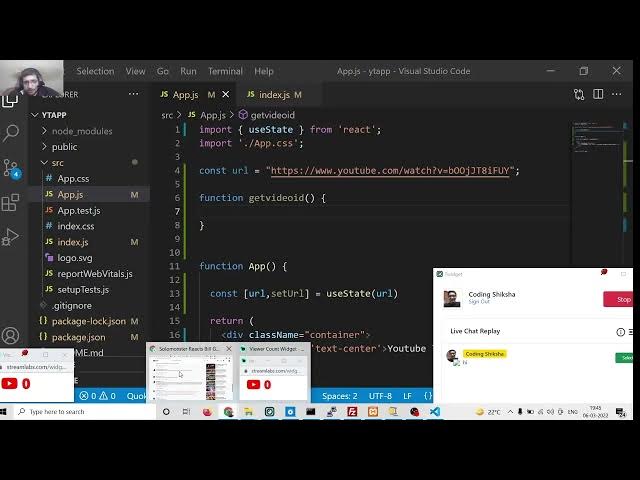
we will be building again a YouTube
0:12
video thumbnail downloader. This time we
0:15
will be using ReactJS. So many people
0:17
were asking in the comment section that
0:19
you need to be building inside the
0:21
client side. So for this application we
0:24
are using the client side which is
0:26
ReactJS. So ReactJS is a very much
0:29
popular library. If you search on
0:31
Google, it's a very popular JavaScript
0:34
library for building user interfaces. So
0:36
you can see that. So we will be using
0:38
ReactJS for building this YouTube video
0:40
thumbnail downloader kind of
0:42
application. So let me just wait for the
0:44
viewers to join join in in the chat
0:46
here. So we will be using ReactJS and
0:50
let me just show you the sample
0:52
application that we will be building
0:53
here. So one guy has joined the chat
0:56
here. So this is the ReactJS application
0:58
guys we will be building in this live
1:00
stream. So you can see that
1:04
it will download the YouTube thumbnail
1:08
from uh
1:11
the YouTube video URL that you provide
1:13
here.
1:16
So now let me just launch this
1:18
application.
1:19
So in the command line we will simply
1:22
say
1:24
npm start. So this will start the
1:27
application. Here you will see that.
1:39
So click on yes and it is starting the
1:42
development server. You will see that.
1:46
So this is a chat. This is the
1:48
application guys. So simply you will
1:51
replace the
1:54
YouTube URL. So simply I will copy paste
1:56
the YouTube URL and paste it inside this
1:59
application. As as I paste it you will
2:02
see this URL will be ready. I can right
2:03
click this save this image inside my
2:06
computer
2:09
and I can open this image. You can see
2:11
this is the image which is downloaded.
2:13
It is kind of a thumbnail which we have
2:15
downloaded from the this application. So
2:19
this is kind of ReactJS application. So
2:21
if you are watching the stream for the
2:23
very first time then please hit the like
2:25
button. So we will be building this
2:27
ReactJS YouTube video thumbnail
2:30
downloader kind of application where you
2:32
just put a URL and instantly it will
2:35
change. You can pick any URL of your
2:36
choice. Let's suppose
2:39
I pick this URL copy link address and
2:44
then again paste it.
2:48
So now you can see it will change here.
2:50
This will now have this URL. Simply you
2:53
can save this inside your computer. So
2:56
this is for ReactJS.
3:00
So let's start building this application
3:02
from scratch guys. So
3:06
for building this we will create a new
3:08
project inside our command line.
3:14
So I will open this inside my
3:18
projects directory here.
3:22
So I will make a new directory here
3:24
which is
3:26
react
3:28
YouTube thumbnail.
3:31
I will cd into this
3:38
and then we will make a new project
3:40
which is npx create react app
3:45
and then this yty
3:48
app.
3:50
So this will create this reactjs
3:52
application inside this command line. So
3:55
it will hardly take 5 to 10 seconds. So
3:58
this will create this ReactJS
4:00
application.
4:02
So at the end of this video guys,
4:04
hopefully you will able to understand
4:06
how to build this awesome little YouTube
4:08
thumbnail kind of application where you
4:10
can right click and save the image
4:13
inside your computer from the YouTube
4:15
video URL.
4:17
You can see that ReactJS YouTube video
4:19
thumbnail downloader.
4:23
So right here inside this command line
4:25
it is just installing all the
4:27
dependencies and
4:35
after installing it we will just make
4:37
this application. Let me close out the
4:40
windows here
4:43
and stop this application.
4:50
So stop this application from running.
4:52
So stop this.
4:55
So three people have joined in guys. So
4:57
we will be building this uh YouTube
4:59
thumbnail downloader kind of application
5:01
where you will put the URL and then it
5:04
will download the YouTube thumbnail. So
5:06
if you haven't already uh hit the like
5:09
button, please hit the like button
5:11
and here we will open this inside Visual
5:14
Studio Code Tex editor.
5:17
So for this application we will also
5:19
need Bootstrap. So just install
5:22
bootstrap npmi bootstrap
5:24
inside your command line.
5:27
So four people are watching the stream.
5:29
So guys in this tutorial we are building
5:31
YouTube thumbnail downloader in ReactJS.
5:34
You can start this application at npm
5:37
start. So this will open the ReactJS
5:40
application.
5:44
So we can say yes.
5:49
You can see that local host 301.
6:07
So this is my ReactJS application guys.
6:09
Sample ReactJS application. So now we
6:13
can do this. We can go to the source
6:15
folder and inside app do.js Here this is
6:18
all the code which is there. I can
6:20
remove all this. I don't want this
6:21
header. So if I hot reload you will see
6:25
all thing will be gone here. I can add a
6:28
hello hello world message to it.
6:33
So if I add a hello world message you
6:35
will see hello world. So now we need to
6:38
add the bootstrap. So in order to add
6:40
the bootstrap we will go to the index.js
6:43
js file and right here inside this we
6:45
will write a import statement.
6:50
So we will say bootstrap/dist
6:53
/ css/
6:57
bootstrap
6:59
main.css.
7:01
So you just need to write this line in
7:04
order to include bootstrap inside your
7:05
index.js file of your ReactJS project.
7:09
After that we will able to use the
7:12
container class of bootstrap
7:17
and then we will simply say inside
7:20
the h1
7:24
we will place it in the center screen
7:26
and we will say YouTube thumbnail
7:30
downloader.
7:36
And first of all at the very top we can
7:39
remove the logo. We don't want the logo
7:41
here.
7:42
And then we can just write some
7:45
variables. First will be the URL. So
7:48
this will be constant.
7:50
So I can give this URL as constant value
7:55
here. So when you load the page for the
7:57
very first time then the URL will be
8:00
shown to you. And then
8:03
here we can set the ustate hook.
8:07
So const url comma set URL
8:13
and here we can use the use state hook.
8:15
So this will get imported from the react
8:18
here like this and the default value
8:20
will be equal to the URL. That's it.
8:25
So after this guys we also need to
8:29
define a function which will get the
8:32
video ID for us. So here I have given
8:36
all the source code in the video
8:38
description. I have written a complete
8:39
blog post.
8:42
So this is my blog post and inside this
8:45
first of all we need to grab the
8:48
video ID. How we can do this? We can
8:52
write a simple function here.
8:55
So this uses some regular imp regular
8:58
expression
8:59
for uh getting the video ID. So we can
9:03
paste it. So this this receives the URL
9:07
as the argument and that's it. It
9:09
returns the video ID. So now we can do
9:13
this. We can get the ID right here
9:15
inside con ID is equal to get video ID
9:20
and we will pass the URL. That's it.
9:24
So now we will get the ID which we want
9:26
to print out. So after this we can
9:29
construct our uh URL
9:33
for high resolution image.
9:36
So this is the high resolution
9:38
thumbnail.
9:40
Depending upon that you can get also low
9:43
quality also. So this is the actual URL
9:46
we are concatenating the ID. So
9:49
basically you can see that S is saying
9:51
hello. So first of all guys if you are
9:54
watching it for the very first time then
9:55
please hit the like button subscribe the
9:57
channel as well. So in this we are
9:59
building client side YouTube thumbnail
10:01
downloader. So no server side is
10:03
involved in this. You don't need any
10:05
sort of server you can build it on the
10:07
client side.
10:09
And this is our large thumbnail. We can
10:12
print it on the screen.
10:16
So in order to print this large here we
10:20
can simply
10:22
print this inside image tag
10:25
we can give source is equal to large.
10:33
So in order to initialize it to large
10:35
here
10:37
we can give it inside double braces put
10:40
large
10:44
and we can give it a class name of image
10:48
thumbnail. This is bootstrap class and
10:50
image responsive.
10:53
So if you load it this page now inside
10:56
your application you will find out that
11:03
uh let me see
11:14
source is equal to image. Let me see
11:26
source is equal to source.
11:31
So we can use a component here instead
11:33
of writing here only we can use a
11:36
component.
11:38
So this component we can call this
11:40
component anything. I will call this as
11:42
image link. So here we can pass the URL
11:46
which will be equal to
11:49
the URL.
11:52
So this is kind of a component.
11:56
So this is app level component. So here
11:59
we can define it after this. This is
12:02
function image link and this will get
12:06
our URL which is passed to it like this.
12:10
So here we can display this similar to
12:13
this. You can see that.
12:17
So we can have a return statement here
12:19
as like this.
12:24
So inside this we can have a div which
12:28
will have a class name of container.
12:31
This is bootstrap class and inside this
12:34
we can have image tag. The source will
12:37
be equal to
12:39
source
12:42
and we will give it a class name which
12:44
is uh image thumbnail
12:48
and image responsive
12:51
responsive.
12:59
So it is saying source is not defined.
13:03
Oh, sorry. This needs to be URLs source.
13:15
Oh, sorry. Here we need to pass large
13:17
here not uh source. So that is why
13:25
if I refresh it image
13:35
let me see guys I haven't used the
13:37
function which is uh I think
13:41
use state URL let me study it uh large
13:46
and
14:01
So
14:07
what we can do is that instead of like
14:10
this we can set this using a
14:16
input field. So right here inside our
14:19
app component we can have a input field.
14:22
Right here after this we can have a
14:24
break tag.
14:28
So three people are watching the stream.
14:29
So we are building here reacts
14:31
thumbnail. So bro I have made the
14:34
thumbnail downloader but course error is
14:36
coming. So it will definitely come
14:38
course error because you cannot download
14:41
directly the image because uh the server
14:44
is of YouTube. You can't do this. So
14:46
definitely the course error will come
14:48
and you need to open the image in a new
14:50
tab and then you can right click as save
14:52
as image as if you have your own server
14:55
then you can directly download it using
14:57
nodejs library.
15:00
So that's why you are getting the core
15:02
error path saying is hello. So here guys
15:05
if we are building the node uh reactjs
15:08
YouTube thumbnail downloader so all the
15:10
things will be happening on the client
15:12
side. So we are getting we this is the
15:16
input field. You can see that
15:19
uh this is a bootstrap input field. Let
15:22
me refresh it.
15:30
npm start.
15:50
So if you go to my video description
15:52
link, you will find all the source code.
15:54
Let me paste it here.
16:05
So this is all the source code that you
16:06
will need for this application. I will
16:09
summarize the code for you. So you will
16:11
see this is the code here.
16:15
So URL you just need to copy paste the
16:17
URL whatever URL that you need to do.
16:20
Simply you will take the video URL
16:23
simply copy link address and simply you
16:27
will paste it
16:29
and the URL will change here like this.
16:31
You can see that simply right click save
16:34
image as and your sim image will be
16:37
saved here simply JPG file. So high
16:40
quality image is there you can see that.
16:43
So this is YouTube thumbnail downloader
16:45
in ReactJS. So let me summarize the code
16:48
for you.
16:51
what we are doing here.
16:57
So right here we are using a app level
17:00
component and we are using hooks here
17:02
like this. We are setting the
17:06
we are extracting the uh video id from
17:08
the URL using this custom function we
17:10
have developed. So this is kind of a
17:13
regular expression. So it is extracting
17:16
the YouTube video ID from the URL and
17:19
then it is returning it back to the
17:22
function.
17:24
After that
17:26
we are simply constructing the URL of
17:31
maximum resolution of thumbnail. So you
17:35
can see https
17:37
i3
17:39
ytimage.com.
17:41
This is actual thumbnail of how you can
17:44
get
17:45
for a if you just uh take example for
17:48
this video. I want to construct the high
17:53
resolution thumbnail. I can simply type
17:55
on YouTube image youtube.com this URL
18:00
and here I need to simply paste the
18:04
video ID. So this is actual video ID. So
18:09
I will copy this video ID
18:12
and paste it right here.
18:16
So this will get me the high resolution
18:19
thumbnail. So this is the actual concept
18:21
which is used here. So we are
18:23
constructing this URL based upon the ID
18:26
which is given and then we are rendering
18:28
out this dynamic stuff which is H1
18:32
heading is this and then we have a
18:33
simple paragraph again a paragraph
18:37
and then we will have our uh simple
18:41
input field where we are setting our
18:43
E.target dot value. This is the use
18:47
state hook function
18:51
and here we are passing e.target dov
18:53
valueue and then after that we are just
18:56
uh displaying the thumbnail using this
18:59
custom component. Right here we are
19:02
displaying it. You can see that we are
19:05
using two classes of bootstrap which is
19:08
image thumbnail and image responsive.
19:11
And then we are giving the two
19:14
properties which is style maximum width
19:16
and height auto.
19:19
So this is the all application simple
19:22
app.js file.
19:27
So if you have any sort of doubt
19:29
regarding this you can ask in the
19:31
comment section.
20:26
So three people are watching the stream
20:28
guys. So we have built a ReactJS YouTube
20:30
thumbnail downloader. I have given the
20:32
link in the video description. Now if
20:34
you have any sort of doubt related to
20:37
blogging and programming, you can ask in
20:38
the comment section. So you can see this
20:41
is my realtime traffic here on the
20:43
website.
20:48
So if you want to ask any sort of
20:50
question related to ISOIC
20:52
programming and blogging, you can ask it
20:54
in the comment section.
21:19
Uh sance is asking bro how can I send
21:22
you link of my tool.
21:26
You can just mail me right now. I can
21:29
open Gmail here. So I will let see your
21:32
tool name. So just send me the tool
21:36
right here inside my Gmail address. So
21:43
just send uh mail me right now. I will
21:46
see your tool. How is the tool here?
21:51
So mail you know is uh geeky goam 1997
21:56
at the redgmail.com.
23:29
So the interface is very nice of the
23:32
tool here but it is not working. If I
23:34
click this button
23:36
let me see if I right click inspect
23:38
element go to console.
23:44
So I was just telling you you cannot
23:47
download directly here because this is
23:49
client side. you are you don't have any
23:52
sort of website or server. This error
23:54
will definitely come because you don't
23:57
have any sort of server. You there is no
24:00
option just you need to right click save
24:02
this image like this or you can open
24:04
this image in a new tab or you can
24:07
download like this. You can't directly
24:09
if you click the save button you can
24:11
download this.
24:13
Let me show you a scenario here. There
24:15
is a website called as uh if you see
24:17
here YouTube thumbnail download.
24:22
So this is a website and uh if you just
24:26
click it and they also show you this uh
24:29
hdh
24:31
sdime all this stuff. So when you click
24:33
it this will get downloaded. Sorry if
24:36
you click download simply this file
24:39
downloads because they are having their
24:41
own website and they have their own
24:44
server. So on local host it it will not
24:47
work. it will always give you this
24:50
course error. But you need to deploy
24:52
this application to a real website.
24:58
The course can only be disabled by the
25:01
server. You cannot disable course
25:03
because you are running it on the client
25:05
side. You are actually calling the API.
25:09
So basically in order to disable course
25:12
you need to be having access to the API
25:15
or server.
25:17
So you need to deploy your website or
25:19
you need to use NodeJS PHP script. In
25:23
PHP you can directly click the link and
25:25
download it as attachment. But on the
25:28
client side JavaScript side you cannot
25:30
do this. Always this core server will
25:32
definitely come. So you need to convert
25:36
this call any uh just uh use back end or
25:40
you can
25:42
I think you have also purchased my
25:45
script here which I was given you. That
25:50
script also was opening the URL in a new
25:53
tab.
26:00
So on local host you cannot directly
26:02
download it.
26:20
Will it cost much if I create a server
26:22
in NodeJS? Definitely not.
26:26
If you are buying it from a good
26:28
website, you can buy it from Hostinger.
26:32
So you can you just need a VPS hosting
26:34
for hosting NodeJS apps. My website also
26:38
which is one year old is hosted on
26:40
Hostinger VPS. It doesn't cost much if
26:43
you just go to the hosting panel. Just
26:46
search for this VPS hosting and
26:50
the plans start from you can see 639
26:53
rupees per month, 285 rupees per month.
26:56
I am using this VPS VPS 2. This is more
27:00
than enough. So you will get all the 2GB
27:02
RAM all this stuff full root access you
27:05
will got. you will get. So you can just
27:09
deploy your this application on this VPS
27:11
and definitely this application will
27:13
work. 639 rupees per month.
27:22
So you should be having your own server.
27:24
In this case, NodeJS is a server. It is
27:26
not a client side machine.
27:29
So on nodejs there are various libraries
27:31
which are there which lets you do this
27:34
in order to download any sort of image.
27:36
So there is a image downloader library.
27:38
In the last video also I make use of
27:41
this library to download the image into
27:44
the server machine and then you can
27:47
download it using express. So you can
27:50
just give it any URL and it will
27:52
download this image to your server
27:54
machine and from that you can do this.
27:58
Best thing to make money from web
28:00
development definitely you should do
28:03
YouTube and blogging and these are the
28:05
two ways you can also do freelancing
28:09
on fiverr.com
28:17
and there is also freelancer website
28:20
also. So these are some of the things
28:23
you can use
28:26
and I think up work is also there.
28:28
Upwork
28:35
I don't do freelancing so I don't have
28:38
experience in freelancing
28:44
but many people do freelancing when they
28:48
are related from web development.
28:51
So that's why how much we can earn from
28:54
my thumbnail downloader website. So it
28:57
totally depends upon how much traffic
29:00
you get on your website and I will not
29:04
recommend that you if you deploy only
29:05
single tool. So don't work. It is just a
29:09
waste of time because
29:14
you can take the example of my website.
29:16
You can see how many tools I deployed
29:18
here. But still the earning from AdSense
29:21
is zero. So the traffic is very less in
29:26
toolbased website. So many people have
29:29
already just you can see how much less
29:32
earnings is there from this tool website
29:35
only $2 this month and from the previous
29:38
month it is $8. So this website is
29:41
already if I show you domain age it is
29:43
already one year 160 days old. This is
29:46
just
29:48
a waste of time to run toolbased
29:50
website.
29:52
If you can run it, if you can uh just
29:54
rank it on the number one position, then
29:56
it is another case. But if you will, if
30:00
you will not rank toolbased website,
30:02
then it is just a waste of time and I
30:06
will not recommend it. How much is your
30:09
overall earning in AdSense monthly?
30:14
I you can see AdSense pays me nothing
30:16
here in terms of blogging you can see
30:19
only $8 majority of the earning comes
30:22
from ISOIC so
30:25
the YouTube earnings is from AdSense so
30:28
that's it
30:30
so if you are running a toolbased
30:32
website you need to see the competition
30:35
if the competition is high so don't run
30:38
the tool website it will not work
30:42
already the people who have built their
30:44
own tool website will rank it.
30:47
Your website will never come up in
30:49
search result.
30:53
So this is the day-to-day earning. You
30:55
can see that five people are watching
30:58
the stream. So first of all, hit the
30:59
like button if you haven't already hiten
31:01
the like button and also subscribe the
31:04
channel.
31:05
So what is this ISOIC? ISOIC is a ad
31:08
network for monetizing websites. It is a
31:12
alternative to AdSense
31:15
and it performs better. It gives you
31:17
high EPMBB and earnings. So just go to
31:21
isoic.com and if if you have a website,
31:24
you can apply for it and uh they can
31:28
accept your website and place
31:30
advertisements on your website
31:32
automatically.
31:35
So here the EPMBB is good as compared to
31:39
AdSense.
31:42
You can see all almost $563.
32:04
Oh.
32:06
I have caught a super chat. So, thanks
32:08
so much bro for super chatting €1. I
32:11
think it is 1uro. So, thanks much for
32:15
super chatting. Your name is Narco 832.
32:20
So, also send me the message what you
32:22
want to ask and once again thanks for
32:25
the donation. Thanks for the super
32:27
chat€1.
32:29
Really appreciate your uh donation and I
32:33
will try to upload quality content so
32:36
that you people like.
32:40
So where are you from bro? Can you can I
32:43
just ask you? Nako 832.
32:59
So if you have more question guys you
33:01
can ask in the comment section. And once
33:03
again pro thanks for the donation for€1.
33:07
Just want to support you. You don't need
33:09
to do anything for Mr. I'm from UK. So
33:13
that's wonderful to see that
33:17
you are supporting me. So
33:21
from Europe. Oh nice. Nice to meet you.
33:24
And once again thanks for the donation
33:27
and
33:46
So if you want any sort of question guys
33:49
you can ask in the comment section.
33:54
I know from you are from India. I was
33:56
just telling me you are just telling me
33:58
that he's from Europe. So I understand
34:03
euro is a currency in the Europe. So I
34:06
understand that
34:25
uh so make more static tools project
34:28
please. Yes, definitely I will make it
34:30
in the future more and more static
34:34
projects related to JavaScript, NodeJS,
34:37
Express, ReactJS, Angular, Vue.js
34:41
and I have also started a new series on
34:44
C and if you want to learn C from
34:48
scratch, I will be building tools
34:51
related to C from time to time. So C is
34:55
a has a very bright food future.
34:59
And
35:01
in the old days people tend to say that
35:03
PE C is only for Windows system but it
35:06
is not the case right now. You can
35:08
develop crossplatform applications with
35:11
using C. So you especially using ASP.NET
35:15
and bler coming through.
35:21
So I will be building some more project.
35:24
If you just see here inside your
35:28
what I'm talking about, Blazer is a
35:30
great technology
35:32
which is brought to you by Microsoft. So
35:36
you can see Blazer is a free and
35:38
open-source web framework that enables
35:40
developer to create web apps using C and
35:43
HTML. So here
35:46
basically in the past you cannot create
35:50
the you cannot use HTML and C# together
35:53
but due to blazer
35:56
they have created through so I think
35:59
blazer is a great technology you should
36:01
definitely learn it so I see more and
36:03
more YouTube videos related to blazer
36:06
are getting lots of views
36:09
so bro what's the monthly page views in
36:11
your tool website uh let me show you
36:15
very few traffic is there inside the
36:18
tool website not much if you just see
36:21
here
36:23
if I select the
36:27
code uh sorry freetools.com
36:30
this is the website that you were
36:31
talking about
36:34
so you can see in the last 3 months it
36:37
has got uh only 4,000 traffic so this is
36:41
very low traffic as compared compared to
36:43
the main blogging website
36:46
and uh the impressions are also very low
36:49
164,000 impressions.
36:57
Yes, seed in blazers. Yeah. Yeah,
36:59
Blazer. I will definitely try to make
37:01
more and more videos on Blazer and
37:03
ASP.NET
37:05
so that uh C is a great technology in
37:09
the programming world.
37:12
So if you s see here not a lot of
37:14
traffic is there. So the website is not
37:17
growing in a very uh very fast way. It
37:22
is growing it very
37:24
mildly very slowly. So you will see
37:26
that. So if you want to deploy the tool
37:29
website you need to work you need to
37:32
work very hard and you need to give some
37:34
time to the for the tool website to rank
37:37
completely rank. So this is my
37:41
I think you should target a specific
37:43
niche. Uh I don't think so. I have tried
37:47
in the past but it doesn't work.
37:54
It totally depends upon your tool. What
37:58
is what is the quality of the tool? How
38:00
much marketing you have done for your
38:02
tool. So it totally depends upon if your
38:05
tool has been liked by user then
38:07
definitely that tool will be ranked in
38:10
Google.
38:12
So for the tool website you need to do
38:15
some kind of marketing. So you can so
38:17
join unlimited Facebook and WhatsApp
38:20
group and try to share your tool there.
38:22
So it's a hard job ranking the tool
38:24
website. Tool website need more SEO.
38:27
Definitely tool website need a lot of
38:31
SEO as compared to normal website. So if
38:34
you see the normal website coding you
38:36
will see a huge difference in last 1
38:40
month. I'm just comparing the last 16
38:43
months you will see 12 million
38:45
impressions
38:47
and the clicks you can see almost five
38:50
lakh 21,000 clicks is there. So this is
38:54
a lot of traffic in just 16 months. And
38:58
you can see the CTR is also good as
39:00
compared to tool website.
39:03
So if you make just a general blog
39:07
website where you put tutorials, it will
39:10
perform way better as compared to the
39:12
tool website.
39:15
I see in your tool website you need to
39:16
work to
39:19
you need to work more on SEO in your
39:21
tool website.
39:23
I don't think so. If I work better then
39:26
it will get more traffic.
39:29
SEO is not
39:31
I think in 2022 SEO is no more valid.
39:35
You just need to put quality content.
39:38
Google is smart enough. Google will pick
39:41
your content and rank it. So you don't
39:44
need to do anything
39:46
like SEO. Just put a fancy description
39:48
title. If your content is good then
39:51
obviously Google will rank it. If your
39:54
content is not good then you will
39:56
definitely will not get any sort of
39:58
traffic.
40:01
So just look at my top keywords and you
40:04
will understand why I am performing
40:05
well. So these are very low competition
40:08
keywords. So nobody is talking about
40:11
these keywords which is HTML 2 PDF,
40:15
JavaScript key logger, HTML 2 PDF, Omega
40:19
bot. So these are very low competition
40:21
keywords. So once you target low
40:25
competition keywords definitely you will
40:27
get more impressions, more clicks.
40:31
So it totally depends upon how you
40:33
target.
40:36
No like a good description having
40:38
detailed information about it too.
40:44
I don't think so it will have a positive
40:47
impact in SEO.
40:50
It totally depends upon how your tool
40:54
performs. If you write a very good
40:56
description but your tool doesn't
40:58
perform well, how you can rank it. In
41:01
the long run, Google will penalize your
41:04
website and it will your website will be
41:08
down in rankings. So the first priority
41:11
is that you should definitely have a
41:12
good tool. It should be working
41:15
and uh then you can concentrate on these
41:18
things which is description and all that
41:20
stuff. First of all, make the tool good
41:24
and sharable. People should come to your
41:27
tool website and share it with your
41:29
friends.
41:34
So basically if I show you the tools
41:36
which are performed well for me. If I
41:38
show my tools the top pages.
41:44
So these are the tools which have
41:45
performed well. This is karaoke maker.
41:48
So basically this is a tool which
41:50
converts a
41:53
actual song and it removes its uh
41:57
vocals. It only contains the background
41:59
music.
42:01
So this is very much uh this tool is
42:05
performing well. So almost uh 60 to 70%
42:10
traffic comes from this single page
42:12
karaoke song maker app
42:15
because the competition of this keyword
42:18
is very low because
42:21
tools are not made on this topic. So
42:24
that's why my website is ranking here.
42:27
If you just search here karaoke
42:34
song maker, if you just type this
42:37
keyword, definitely you will find my
42:40
site here.
42:44
If you see here, let me see
42:48
in the search console, it will
42:50
definitely tell me where the site is.
42:59
So if I see here if I average position
43:02
so you will see around 14 position is
43:05
there still inside 14 position I'm
43:09
getting a lot of clicks almost 1,25
43:12
clicks in 3 months. So if I just show
43:15
you the last 28 days data.
43:23
So very few impressions, very few clicks
43:26
and majority of the you can see k make
43:29
322 clicks. This is on 14th position. So
43:34
it is not on the first page. Still it is
43:36
getting a lot of traffic. Can you tell
43:39
me how to make that karaoke song maker
43:41
tool?
43:43
I will definitely upload this on this
43:45
YouTube channel
43:47
karaoke song maker. So this is built
43:50
using FFmp. So we are just removing the
43:54
vocals and the background music will be
43:56
there. So I will be uploading in this
43:59
channel. So please hit the like button,
44:01
subscribe the channel.
44:03
After that we have this tool raw string
44:05
to JSON.
44:09
Then we have YouTube video timestamp
44:11
generator
44:13
unminify source code. YouTube tag finder
44:17
YouTube video ID.
44:23
So just want to extract the YouTube
44:25
video ID. This is a tool here which is
44:27
getting traffic. Then we got ISOIC
44:30
AdSense calculator that we made.
44:34
Reverse video iframe generator. So these
44:37
are some of the tools which are
44:38
performing well but not good.
44:43
This traffic is not uh good traffic.
44:46
Merge images, encrypted text, repeat
44:49
text.
45:00
Oh, that not a static version.
45:44
You are saying the main problem is that
45:46
why people will share a tool website?
45:49
People share tool website because tool
45:53
website are sharable because
45:56
if you develop a good tool then they
45:59
will definitely share it. There is not a
46:01
problem that they will not how you made
46:04
YouTube pack founder. So definitely one
46:07
day I will show you all the tools that I
46:09
made one by one I will upload this on
46:11
this channel and I will give you full
46:13
source code. So definitely wait for the
46:16
videos to come out. So each and every
46:18
tool that I develop I give full source
46:20
code to you so that you you can also
46:23
deploy it on your website.
46:30
So statically
46:32
no these tools are not made statically.
46:35
You will require a NodeJS server
46:39
and VPS hosting. So without it you
46:41
cannot build these tools. So you need to
46:44
be spending some kind of money and you
46:47
need to be having some kind of
46:48
investment.
46:50
All tools are not made statically. You
46:53
need some kind of server. So this server
46:55
can be Apache or NodeJS or VPS hosting.
47:00
But for some tools like FFMPPG, you
47:02
should have complete access to the
47:04
machine. So for this you need to be
47:06
having uh VPS hosting for your machine.
47:12
So four people are watching the stream.
47:14
So first of all like the stream guys.
47:15
Please hit the like button. Subscribe
47:17
the channel.
47:34
I host these using uh
47:38
I told you earlier I use uh hosting or
47:42
VPS hosting
47:44
to host these tools
47:49
virtual private server it is called as
47:52
and uh
47:56
so five people are watching the stream
47:58
guys. So if you have any sort of
47:59
question related to ISOIC
48:02
and programming you can ask in the
48:04
comment section and please hit the like
48:06
button subscribe the channel.
49:03
Uh which project are you working right
49:05
now?
49:07
I'm not working on any sort of
49:08
individual project. I am just uh every
49:12
day I explore new libraries, new
49:15
project. I try to make it and share it
49:17
on my channel and blog and my website.
49:21
So there is not any sort of individual
49:23
project that I'm working on.
49:27
So every day I go to github.com or
49:30
reddit.com to explore new libraries,
49:34
languages so that I can share with you.
49:44
No, I mean in this video live stream. So
49:47
I have built that application from
49:49
scratch. It is uh react video thumbnail
49:52
downloader.
49:53
So I have given the link in the video
49:55
description. This is the full source
49:57
code.
49:59
So this lets you download the video
50:01
thumbnail inside your client machine.
50:11
So just provide the URL and you will be
50:14
able to download the YouTube video.
50:16
Right click save images.
50:22
So that's it guys. This was the thing
50:25
and uh thanks very much for watching
50:27
this live stream and I will be seeing
50:31
you in the next live stream.