Up next in 10

Python Youtube Data & Analytics API Script to Get Details of Video & Channel and Save it as JSON
Jun 3, 2025

Buy the full source code of application here:
Show More Show Less View Video Transcript
0:00
uh hello guys welcome to this video so
0:02
in this video I will show you a package
0:04
inside uh uh Python which actually uh
0:09
interacts with the YouTube uh data API
0:12
and analytics API to get the information
0:15
regarding any YouTube video so basically
0:18
I pasted this API key inside this Python
0:21
script so what this Python script does
0:23
you actually paste whatever video you
0:26
want to get
0:27
information so I pasted this video ID if
0:30
you see of a certain YouTube video let
0:33
me show you the video
0:35
here so we will get all this information
0:38
regarding this video such as you will
0:41
see the title of the video the number of
0:44
likes the number of
0:46
comments so as I run this Python script
0:49
here you will see Python app py all this
0:51
information will be fetched and it will
0:53
be saved inside this video data.json
0:56
file if I see that this if new file will
0:59
be created and inside this file here you
1:02
will see the title description publish
1:05
the number of views number of likes
1:07
number of comments so all this
1:08
information will be stored right here
1:10
you will see it is now matching it
1:12
73,000 likes you will see that comments
1:16
you can
1:17
see so in this way you can see that it
1:22
is uh actually grabbing this all this
1:25
information and
1:27
uh the module that we are using right
1:30
here for this if you go to this uh
1:33
python- YouTube this is actually the
1:36
module here simply execute this command
1:38
just go to your command line and uh
1:41
simply paste this to actually first of
1:43
all install this module I have already
1:46
done that and now I I will show you the
1:49
script here it's very easy to do we
1:52
first of all import the JSON module and
1:54
uh then we import this module which is
1:57
pi YouTube from this we import this API
2:01
and then we simply define a function
2:03
which will be get video data and to this
2:06
function we will pass the video
2:09
id and then we will initialize the API
2:11
here and for initializing it here we
2:14
need to simply pass the API
2:18
key so this API key you can easily get
2:21
inside your Google cloud console just
2:23
create a API key i've already created
2:27
one so simply copy this API key and uh
2:30
this will be coming from your own Google
2:32
cloud console so don't copy my API key
2:35
and then after that initializing it now
2:38
you can actually get all this
2:42
information so there is a function right
2:44
here inside this
2:46
get video by ID so it fetches the video
2:50
ID and here you just need to specify the
2:53
video ID that the user has given you and
2:56
now after that we can extract the
2:58
relevant information such as the title
3:01
of the video the description everything
3:04
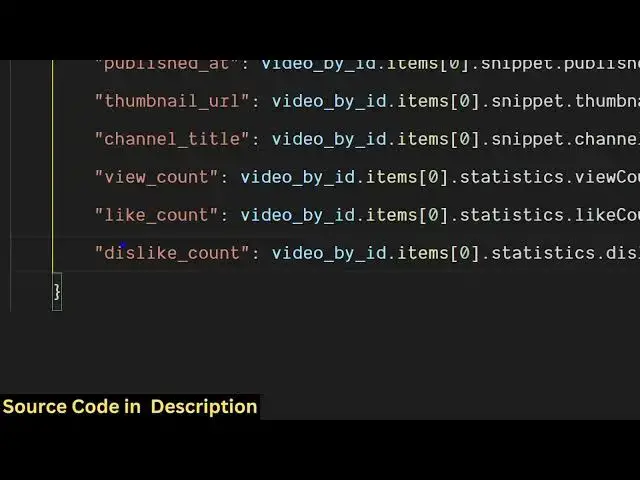
you will see title description publish
3:07
ad thumbnail URL channel title view
3:09
count like count dislike everything it
3:13
can be fetched here you will see how
3:15
easy it is to fetch all this
3:20
information so I have given the script
3:22
guys in the description of the video so
3:24
if you need the full script you can go
3:26
to the description so we get we declare
3:29
this object here video data which
3:31
contain all these properties title
3:32
description view count like count
3:34
comment count and just after that we
3:37
simply save this information into a JSON
3:40
file so let me say video data
3:43
JSON JSON term so we dump all this
3:47
information into a JSON
3:52
file and then we simply return the video
3:57
data now we just need to call this so
4:00
inside our main function we simply
4:02
provide a video ID so whichever video
4:07
you are working here so this is you go
4:10
to a particular video and this is
4:12
actually the video ID so simply copy
4:15
this video id to get the relevant
4:17
information simply paste
4:19
it after that you will get your data
4:23
simply call this function get video data
4:26
passing this video id and then we simply
4:30
print out that uh
4:32
data fetched and saved to video
4:35
data.json so now what happens if I
4:37
delete this file
4:43
here and let's suppose I take
4:46
uh my own
4:48
video so if I type here
4:52
freemediattools.com and let's suppose I
4:54
take one of my popular videos here go to
4:59
popular let me take this video for
5:02
example i copy this video
5:08
ID i paste
5:11
it and once again run this script here
5:14
you will see that so this will be
5:17
created and you will see view count is
5:21
3,37 likes 31 comment is five so you can
5:25
match it it is perfectly fetching all
5:28
this information
5:30
so in this easy way guys it's a great
5:33
module in Python to interact with the
5:35
YouTube data and analytics API and with
5:37
this module you can do more things as
5:40
well but I showed you a very basic
5:42
example of fetching the information
5:44
regarding a particular YouTube video you
5:46
can even fetch information regarding the
5:48
channel you can search videos as well so
5:51
it's a great module uh just play with
5:53
this module inside the Python and uh
5:56
also check out my website which is
5:58
freemediatools.com
6:00
uh which contains thousands of tools and
6:03
I will be seeing you in the next
#Online Video
#Computers & Electronics
#Internet & Telecom
#Photo & Video Sharing
#Video Sharing