Up next in 10


Buy the full source code of application here:
Show More Show Less View Video Transcript
0:00
uh hello guys welcome to this video so
0:02
in this video I will show you a command
0:04
line utility inside Python which allows
0:07
you to fetch the YouTube thumbnails of a
0:09
particular video using a URL so this is
0:12
actually the module here Python i
0:15
recently discovered this it's a very
0:16
newly constructed module and the command
0:20
is very simple you install this module
0:22
inside your terminal pip install Python
0:25
just come to your terminal right here
0:28
and execute this command as soon as you
0:31
execute this you can now use this
0:34
utility right in the terminal itself and
0:37
uh let me show you the command that is
0:40
used to fetch the YouTube thumbnail and
0:43
store it as a JPG file so the command is
0:47
very simple once you get this simply
0:49
type here
0:50
Python and then in double quotes you
0:53
actually paste the address of whichever
0:56
video thumbnail that you want to get so
0:59
let me open any of this my videos here
1:03
let me type here free media
1:05
tools let me copy the thumbnail and
1:08
simply paste it
1:11
as soon as you do this it is requesting
1:12
the thumbnail for video ID and it's
1:15
found the thumbnail successfully saved
1:18
so if I open this in the directory you
1:20
will see the thumbnail is successfully
1:22
saved right here this is the
1:26
thumbnail let me pick this video again
1:29
repeat the same
1:33
process python in double quotes you
1:36
paste the
1:37
video and once again you will see the
1:40
video thumbnail will be saved you will
1:42
see
1:44
that so you can also use it
1:46
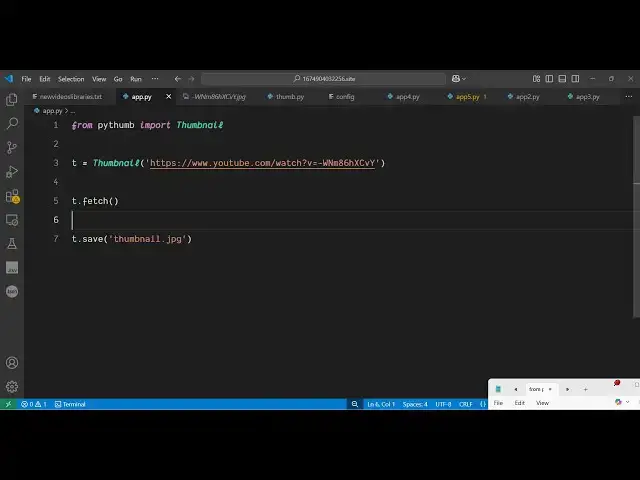
programmatically as well uh very simple
1:49
just create a simple Python script if
1:51
you want to automate this you simply say
1:54
from Python we need to import the
1:57
thumbnail package and after that we
2:00
simply initialize this thumbnail and
2:03
here we simply pass the address of the
2:05
video that we want to fetch the
2:08
thumbnail again we call this fetch
2:10
function and then we simply save this so
2:13
you can give it a file name
2:15
thumbnail.jpg so now what happens if you
2:18
see uh if you just execute this Python
2:25
script so you will see it will create
2:29
this thumbnail jpg folder and inside
2:32
this your thumbnail will be successfully
2:35
saved right here so
2:38
uh this is a really free Python package
2:41
for fetching the YouTube thumbnails of a
2:44
particular video both in command line or
2:46
also you can do it programmatically i
2:49
tested it out you can use it unlimited
2:51
number of time for this we doesn't need
2:53
to require any sort of API key you can
2:56
use it unlimited number of time so thank
2:59
you very much for watching this video
3:01
and also check out my website which is
3:03
freemediattools.com
3:05
uh which contains thousands of tools
#Video Sharing