Up next in 10

Python Script to Extract Text From PDF & Export it to MP3 Audio Using pdfplumber & GTTS Library
Jun 3, 2025

Buy the full source code of application here:
Show More Show Less View Video Transcript
0:00
uh hello guys uh welcome to this video
0:02
so in this video I will show you a
0:04
Python script which actually uh converts
0:08
your PDF into a MP3 audio file so what
0:12
this Python script does it actually
0:13
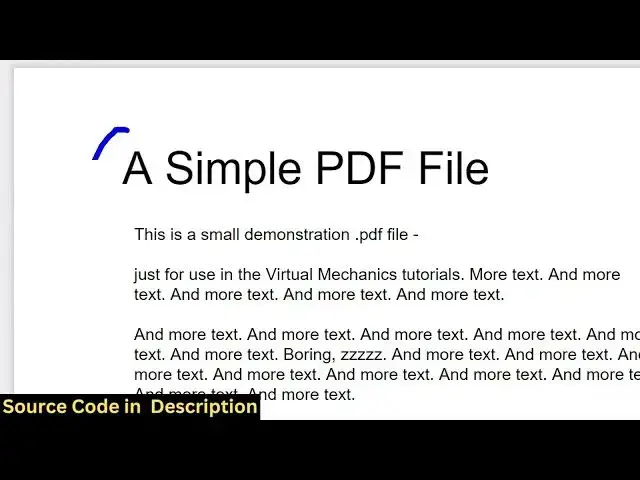
takes this uh PDF file so we have this
0:16
PDF file present which contains two
0:18
pages so it actually extracts first of
0:22
all all the text from this PDF document
0:25
and then it actually convert this into a
0:28
audio file where the person will speak
0:30
those words and uh you will see this MP3
0:34
file is present in the same
0:36
directory so there is a module here
0:39
which does this task automatically so we
0:42
are using two modules here first module
0:44
is PDF plumber and uh second one is GTS
0:50
which will carry out the conversion from
0:52
text to MP3 so we have this sample PDF
0:57
file present uh so let me just run this
1:00
Python script so as soon as the Python
1:03
script runs you will see on the left
1:04
hand side an MP3 file will be generated
1:07
you will see this PDF file will be
1:10
converted to MP3
1:14
so just wait for the full conversion to
1:17
take place so as you can see this is an
1:19
MP3
1:20
file if I play
1:25
this and now you can see the processing
1:28
has been finished so you can play the
1:30
audio file
1:40
so let me open it inside a MP3 player
1:46
a simple PDF file this is a small
1:49
demonstration PDF file just for use in
1:52
the virtual more text so as you can see
1:56
the person is speaking those words so in
1:59
this easy way you can convert your PDF
2:02
file into an MP3 file using a Python
2:04
script so now let me show you the actual
2:07
script here so first of all you need to
2:09
install two modules here just go to your
2:12
command line and simply install these
2:14
two modules first is PDF lumber and
2:18
uh second one is uh
2:22
gdts so pip install pdf plumber and gdts
2:27
so this is the name of these modules so
2:29
this is the command uh simply install
2:31
this by executing this command uh I've
2:34
already installed it
2:36
so just create a simple app py file and
2:40
right here you at the very top you just
2:42
need to import the pdf plumber package
2:46
then we also need to import from gtts we
2:50
need to import this package as well so
2:52
we imported both the packages here and
2:55
then we just need to open the pdf file
2:57
right here with this library PDF plumber
3:00
it contains this open function so here
3:03
you will pass the path here sample
3:06
PDF as PDF and colon and after that here
3:11
you will declare a text variable where
3:15
first of all we will extract all the
3:17
text from this PDF document as inside
3:20
this for doing this we loop through all
3:23
the pages in the PDF file so PDF
3:26
dotpages so we are looping through each
3:29
page so this will return the total
3:31
number of pages and then we simply store
3:34
the extracted text in this variable so
3:37
it contains this function here which is
3:40
extract text so you can see it contains
3:43
all these functions so we will be using
3:45
this function which will extract text so
3:49
this will extract all the text from the
3:51
PDF document and store it so we can even
3:54
print this as well
3:57
and then we will actually convert this
3:59
into an MP3
4:01
file MP3 audio file so we simply use
4:06
this library
4:10
GTS and here we simply pass uh the text
4:15
that needs to be converted and there is
4:18
also another attribute you can pass
4:20
which is the language here by default it
4:22
is English language but you can even
4:24
change that as well so just need to
4:27
provide the two little uh digit uh
4:30
language code and then we need to simply
4:32
save this so I will say
4:36
audio.mpp3 so now if
4:42
I if I execute the script here you will
4:45
see that it will extract first of all
4:48
the text here and then it will make this
4:51
audio.mpp3 file here in the left hand
4:53
side
5:00
a
5:01
simple a simple PDF file this is a small
5:06
demonstration PDF file just for use in
5:09
the virtual mechanics to so in this way
5:11
you can see that uh you can even change
5:13
the language here so you can just
5:15
provide any different language code as
5:18
well so ES is for Spanish so now what
5:21
happens it will convert this into a
5:24
different
5:29
language
5:31
so just open
5:57
simply file this is a small
6:01
demonstration file just for us in the
6:04
virtual mechanics so as you can see it
6:06
has now converted to Spanish here you
6:08
can see the person is speaking Spanish
6:10
so in this easy way you can actually
6:12
convert the PDF file into an MP3 audio
6:15
file in different languages using this
6:17
modules and for this specific purpose I
6:20
made this
6:21
uh online tool here on my website
6:24
freemediatools.com
6:26
uh which contains thousands of tools so
6:28
you can just search for this tool which
6:30
is PDF to
6:31
audiompp3 you can directly go to this
6:33
tool and here you will simply upload
6:36
your PDF file
6:40
so and then you can select the language
6:43
here any
6:45
language so let me select here Korean
6:49
and uh convert to audio so this is a
6:53
same tool that I developed here which
6:56
will convert your PDF into audio and
6:59
then it automatically the MP3 file will
7:02
be downloaded so you can check out this
7:04
tool on freemediatools.com PDF to audio
7:08
so it is essentially using this Python
7:10
script to actually carry out a
7:12
conversion
#Podcasts
#Audiobooks