Up next in 10

Python 3 wkhtmltoimage Script Example to Export HTML & CSS Template to Image Using imgkit Library
Jun 3, 2025

Get the full source code of application here:
https://codingshiksha.com/python/python-3-wkhtmltoimage-script-example-to-export-html-css-template-to-image-using-imgkit-library/
Show More Show Less View Video Transcript
0:00
uh hello guys welcome to this video so
0:02
in this video I will show you a Python
0:04
script which will actually convert your
0:07
HTML plus the CSS into an actual image
0:11
so as you can see right here we having
0:13
this uh HTML file template we have with
0:17
this HTML code right here and we are
0:20
generating a image from this so inside
0:23
this Python script so as I run this
0:25
Python script you will actually see
0:28
image file will be generated it can be
0:30
JPG or PNG so let me run the file here
0:35
python let me navigate to the folder and
0:38
then just type Python app py so as I run
0:42
the script here you will see output
0:43
image jpg file will be generated and you
0:46
can see we successfully created this
0:49
image uh just wait let me zoom open my
0:53
zoom it tool so that I can zoom it on
0:56
particular
0:58
element so this is actually the image
1:01
generated you will see that we got the
1:04
heading we got the paragraph as well so
1:06
this is actually the HTML that we got
1:09
here we have the H1 heading and we have
1:12
a simple paragraph as well so we are
1:14
simply generating this image from this
1:17
HTML you can even uh let me show you the
1:21
package name uh just go to the website
1:24
of Python where you can search for
1:26
thirdparty packages so we are using this
1:29
package which is image kit this is a
1:31
very popular package for converting HTML
1:35
to image using the webkit rendering
1:38
engine so the command is simple you
1:40
simply execute this command to install
1:42
this package i've already installed it
1:46
and for working this you need to have
1:48
this library installed so simply install
1:52
this library WK HTML to PDF this is a
1:55
open-source library you should have this
1:58
installed before you execute this so
2:00
download this pre-ompile
2:03
binary simply click it and select your
2:06
operating system and install this after
2:08
installation basically it will install
2:10
inside your C drive in the program files
2:15
it will create this folder
2:18
WK you will see it create this folder WK
2:22
HTML to PDF so go to the bin folder and
2:25
right here you will see all the binaries
2:28
so we are using this binary here WK HTML
2:31
to image this is actually the exe binary
2:34
which converts your HTML to actual image
2:37
so just make sure that you add this
2:39
whole path just right click copy this
2:42
path and go to environment variable and
2:46
simply go to the path
2:47
variable and add this path i've already
2:51
added this path here you can see and
2:54
then just restart your terminal and then
2:56
execute this application so now let me
2:59
show you the Python script so just
3:03
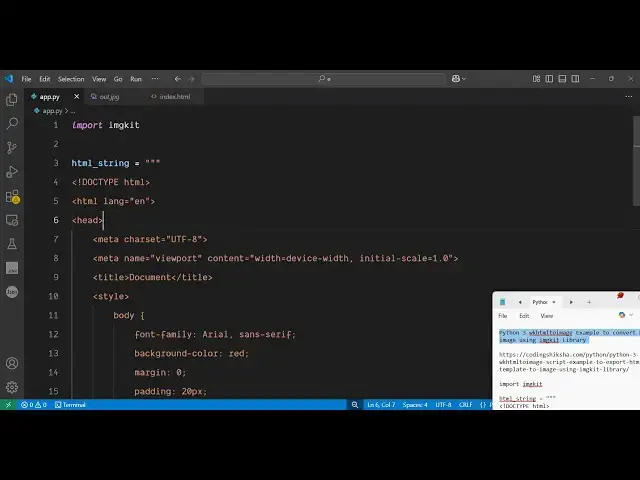
create a simple app py file and right
3:08
here you first of all import the package
3:10
which is image kit then we simply have a
3:14
HTML
3:15
string
3:18
so right here you can actually write
3:22
your basic HTML
3:26
code you can see that
3:34
You can have the
3:38
title you can even add some uh basically
3:42
the CSS styles as
3:46
well and then we can actually close this
3:49
style
3:54
so as you can see we are also
3:58
having this custom CSS and we basically
4:02
change the font family background color
4:05
margin padding H1 P and inside this we
4:08
will have the
4:15
body so inside the body we will have the
4:17
H1 heading we have the
4:21
paragraph and image tag and another
4:24
paragraph so this is our HTML template
4:27
guys that we need to export this
4:29
template to an actual image file this
4:31
image get module inside Python contains
4:34
this function from string and then you
4:38
actually pass this HTML string and then
4:41
the output jpg or png any file name
4:46
that's all that's all that we need to do
4:49
and if you execute this application now
4:51
just execute the
4:53
script so it is saying
4:56
that fail to load h just make sure that
5:00
you don't put the image tag because yeah
5:03
so don't put this image tag just have
5:06
the basic HTML tag and now you will see
5:10
the JPG file will be created this is
5:13
your heading this is your paragraph and
5:18
if you see let me change the background
5:22
to red
5:27
color so now you can see background has
5:30
been changed to red color and if I
5:32
change this
5:33
heading text color to yellow color and
5:38
then this paragraph to green
5:43
again do this you can see it is applying
5:45
all these CSS styles as well inside the
5:48
image text color is yellow background
5:51
color red so in this way guys you can
5:53
use this package in Python image kit to
5:56
actually export your HTML template or
5:59
file so this you can even take this if
6:03
you're having a file rather than the
6:05
string you can create this file as well
6:08
so index html you can create this file
6:11
this template and then you can actually
6:14
use this method which is from
6:17
file you can see that you can take this
6:20
from file and you can pass this template
6:22
here which
6:25
is this also contains this so rather
6:29
than taking it from
6:32
the you can take it from the actual
6:36
template then you can even pass some
6:37
options quality
6:39
100 can control this so now if you see
6:44
it actually created this you'll see
6:46
that so you can even create this from
6:49
the HTML file as well so this is
6:53
actually the module guys thank you very
6:54
much for watching this video and also
6:56
check out my website freemediatools.com
7:00
uh which contains thousands of tools
#Programming
#Software
#Multimedia Software
#Clip Art & Animated GIFs