Up next in 10

Python 3 send2trash Module Script to Delete Files & Send them to Trash & RecycleBin Automatically
Jun 3, 2025

Get the full source code of application here:
https://codingshiksha.com/python/python-3-send2trash-module-script-to-delete-files-send-them-to-trash-recyclebin-automatically/
Show More Show Less View Video Transcript
0:00
uh hello guys welcome to this video so
0:02
in this video i will show you how to
0:04
delete uh files to your recycle bin or
0:08
trash automatically inside python so
0:11
there is a package here which works
0:14
crossplatform so it doesn't depend upon
0:17
which operating system you are
0:19
running so the name of the module is
0:22
send to trash from the name itself it
0:25
will automatically send all your files
0:28
to trash or recycle bin in windows so
0:32
you can see send file to trash natively
0:34
under mac apple windows or linux
0:38
so it will natively support all the
0:41
operating system if you're running on
0:44
linux or mac also then also it will send
0:48
files to your recycle or trash bin so
0:51
i'm running on windows here you will see
0:53
i have the script so i'm just checking
0:56
for all the csv
0:58
files so in my root directory you will
1:00
see a bunch of csv files are present so
1:04
what i will do i will run this
1:09
script so it will detect and all send
1:12
all the csv files to my recycle bin so
1:15
if i check the recycle bin you will see
1:18
the csv files are now there
1:22
so in this easy way you can see so now
1:25
let me show you the example code here
1:30
for so after installing it just simply
1:34
make a simple python file and write
1:37
first of all you just need to import the
1:39
operating system module and also this
1:41
module which is send to trash and then
1:45
we
1:46
simply loop
1:49
through in the
1:52
directory so operating system walk
1:54
function is there so you'll be taking
1:56
the root directory and uh right here you
2:00
will specify which files you want to
2:02
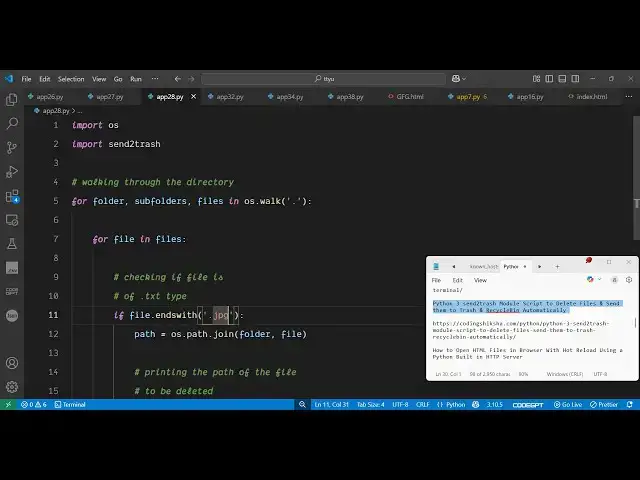
delete so right inside this loop we will
2:06
simply have this condition that if the
2:08
file ends with so here you can put the
2:12
any extension right here let's suppose i
2:15
am targeting csv
2:17
files
2:19
so it will
2:22
simply delete all these files so
2:25
operating system path
2:29
join then simply delete print out this
2:33
simple message that
2:38
deleted and now to send this file to
2:41
trash we call this function send to
2:43
trash it contains this function send to
2:46
trash
2:47
and that's all that's all that we need
2:50
to do inside this it contains this
2:53
inside this module
2:55
send to trash so if you execute
3:01
this so line number nine you will see
3:04
indentation
3:28
line number
3:31
10 there is some kind of indentation
3:33
error let me just paste
3:35
it let me target now uh instead of jpg
3:40
file so now it will delete all the
3:43
images you will see
3:45
that it is deleting all these images and
3:48
if you check your recycle bin you will
3:50
see
3:54
it is transferring the files to your
3:56
recycle bin natively so you can use this
3:58
module inside python simply install it
4:00
and start using it also check out my
4:03
website freemediattools.com
4:06
uh which contains thousands of tools
#Software Utilities
#Freeware & Shareware