Up next in 10

Python 3 Pandas Script to Parse & Extract All HTML Tables From Website URL and Save it as Excel File
Jun 3, 2025

Get the full source code of application here:
https://codingshiksha.com/python/python-3-pandas-script-to-parse-extract-all-html-tables-from-website-url-and-save-it-as-excel-file/
Show More Show Less View Video Transcript
0:00
uh hello guys welcome to this video so
0:02
in this video I will show you a Python
0:04
script uh web scraping script which will
0:06
extract all the HTML tables from a
0:09
particular website you plug the URL
0:12
which contain multiple tables and then
0:14
it will extract all those tables and
0:17
save as an Excel file so let me just
0:20
plug this URL inside this Python script
0:25
here so as you can see it's a population
0:27
kind of a website which contains
0:29
multiple tables so what it will do it
0:32
will extract all the necessary data once
0:34
I execute this Python script you will
0:36
see in the terminal it will extract all
0:39
the necessary tables and ex and save it
0:43
inside this Excel file so it created
0:45
this folder it has three tables right
0:48
here if I open this you will see it has
0:51
extracted this tabular data and stored
0:54
this inside this Excel file this is the
0:56
first Excel file this is actually the
0:59
second
1:00
one you can see that this is the third
1:03
one so it automatically detected
1:07
extracted all the HTML tables right here
1:09
from this web page so you just plug the
1:12
URL and then it automatically will do
1:14
the job for you and you can do this with
1:17
any website let's suppose I copy this
1:21
URL you will see it has a lot of tabular
1:23
data which is present so again you plug
1:26
the URL and then again it
1:29
will save the data inside an Excel file
1:33
so let me run
1:35
this so you will see it will again
1:38
extract all these five
1:40
tables as an Excel file
1:44
it's a compar comparison table here you
1:46
will see of different programming
1:48
languages so again it extracted all the
1:51
necessary data and saved is inside an
1:53
Excel file so it's a very good Python
1:56
script which will save you a lot of time
1:58
because data extraction is a very
2:01
popular skill so I've given this uh
2:05
script in the description of the video
2:06
you can go to my website and just copy
2:09
the overall script and for this you just
2:12
need to have some modules installed so
2:16
first of all you need to have this
2:18
pandas library which is a very popular
2:21
module for data extraction so simply
2:24
install this module pip install pandas
2:27
for data
2:29
analysis and I think that's all that you
2:32
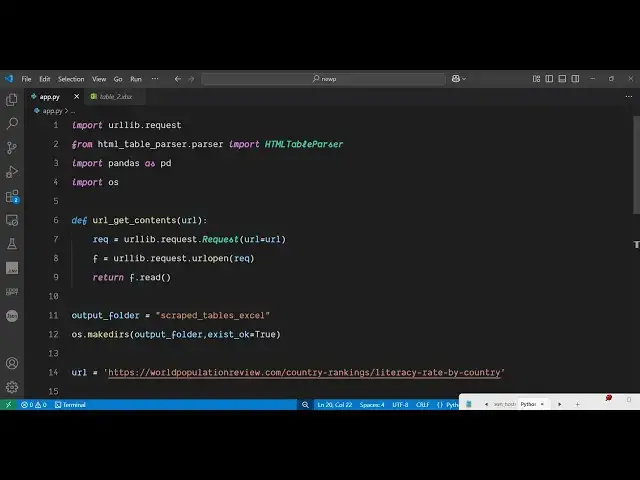
need to do simply create a app py file
2:34
and then you just need to
2:36
import the necessary packages url lib
2:39
request and then from this HTML
2:43
table parser library you just need to
2:47
import this HTML table parser so one
2:51
other library you will need here which
2:53
is HTML table
2:56
HTML
2:58
table parser package so this actually is
3:04
doing the heavy lifting it is extracting
3:06
all the HTML tables right here so the
3:08
command is simple you simply install
3:10
this module and after installing this
3:13
simply import this like this and then we
3:16
also import the pandas library as PD and
3:20
then we also import the operating system
3:22
module so after this we actually define
3:27
a function which will simply get the
3:30
contents from the URL you pass this URL
3:34
as an argument and then it will actually
3:38
open this URL first of all using URL
3:40
live module it will
3:42
request use this request class and it
3:46
takes the URL as argument it will open
3:49
this URL
3:54
url div request dot url open so it will
3:59
use this function to open this
4:02
URL and then it will return everything
4:05
which has it read so f dot read so it
4:09
returns everything what it reads from
4:12
this URL and then we simply call this
4:16
function so we create a output folder
4:19
which will script
4:23
tables excel it will create this folder
4:25
for you so it will make a directory we
4:29
are using this function of operating
4:35
system after creating the folder now we
4:38
just need to specify which URL that you
4:40
want to scrape so I will simply provide
4:42
this URL after providing the URL we
4:46
simply call this function that we
4:48
specify URL get contents and simply pass
4:51
this
4:52
URL and then we also decode
4:56
this decode this inside
5:04
UTF8 so after we get this HTML now we
5:08
can actually parse this HTML so as you
5:11
can see it will return this HTML to us
5:15
so if I execute this application now
5:17
here it will go to this URL and then it
5:20
will extract all this HTML that you are
5:22
seeing right here now we just need to
5:24
extract the necessary data from this
5:27
HTML for this you will initialize this
5:29
module which is HTML table
5:32
parser so in the next step we will
5:35
simply initialize this HTML table parser
5:40
and then P dot it will we will feed this
5:44
HTML to this
5:46
library after that we save each table as
5:49
an Excel file for we'll simply run a
5:51
simple for
5:56
loop like this so enumerate dot it
6:01
contains this a series of tables we will
6:03
loop through each table and just export
6:07
the data frame by using the pandas
6:13
library and then we will create the
6:15
excel file name by using operating
6:18
system path join and we will
6:21
basically create this file inside this
6:24
output directory and name it as
6:29
dynamically like this
6:34
at the next step we simply save this to
6:36
an Excel file by calling this function
6:38
to Excel of pandas and we simply specify
6:42
this uh Excel file
6:47
name and index to
6:51
false then we simply print out that your
6:53
table has been
6:58
saved so this completes the script
7:00
that's all that is needed right here if
7:02
I again delete
7:08
this again execute this first of all it
7:11
will go to the website and then ex
7:14
scrape all those three tables and save
7:16
it as a site an Excel file so you will
7:20
see all your tables have been
7:22
successfully extracted from an HTML file
7:25
here you will see that you can take any
7:28
URL for example from the internet just
7:31
plug this to the script and then it will
7:33
instantly scrape all the HTML tables and
7:36
save it as an Excel file so thank you
7:38
very much guys for watching this video
7:40
uh please hit that like button subscribe
7:42
the channel as well for more videos like
7:44
this and also check out my website uh
7:49
freemediattoolsh.com uh which contains
7:51
uh thousands of tools
#Web Stats & Analytics