Up next in 10

Python 3 OpenCV & Deep AI Face Recognition & Analysis of Images and Save Result in JSON File
Jun 3, 2025

Get the full source code of application here:
https://gist.github.com/gauti123456/fa9810ffe028c13bed84c323e55ed715
Show More Show Less View Video Transcript
0:00
uh hello guys uh welcome to this video
0:03
so in this video I will show you a
0:04
Python script which will actually use
0:07
the facial recognition system and it
0:10
will analyze the face of a person on
0:13
various parameters such as what is the
0:15
gender of this person how is the emotion
0:18
which is there in the picture is it
0:20
smiling is it angry it will analyze the
0:23
overall picture and it will give you the
0:25
response back in this JSON response such
0:27
as what is the age of the person what is
0:29
the gender of the person is it a male or
0:32
female what is the dominant emotion in
0:35
that picture is it angry is it happy
0:38
what is the dominant race black white or
0:40
Middle Eastern so let me just show you
0:43
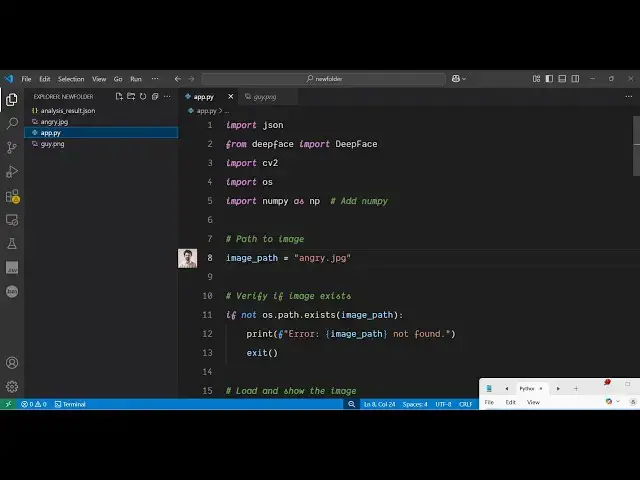
the script here so it's a simple Python
0:46
script that I written and we are
0:49
actually providing this this face here
0:52
which is little bit angry face you will
0:54
see it's a guy face with a little bit
0:56
angry so if I execute the script here
0:58
python app py so it is using open cv and
1:02
deep phase modules of python it will
1:06
open this image it will detect the
1:08
emotions and then automatically it will
1:11
close and it will create this file here
1:13
JSON file and this will actually contain
1:17
the information regarding this image so
1:19
it actually detected the age of the
1:21
person is round about 35 the gender here
1:24
you will see man is 99% so it's correct
1:28
dominant emotion is angry you will see
1:31
and dominant trace is middle eastern so
1:34
it detected this image correctly I think
1:37
now if I provide this
1:39
image so if I just provide this image
1:42
here
1:43
guy.png now let's see what happens
1:47
let me just change the file name to
1:51
analysis result
1:53
2.json so if I run the same script here
1:55
with a different image now let's see
1:58
what happens and what result comes it
2:01
will repeat everything it will open this
2:03
image analyze it and just on various
2:07
factors and then it will create this
2:09
second file here if you see now you will
2:12
see age is 41 man 99% dominant emotion
2:17
happy and dominant race is black you
2:20
will see correctly it has recognized the
2:22
overall picture right here and it given
2:24
you the responses back so now let me
2:27
show you the modules that I used for
2:30
this uh application all the script is
2:33
given in the description guys uh the
2:35
link is given in the description so if
2:38
you want the full source code you can go
2:40
to the description of this video so the
2:43
very first module we are using is deep
2:45
face which is a facial recognition
2:48
package for Python simply install this
2:51
the command is simple then we are also
2:54
using open cv to actually open the image
2:57
in a
2:58
window so also just install this package
3:02
as well the command is simple and also
3:05
we are using numpy which is also a
3:08
package for computing data so also
3:13
install this as well so these three
3:15
packages are there and now just create a
3:18
simple app py file and let me just show
3:21
you how to write the script so first of
3:23
all we will require the overall modules
3:25
the JSON module and the deep face we
3:29
need to import the deface and then
3:32
import open CV
3:34
cv2 import the operating system
3:38
module and then we need to import the
3:41
numpy module as well
3:44
after that guys we just need to provide
3:47
the image path whatever image you are
3:50
actually doing this and
3:54
uh
3:57
I after providing this image path now we
4:00
come to if the image exist or not if the
4:04
folder exist where we will be holding
4:06
all the information regarding this image
4:08
if the folder doesn't exist then we will
4:12
actually create that
4:16
folder so if the path does doesn't exist
4:19
then we will just say the image path not
4:23
found and then if the image is valid
4:26
image then we will read this image by
4:28
open CV this contains a function image
4:30
read we will provide this image the path
4:35
then we will simply show this
4:37
image in the window so image
4:42
show so we'll simply show the input
4:46
image then we will wait for some time so
4:49
wait key one so we'll wait for 1
4:53
millisecond small delay so that we can
4:55
analyze this image based upon the deep
4:59
phase library so we will use now this
5:03
deep face package analyze function it
5:06
has and here you provide the various
5:08
parameters on which you need to analyze
5:10
the image so deep face here we are
5:14
providing these parameters what is the
5:16
age gender emotion race so these four
5:19
parameters we are doing it so this will
5:21
analyze the image and then it will
5:23
return you the response
5:26
so so after that this overall is the
5:30
code let me paste it this is just
5:34
storing the response in a JSON file this
5:37
is all that we are doing right in this
5:38
code right here we are storing this
5:41
response in this JSON
5:43
file so we are running a for loop and
5:47
storing everything in a JSON file so it
5:50
contains four properties age gender
5:52
dominant emotion dominant
5:55
trace so this is the overall script guys
5:58
so let me just delete everything and
6:01
again run
6:03
this so just say python app.py so it
6:08
will open this
6:12
image you can see that then it is
6:15
running the
6:16
models the facial recognition system and
6:19
then it will give you the response here
6:21
in the JSON file so you can see that
6:23
guys how easy it is to create this
6:25
facial recognition system in Python
6:28
which will analyze any image that you
6:30
give to it so the overall script is
6:33
given in the description of this video
6:35
uh please hit that like button subscribe
6:37
the channel and also check out my
6:40
website
6:41
freemediatools.com which contains
6:43
thousands of tools