Up next in 10

Python 3 Instagram GraphQL & Display API Script to Fetch User Profile Feed Images in Terminal
Jun 3, 2025

Get the full source code of application here:
https://gist.github.com/gauti123456/251ad0e1ee542f00a7a2cd87e5cd13c8
Show More Show Less View Video Transcript
0:00
uh hello guys welcome to this video so
0:03
in this video I will show you a Python
0:05
package which interacts with the
0:07
Instagram graphql or display API and it
0:11
will actually return the profile
0:14
pictures of a particular Instagram
0:15
username the feed profile feed so I've
0:18
just provided the Instagram username
0:20
you'll see that so you will see it will
0:24
actually return the feed here all the
0:26
pictures the media files that you see in
0:28
the JSON response so if I run this run
0:30
the script here you will see on the left
0:33
hand side a JSON file will be created
0:36
you can see feed saved to and this JSON
0:39
file is created here and this will
0:41
actually contain all the data right here
0:43
if you see the images are returned I can
0:46
simply open it in the browser you will
0:48
see this is a link of the image this is
0:51
the first image this is similarly we
0:54
have the second one you can
1:01
see so in this way this is actually a
1:05
free Python package it doesn't require
1:07
any API key in the background it is
1:09
communicating with the Instagram graphql
1:11
or basic display API to fetch these
1:14
information and display it in the JSON
1:16
file if I change this username let's
1:19
suppose I provide any other
1:22
username and uh let me change the file
1:27
name so here you can input any username
1:30
uh let me just change it you will see
1:37
uh let me just provide a different one
1:39
so you will see now it will
1:44
again run this script here as soon as
1:47
you run this you will see it
1:49
will
1:53
actually create the second one and you
1:55
will see all the files all the feed here
1:58
it will be returned
2:00
so so you can see that it works with all
2:04
the usernames so the account should be
2:06
public here that's why it will grab
2:09
everything and return to you this JSON
2:11
file so let me show you the module here
2:13
uh insta feed checker
2:16
and if you go just go to the just search
2:20
for this module insta
2:23
feed_ch checker uh this is actually the
2:26
module
2:27
here the command is very simple uh pip
2:30
install insta feed checker simply go to
2:33
the command line and simply install this
2:36
module by executing this command here so
2:38
this will install this module and now I
2:41
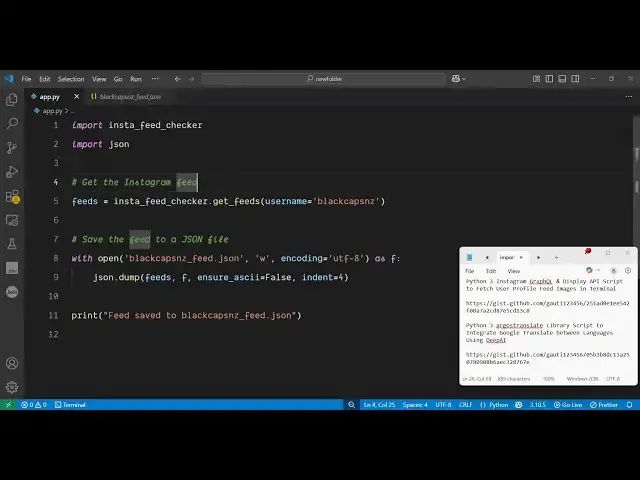
will show you how to use
2:43
this so first of all just create a
2:46
simple app py file and then simply
2:49
import this
2:51
module then we will also import the JSON
2:53
module and here we just need to
2:56
provide initialize this so
2:59
Insta feed checker and here it actually
3:03
contains this function here get feeds so
3:05
it will actually profile provide you
3:08
with the profile feed of the user here
3:11
you just need to provide an argument
3:13
here which is the username so here you
3:15
can provide any
3:18
username after that it will actually
3:21
save everything in a JSON file for
3:23
saving it we
3:25
simply put results JSON and we will
3:29
write this
3:30
file
3:33
simply also provide the encoding
3:37
here UTF8
3:43
and after that we will simply dump this
3:47
in a JSON
3:49
file and then simply write a print
3:52
statement that result save to
3:55
result.json that's all that we need to
3:57
do you can see it's four five lines of
4:00
code here and let me just remove this
4:05
here so the nice thing about this module
4:07
is that you don't require any API key
4:10
and you can do it for unlimited number
4:12
of
4:13
time and once again if you run this it
4:16
will actually create this JSON file you
4:19
will see with the help of this you can
4:21
create any sort of application related
4:23
to Instagram you can display these
4:26
pictures in the browser so that the user
4:29
can download this you will
4:33
see it provides you with the JSON
4:35
response here it's basically a good way
4:38
by which you can make an API as well so
4:40
the possibilities are endless this is
4:42
actually the Python module that I wanted
4:44
to show you uh simply install it and
4:47
start using it to get the profile feed
4:50
of an Instagram user so thank you very
4:53
much for watching this video and also
4:55
check out my website which is
4:57
freemediatools.com
4:58
uh which contains thousands of tools
#Social Network Apps & Add-Ons
#Photo & Video Sharing
#Scripting Languages
#Video Sharing