Up next in 10

Python 3 Github API V3 Web Scraping Script to Scrape Github User Profile Info & Save it in Excel
Jun 1, 2025

Get the full source code of application here:
https://codingshiksha.com/python/python-3-github-api-v3-web-scraping-script-to-scrape-github-user-profile-info-save-it-in-excel-file/
Show More Show Less View Video Transcript
0:00
uh hello guys welcome to this video So
0:02
in this video I will show you uh an
0:05
example of web scraping the GitHub API
0:08
to actually fetch the user profile
0:10
details and save it as a uh Excel file
0:14
So it's a simple uh web scraping script
0:16
using beautiful soup library inside
0:18
Python For this we'll be using the
0:20
GitHub API to fetch actually fetch the
0:23
GitHub user profile details So GitHub as
0:26
you all know it's a popular website for
0:28
coding and programming purposes It's a
0:31
mini social network So if you want to
0:33
fetch a particular user details let's
0:36
suppose I take my own
0:38
example So this is actually the profile
0:41
which looks like we have the profile
0:43
picture We also have the
0:45
username We have the short little
0:48
description This is email address
0:50
followers
0:51
everything You can take any other
0:54
example here Let me
1:01
say
1:06
so you can take any example here Let's
1:10
suppose I take this
1:14
one So this is actually my script here
1:17
And here you just need to replace the
1:20
username
1:23
So you just need to this is actually the
1:26
username which looks like So you just
1:29
need to copy this username to fetch the
1:32
other profile details So I will simply
1:34
copy this username After that I run this
1:37
Python script You will actually see it
1:39
will scrape all the details and save it
1:42
inside your Excel file You will see it
1:44
create this Excel file Microsoft Excel
1:47
file And uh then it actually scrapes
1:50
this description the name the company
1:54
name and public repositories as well You
1:57
also get the avatar URL which is you can
2:03
see So everything we have scraped here
2:06
Similarly you can replace any other
2:09
username
2:15
So again you run the
2:23
script So you can see it actually again
2:26
scrape all these details Location
2:32
296 So all the script is given in the
2:35
description of the video So now let me
2:37
get started how to make this So the
2:40
first library you need to install is the
2:43
web scraping library inside Python which
2:45
is called as beautiful
2:47
soup 4 It's a screen scraping library So
2:52
if you want to extract the web pages
2:55
directly you can use this package in
2:57
Python So after installing it uh just
3:00
make a simple app py file and then we
3:04
first of all require the request module
3:06
which is a built-in module and then from
3:08
this beautiful soup library we'll be
3:10
importing this like this and for this we
3:14
also need the pandas library as well for
3:16
exporting the data to the excel
3:18
file so also install this package as
3:23
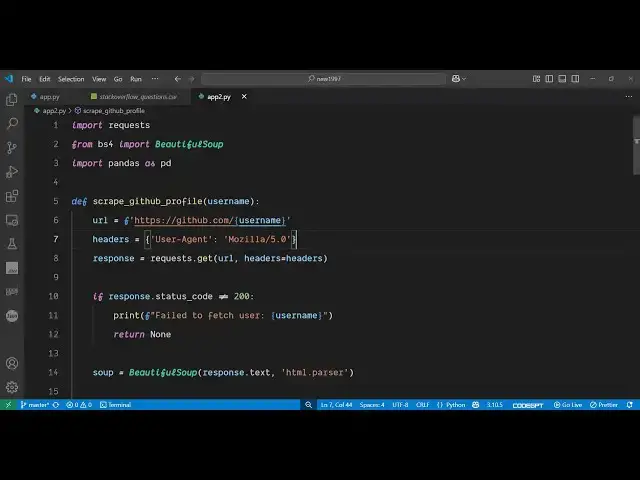
well so you can see this is actually the
3:26
package and after that you just need
3:30
to define define a function which will
3:33
actually uh do the scraping for us So we
3:36
define this function scrape grid GitHub
3:38
profile We receive the username as an
3:41
argument and then we simply hit this
3:44
endpoint where we will be fetching this
3:47
uh user profile data So
3:50
github.com/ and followed by you will
3:52
paste your username right
3:55
here So this dollar sign is not required
4:02
just so like this this username will be
4:06
the dynamic one So then we'll be
4:08
providing our
4:11
headers This is uh necessary inside
4:13
whenever you are doing web scraping you
4:15
need to provide a user agent So this you
4:19
can set this to this
4:22
value Mosilla 5.0
4:29
zero and then we will simply first of
4:33
all request the HTML of this So we be
4:37
simply be calling the get method passing
4:39
the URL with these
4:42
headers and then we will simply check
4:45
that if the response coming status code
4:48
is
4:49
equal is not equal to 200 be checking
4:56
it So if it is not returning that we can
5:00
print out this error message that your
5:03
failed to fetch user But if the response
5:06
is there in that case we need to simply
5:08
extract the relevant information First
5:11
of all we need to initialize this web
5:13
scraping library beautiful soap and here
5:16
we need to pass this response HTML text
5:20
which is coming and now we just need to
5:23
pass this HTML to extract the relevant
5:27
information So
5:30
this this is actually
5:33
your HTML which is contained inside this
5:45
response.ext So if I just call this
5:48
function right here by
5:52
passing So we basically call this method
5:59
passing this username and then we are
6:01
calling this function with this username
6:03
So if I try to run
6:07
this so I think there is some kind of
6:10
error here So
6:11
[Music]
6:15
return So right here if
6:21
you so this needs to come inside
6:36
this Thank you
6:44
Sorry So is equal
6:47
to So here we need to initialize this by
6:51
passing this response
7:04
So we can just print out to simply see
7:07
what is returning here So if I just uh
7:10
execute this you will see it will return
7:12
this all this HTML that is
7:15
returned So web scraping actually works
7:18
if you let me show
7:22
you So this is essentially the profile
7:24
page If you just rightclick and inspect
7:27
element So every element in this web
7:30
page is assigned to a particular tag
7:32
right here You'll see So we will be
7:34
doing the scraping by targeting these
7:36
tags by the CSS or class properties or
7:41
ID So particularly be inspecting element
7:44
by and uh getting to target those Let me
7:48
show you how we can do this inside
7:50
beautiful soup So here we initialize
7:53
this by passing this HTML parser
7:57
After that we can now individually
8:00
target the elements to extract the name
8:04
we found So this contains the find
8:06
method and here you can basically target
8:10
elements having unique properties So
8:14
this one we are finding it the span tag
8:18
which has a class of p-
8:21
name So if you cross check
8:24
here by navigating your mouse right
8:27
here and right click inspect element and
8:31
if you see in the HTML you will see this
8:33
name this span tag has this class here
8:37
which is this unique class p- name So we
8:40
just targeting this to get the actual
8:43
value So this will return the name here
8:45
So now to get the actual value we'll be
8:48
calling this text method
8:51
So this will get the name for
8:53
us Uh similarly we will extract the more
8:57
details such as biography company name
9:00
all these things The this process will
9:02
remain the same for all the
9:05
properties So you can see for biography
9:08
we are finding this element of div which
9:11
has this class of
9:13
this and similarly for company as well
9:16
And then we also have the
9:18
location number of repositories which
9:22
have So in this way you can actually
9:25
fetch any sort of data which is there on
9:27
the web
9:33
page and then the number of repositories
9:37
which will be there and lastly the
9:39
profile picture which will be
9:42
there inside the avatar URL So in this
9:46
way we fetched all these details and now
9:48
at last we just need to return these
9:50
details inside
9:51
a
9:53
object so that we can
9:58
directly so in this way we can actually
10:02
put all these properties inside a single
10:04
object So we are directly returning it
10:06
from this function So which has username
10:08
biography name company location public
10:11
repos and avatar URL
10:14
So so after getting this we just need to
10:17
save it inside an Excel file so that
10:21
these details can be saved So right here
10:23
in the we have if condition if the
10:26
profile details are there then we'll be
10:29
initializing this using the pandas
10:31
library calling this data
10:34
frame and saving it to
10:38
a excel file So it contains this
10:41
function here which is 2
10:52
x So this is the overall script
10:57
here So if I just delete this here and
11:00
again execute this And the nice thing
11:03
about this that it's unlimited You can
11:06
do this unlimited number of time This
11:08
web scraping doesn't have any sort of
11:10
limitation So you will see after that
11:13
we'll create this Excel file here where
11:15
you will see the user details such as
11:18
username biography name company location
11:20
public repo and the avatar URL So this
11:24
is actually the Python web scraping
11:26
script Uh all the source code is given
11:29
in the description of the video and also
11:32
check out my website freemediatools.com
11:35
uh which contains uh thousands of tools
#Scripting Languages