Up next in 10

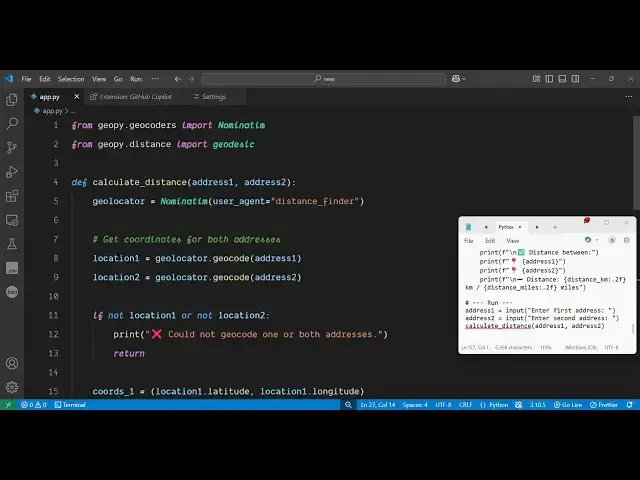
Python 3 Geocoding Script to Calculate Distance Between Two Locations Using Geopy in Terminal
Jun 3, 2025

Get the full source code of application here:
https://codingshiksha.com/python/python-3-geocoding-script-to-calculate-distance-between-two-locations-using-geopy-in-terminal/
Show More Show Less View Video Transcript
0:00
uh hello guys uh welcome to this video
0:02
so in this video I will show you uh a
0:04
Python script which will calculate the
0:07
distance between two locations
0:10
uh inside the terminal so for this we
0:14
are using the geopy package inside
0:17
Python it's a open-source package and uh
0:20
it actually does the geocoding it
0:23
calculates the latitude longitude and
0:25
then it calculates the distance between
0:27
these two locations so let me just
0:29
execute the script
0:30
here so as you execute the script it
0:33
will ask you to enter the lo location
0:37
from which you will be
0:39
starting so the source location so you
0:42
can just write any location let's
0:43
suppose I
0:45
say then I say the destination
0:52
location so now it will calculate the
0:55
distance between these two locations so
0:57
distance between Delhi to Bopal you will
0:59
see 595 kilometer and 369
1:05
miles so you can see it exactly telling
1:09
and we can also verify it by typing it
1:12
to Google we'll
1:15
see we'll see it is round about 764
1:20
kilometer and what this is returning to
1:25
us round about very
1:31
similar
1:34
so you can do this for any location so
1:38
it can
1:50
be so you will
1:55
see so now let me show you the package
1:59
here uh so the package name is uh
2:06
gopy so just search for this so this is
2:10
actually the package so simply install
2:12
this by executing this command so after
2:15
you do this so now you just need to
2:19
import the packages
2:22
gi contains this one
2:29
after that we also need to
2:32
import geopy
2:36
distance from this you just need to
2:39
import this one uh after that we will
2:42
define a function which will calculate
2:44
the distance but before that we just
2:46
need to take the address from the
2:51
user so using the input function
3:06
so we take both the addresses now we
3:08
call a simple function which will
3:10
calculate the distance between the
3:13
address one and address
3:16
two so then we define this
3:26
function so simply inside this function
3:29
uh we initialize this
3:34
package like
3:41
this after that we
3:44
simply
3:46
take do the geolo geocoding by using
3:51
this geoloccator dot geocode this will
3:54
actually convert the address into
3:56
latitude and longitude so that we can
3:58
calculate the
4:05
distance so first of all we convert this
4:08
into latitude and longitude get
4:11
coordinates and then using these
4:21
coordinates so we simply say location
4:25
one dot
4:30
latitude and location one dot
4:36
longitude and same thing we will do this
4:40
for location two
4:49
so then after that we will calculate the
4:52
diff difference between these two
4:53
coordinates to get the distance in
4:56
kilometer so we use
5:04
this so we need to get this distance in
5:07
kilometers so we
5:10
say and similarly to get the distance in
5:22
miles so after getting this we can
5:24
simply print
5:26
this very simply print the
5:33
distance so this completes the
5:36
application uh I've given the script in
5:38
the description of this
5:41
video then you just
5:54
write so you will see that you can even
5:58
crossverify
6:12
We take another example let's
6:29
suppose so so you can see Pune to Mumbai
6:31
it's like
6:33
this so in this way you can calculate
6:36
distance between two locations using
6:38
this package inside Python so there you
6:41
can see we are not using any sort of API
6:43
key it can be used unlimited number of
6:46
time to do the geocoding and calculate
6:49
distance and also check out my website
6:52
freemediattools.com
6:53
uh which contains thousands of tools
#Software
#Scripting Languages