Up next in 10

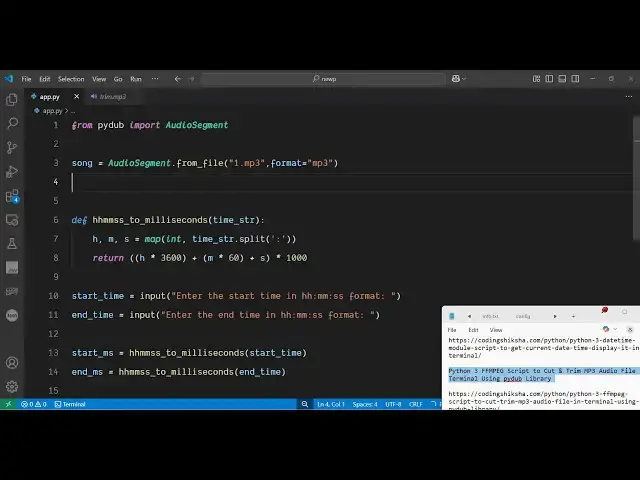
Python 3 FFMPEG Script to Cut & Trim MP3 Audio File in Terminal Using pydub Library
Jun 3, 2025

Get the full source code of application here:
https://codingshiksha.com/python/python-3-ffmpeg-script-to-cut-trim-mp3-audio-file-in-terminal-using-pydub-library/
Show More Show Less View Video Transcript
0:00
uh hello guys welcome to this video so
0:02
in this video I will show you a Python
0:04
script which will actually make use of
0:06
ffmppg to cut or trim a specific portion
0:10
of the MP3 audio file so this is
0:13
actually a script here it is essentially
0:16
using a third party module of Python so
0:19
let me show you the module name which is
0:21
py
0:23
dub so this is actually a audio
0:26
manipulation module which provides you
0:29
with the easy to use methods so the
0:32
command is simple you first of all
0:34
install this module uh essentially in
0:37
the background it is using ffmppg which
0:39
is an open-source audio and video
0:41
processing library so for this library
0:44
you should have installed this package
0:47
for your Windows Linux or Mac it's a
0:50
crossplatform library so simply download
0:53
this and you should have installed it so
0:56
just to check ffmpg is installed just
0:59
type ffmppng in the terminal if the
1:02
command is successful then you have
1:04
successfully installed ffmpg now I have
1:07
given the script in the description of
1:08
the video so it is essentially taking
1:11
this mp3 file
1:13
here so now if I want to play this it's
1:16
2 minute 57 second long video uh hello
1:19
guys welcome to this video so inside so
1:22
I want to cut this so I first of all
1:25
will be providing the path here so I
1:27
will say 1.mpp3 so as I run the python
1:30
script here in the terminal it will ask
1:33
me to cut the starting time here we'll
1:36
provide the starting time so right here
1:39
say I want to cut from this
1:43
portion up till this portion
1:46
so from 25 second to 35 second this will
1:50
be 10 second it will cut this portion
1:53
and save a new file you will see new
1:55
audio file is created and saved as
1:57
mid.mpp3 so you will see on the left
1:59
hand side a new audio file has been
2:01
created and the length of the file is 10
2:05
second so you can five month five day 16
2:10
and also tell the
2:12
So in this easy way you can make a audio
2:15
cutter right in the terminal itself so
2:18
let me show you the overall script
2:24
here so first of all you need to import
2:28
the necessary
2:32
package so right here at the very top we
2:36
simply
2:37
import the third party package from this
2:41
we need to import this audio segment
2:45
uh uh class here and then we specify
2:50
which audio file you're working with by
2:52
providing this audio segment so it has a
2:55
various bunch of methods that you can
2:58
use from MP3 from OG it supports all the
3:02
extensions from RAV
3:06
WAV so it has its bunch of methods we
3:10
can also reverse the audio as well so
3:13
it's a very popular module with a lot of
3:16
methods so in this video we are working
3:19
with the MP3
3:22
file we can directly use this method as
3:25
well from file which will support all
3:27
the extension or if you al only want to
3:30
use a specific method so you can even
3:32
say from mp3 and here you need to
3:35
specify the path here so my file is
3:38
located in the same directory and the
3:41
second argument will be the
3:43
format you can also explicitly tell the
3:47
format here to be mp3 for this you just
3:50
need to use this method from
3:54
file and then we just need to take the
3:57
input from the
3:59
user so what is the starting time and
4:02
the ending
4:09
time and similarly we can take
4:23
the so after taking both these values
4:26
now we can actually split the videos so
4:29
we first of all need to convert both
4:31
these times
4:33
into the format that it is needed so for
4:37
this we will define this
4:41
function converting this to
4:44
millisecond so this will be a small
4:46
little utility kind of a function we
4:49
will just multiply this by thousand the
4:52
time string so it will return it in
4:56
millisecond now we can actually split
4:58
the file by using audio segment
5:03
sorry uh we have just need to
5:08
say
5:10
clip and we provide it to the song here
5:13
and then the starting and the ending
5:16
millisecond this is and now we just need
5:19
to export this to a new file so use the
5:22
export function and we simply
5:25
say trim.mpp3
5:34
and then you can print out a simple
5:35
message that new audio
5:41
file so this is the overall script here
5:44
and if I again run this you need to
5:47
provide the
5:48
starting time and the ending time
5:59
so so you can see new file is created
6:03
the length will be 20 second because 50
6:05
minus 30 is comes out to be 20 so in
6:09
this easy way you can build out a minute
6:12
to if you want to trim out your specific
6:16
audio file portion directly in terminal
6:18
using this package uh thank you very
6:21
much for watching this video and also
6:24
check out my website freemediattools.com
6:28
uh which contains thousands of tools
#Multimedia Software