Up next in 10

Python 3 Audio & Music Editor Script to Change Pitch of Sound in Terminal Using librosa Module
Jun 3, 2025

Get the full source code of application here:
https://gist.github.com/gauti123456/701287b1bbd43287a21e600ed8a270a2
Show More Show Less View Video Transcript
0:00
uh hello guys uh welcome to this video
0:02
So in this video I will show you how to
0:04
build out a very simple audio editor
0:07
where you can actually manipulate the
0:09
audio pitch Pitch is actually the tone
0:13
in which your audio plays So let's
0:15
suppose I take this simple example Just
0:17
listen to this audio This is a simple
0:20
audio Uh hello guys welcome to this
0:23
video Uh so in this once again I repeat
0:26
the process I so you can see this is the
0:28
original audio The pitch is normal not
0:32
high not low So now you can even
0:34
manipulate the pitch A simple script how
0:36
the actual tone looks like So this is
0:39
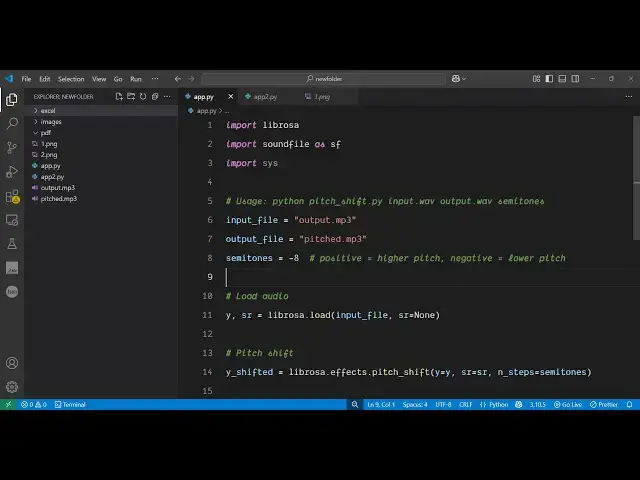
actually the Python script that I
0:40
written right here Uh it is given in the
0:42
description of the video So once I
0:45
execute this either you can increase the
0:48
shift increase the pitch or decrease it
0:50
If you provide a positive value then it
0:53
will increase it If you provide a
0:55
negative value then it will decrease it
0:57
So as you can see we have provided minus
0:59
8 So it will actually decrease the pitch
1:02
and if I execute
1:05
this script right here just notice the
1:08
difference in the
1:10
output So it will take some time 5 to 10
1:13
seconds and then it will generate the
1:14
output audio
1:16
file and it will manipulate the audio
1:20
the pitch to a lower pitch You can just
1:24
apply this to any song video as well
1:26
song
1:27
audio So you can see it has created this
1:30
pitched MP3 file So if I play this one
1:33
just notice the difference Uh hello guys
1:36
welcome to this video Uh so in this uh
1:39
video I will show you a Python script
1:42
You can see this is u lower pitch You
1:46
can provide any value here How many and
1:49
now if I provide eight here positive 8
1:52
and now it will increase the pitch So
1:56
now let me just make sure I give this is
1:59
a
2:03
increased So once again we will execute
2:05
the Python script So now this time it
2:08
will actually increase the pitch instead
2:11
of decreasing it So this is a very
2:15
useful feature in Python You can write
2:17
the script to manipulate the pitch of
2:19
the audio either increase or decrease it
2:22
It's a simple audio editor you can make
2:25
in the terminal So you can see it has
2:26
now created this file So if you see this
2:30
now uh hello guys welcome to this video
2:33
Uh so in this uh video I will show you a
2:36
py So this was the decreased one Uh
2:40
hello guys welcome This is the actual
2:43
increased one Uh hello guys So the
2:47
packages which are needed for this is uh
2:50
let me show you one by one So if you go
2:52
to the website right here of Python
2:54
third party packages just search for
2:57
this package here librosa which is a
3:00
Python module for audio and music
3:02
processing So simply execute this
3:05
command here to install this module And
3:08
second one is to provide sound files
3:12
This is again audio library where you
3:15
can actually provide third party audio
3:18
files as well So this is actually the
3:20
command So these two modules are reused
3:22
right here So now let me write the
3:24
script here from scratch So first of all
3:27
you import all the modules which are
3:29
needed one by one So import sound file
3:32
as FS Then we provide the actual input
3:38
file and the output file So which input
3:40
MP3 file you're working right here So
3:42
our file is present in the same
3:45
directory
3:46
So then we provide the output file name
3:49
which will get
3:51
created So pitched mp3 and then here we
3:56
can need to provide the semmitones
3:58
either it can be any numeric value to
4:01
actually shift or increase or decrease
4:03
the pitch So let's suppose I provide
4:05
here minus 10 This will decrease the
4:09
pitch and then we just need to load the
4:12
audio file So for this we will use this
4:15
librosa module It contains this load
4:18
function and here you specify your input
4:21
file and then the second argument is SR
4:24
is equal to none After you provide your
4:27
input file name then we need to simply
4:29
shift the pitch of the audio file So for
4:33
this we create this
4:35
variable and then this librosa module
4:38
contains this function effects and then
4:41
it contains this function pitch shift
4:46
This will shift the pitch
4:49
here like this and sr is equal to sr and
4:53
n steps is equal to semmitones This is
4:58
the main function right here which is
4:59
manipulating the shift here uh shift
5:02
pitch So this is the function and after
5:05
you do this you save your output file So
5:08
for saving it we use the write function
5:10
and we
5:12
specify the output file with the shift
5:17
apply to it and SR and then we can
5:21
simply say your in output file has been
5:25
saved Done So this is the overall script
5:28
Let me delete everything
5:37
and run this script once again So if you
5:39
again run this it will take 5 to 8
5:43
seconds and then it will generate the
5:45
output
5:46
file So it's a simple audio editor guys
5:49
you can make in the terminal itself Uh
5:52
it is a open-source package You can see
5:54
it has created this In this way you can
5:57
manipulate the pitch of any audio file
5:59
Welcome to the show So this is really
6:02
useful If you have a song or a music you
6:04
can manipulate the pitch of it without
6:06
using any sort of third party video
6:08
editor or audio editor You can use this
6:11
Python script Uh I have given this
6:13
Python script in the description of this
6:15
video and also check out my
6:17
website
6:19
freemediatools.com Uh which contains
6:21
thousands of tools