Up next in 10

Pixel Measurement Google Chrome Extension – Accurately Measure Elements on Any Website
Aug 18, 2025

Get the full source code of application here:
Show More Show Less View Video Transcript
0:00
Uh hey guys, welcome to this video. So
0:02
in this video, I'll show you a very
0:03
important Google Chrome extension to
0:06
actually measure the size of the screen
0:08
such as in pixels, how much is the width
0:11
and the height. This is the Chrome
0:12
extension. It provides you with the
0:14
access pixel measurement. If you simply
0:16
search this extension, it's got almost
0:19
80,000 installed and you simply copy the
0:23
name and simply go to your extensions
0:25
tab.
0:26
Just type here Google Chrome extensions
0:32
and right here in the search bar simply
0:34
type this name pixel measurement respect
0:36
extension will come and click on add to
0:39
chrome simply add this extension. So
0:42
after that this will be added. So you
0:45
simply
0:47
now if you visit any website and if you
0:50
want to measure the size of the screen
0:52
you simply hit this button and now it
0:56
will change it into a cursor. So now
0:58
using your cursor your mouse you can
1:00
move it and it will exactly if you want
1:04
to measure this size here. So
1:07
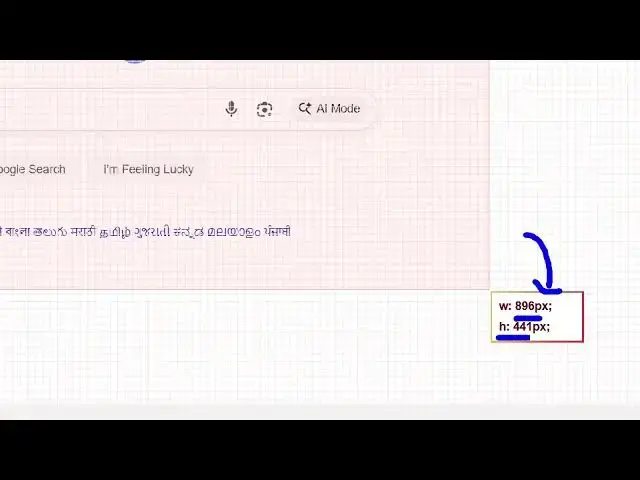
it tells you exactly the size of this
1:09
896 pixel in width height is 441 pixels.
1:13
So it it exactly tells you the size of
1:16
it and in this easy way you can crop any
1:20
portion of the screen and see the size.
1:22
So it's a very useful extension because
1:25
sometimes the UI you need to have
1:27
perfect measurements. So this is
1:29
actually a ruler kind of a setting.
1:33
So here you can different elements you
1:36
can actually measure the size. So this
1:39
is through 3251 120. This is
1:43
specifically useful if you are trying to
1:45
create a user interface for measuring
1:48
the size of images or certain elements.
1:50
So this extension provides you access
1:52
for completely free. So it exactly tells
1:56
you the size here 347 112.
2:00
So
2:04
here also if you don't want you can
2:07
smart select put this to on. So it
2:10
exactly tells you the size of each
2:12
element like this
2:18
button size everything this is a logo
2:20
size it will tell you.
2:23
So very useful extension definitely try
2:25
this guys pixel measurement and you can
2:28
s measure the size of different elements
2:31
which are present on the web page the
2:32
UI.
2:34
So using this ruler kind of an extension
2:36
pixel measurement definitely try this.
#Internet Software