Up next in 10

PHP 7 Registration Form Validation Example to Display Error Messages & Validate HTML5 User Fields
Dec 21, 2025

Buy the full source code of the application at Paypal in USD Currency here:
https://buy.stripe.com/aEU03k6FbbsY43m2Dn
Show More Show Less View Video Transcript
0:07
Uh hello friends today in this live
0:09
stream I will be talking about that how
0:12
to uh validate a advanced registration
0:16
form inside the PHP so and display error
0:19
messages alongside with some CSS also.
0:23
So you can just see on your screen right
0:25
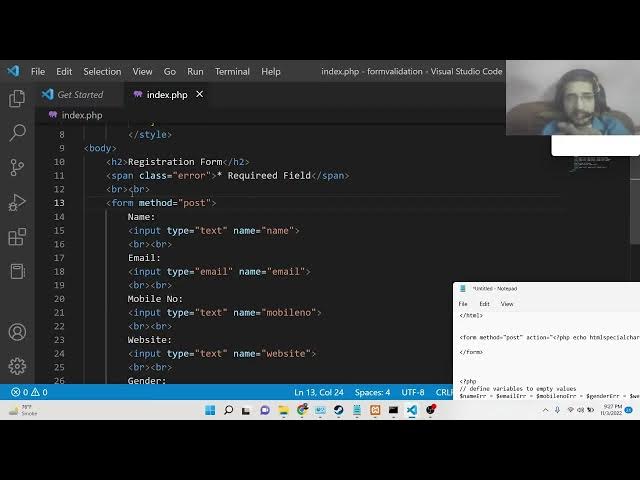
here. This is my registration form out
0:27
there and it contains a lot of fields
0:29
out there which can be if you want uh
0:33
these fields are basically name, email
0:37
address, phone number, website URL. So
0:39
all sorts of fields are available you
0:42
can see on your screen right here. So if
0:44
I refresh this form here and basically
0:48
the name is there, email, mobile number,
0:50
website, this is a checkbox, gender box,
0:54
mail, female, other agree to terms
0:56
service. So this is a check box. This is
0:58
a radio button. So we will be looking at
1:01
how to validate all these input fields
1:03
out there. So if I click this submit
1:05
button without entering these fields,
1:07
right? So this error messages will be
1:10
popping in that is name is required,
1:12
email is required, mobile number is
1:14
required, website URL is required,
1:17
gender is required. So now let's suppose
1:19
I enter a name
1:22
and if I enter a invalid email address
1:25
and let's suppose if I enter a invalid
1:28
phone number, invalid website and let me
1:31
check marks this. So now you can see
1:33
that these error messages will change
1:35
that is invalid email format mobile
1:38
number must contain 10 10 digits and
1:40
this is the invalid URL. So let let me
1:43
write uh a valid email
1:46
a valid number which is 10digit phone
1:49
number and a valid website
1:52
httpfreetools.com
1:55
agree to terms condition and enter the
1:58
name and as you can see all these fields
2:00
are now correct. If you click the submit
2:02
button, you will now see you have
2:04
successfully registered. Your input is
2:06
name is Gotham. You will see email that
2:09
we have written. Mobile number is the
2:11
written that we have written. Website
2:12
and gender is male. So we will be
2:15
looking at how to validate this advanced
2:17
registration form guys and how to catch
2:19
the information inside PHP. So whatever
2:22
you submit this information inside the
2:24
form, we will be displaying it inside
2:26
the uh browser. You can see name, email,
2:29
mobile number, website, gender. So this
2:31
will be a complete example guys. You
2:33
will get to know about how to validate
2:35
your user input data which you submit
2:38
inside the form. So this is very much
2:40
useful if you have uh if the user has
2:42
disabled JavaScript inside their browser
2:45
then the last alternative remains is for
2:47
doing the validation at the server side
2:49
using PHP. So we will be looking at how
2:51
to validate the data which is coming in
2:54
the uh application using PHP code. So
2:57
for this example guys, I have written a
2:59
complete blog post on my tutorial
3:01
website which is webninjiadeveloper.com.
3:03
So this is a detailed article explaining
3:06
each instruction in detail. So if you
3:08
also want to uh read this blog post
3:11
alongside with watching this video, I
3:13
will uh highly recommend that you go to
3:15
this u
3:17
uh blog post. I have given this blog
3:19
post in the description. Sorry, let me
3:22
copy this link here. So you can get all
3:25
the source code basically uh download
3:28
the full source code.
3:30
Let me give this link in the
3:32
description. Sorry, description also.
3:34
You can go to the description also to
3:36
download all the source code and also in
3:38
the live chat I have given. So let's
3:41
start building this application. For
3:43
building this guys, you will need this
3:45
exam control panel. This is Apache web
3:48
server. MySQL database is also comes in.
3:51
So you need to download this softares.
3:53
For this you simply need to go to just
3:56
type here download exam control panel.
3:58
So this is a software which is required
4:00
for this application. So simply you can
4:03
download this for Windows, Linux or Mac
4:06
operating system. So after installing it
4:09
guys just make a simple folder inside
4:13
your HD docs folder. So go to your C
4:16
drive and uh there will be a folder
4:18
called as examp
4:21
docs and here you need to create a new
4:23
directory. Let me create form validation
4:27
and uh cd into this and uh open this
4:31
inside your visual studio code text
4:33
editor. So now you can see that this is
4:36
our directory. So here you need to
4:37
create the index dot php file here. So
4:40
this will uh create this will hold our
4:43
all our PHP code for this. So the very
4:46
first thing we will do guys we need to
4:49
write the basic HTML form.
4:53
Uh for this we will have uh
4:58
uh basically
5:01
we will simply write a simple styling
5:03
guys. So we will also be just attaching
5:06
a custom styling to it. All the error
5:09
messages will be coming in red color. So
5:11
just do it. And also in the body guys.
5:14
So we will have uh
5:18
we will have a simple H2 tag here.
5:20
Basically this will simply say
5:23
registration form.
5:26
So close this and after this we will
5:29
simply say to the user. So we will
5:33
attach a simple class to it a CSS class
5:37
which is error. And here we will simply
5:39
say here required fields.
5:44
All fields are required. You should
5:46
enter all the So here we can define this
5:48
class which is dot error inside CSS. So
5:51
we just need to change the color of this
5:53
to this color which is hexa decimal 001.
5:57
So this is kind of a red color. You will
5:59
see that this is red color. So if you
6:02
now open this file inside your browser
6:04
which is localhost PHP valid sorry form
6:07
validation.
6:09
So you will see that this is your
6:10
registration form here required field.
6:13
So now we need to simply uh enter the
6:16
input fields out there. So we will have
6:19
two break tags.
6:21
Then we will have a simple form element
6:24
guys. So simply close this
6:27
and inside this guys first of all we
6:30
will have the field for the name
6:32
element. So this will be input type and
6:36
uh this will be type text and name will
6:39
be equal to name. So this name property
6:40
should be given guys. We will target
6:42
this inside PHP. Again we will have two
6:45
break tags. Then we will have the email.
6:48
For the email guys, this type parameter
6:50
will be equal to email
6:53
and the name property will be equal to
6:55
email like this. Again two break tags
7:00
like this. You can now see after this we
7:03
will have the input field for the mobile
7:05
number. Input type this will be again be
7:08
a text and here you need to enter the
7:11
mobile number. So we will say mobile
7:15
number. That's it. So give it this name
7:18
attribute. So here you can simply say
7:20
mobile number. So now if you refresh it
7:23
guys basically you will see there will
7:25
be three fields out there which will be
7:28
name, email, mobile number. You will see
7:30
that after this we will have uh the
7:34
other field which is required for this
7:36
which will be website.
7:39
This will be for uh input type text. And
7:43
here we will attach the name attribute
7:45
which is website.
7:47
And uh we will again be having two break
7:49
tags out there. And then we will have
7:51
the gender. So for the gender guys, this
7:54
will be a radio button. So you can even
7:57
only select one choice at a time. So we
8:00
will provide user with three choices. We
8:02
will attach to each choice in name
8:04
parameter which is gender. So the first
8:06
choice will be male. The second choice
8:09
will be for the female. So input type
8:13
radio
8:15
name will be again gender and uh here
8:18
the value will be for female
8:23
and the third choice will be other.
8:33
So now if you refresh it guys basically
8:35
you will also see a radio button.
8:38
Basically this is website
8:41
uh and also guys we need to attach uh
8:43
break tag as well. I forgot to do that
8:47
two break tags.
8:49
So here if you see basically
8:53
we also need to write the
8:56
label for this radio button which is
8:58
male,
9:00
female and other.
9:03
So if you now refresh it basically you
9:05
will now see this is a radio button guys
9:08
which is gender. You can select only one
9:11
value at a time here. This is radio
9:13
button. And then we will have a simple
9:16
checkbox guys. Checkbox is another kind
9:18
of a input field. Just put a break tag.
9:22
And then we will have input type. This
9:25
time this will be checkbox. And uh name
9:28
will be equal to agree. agree to terms
9:31
and conditions. So if you now refresh
9:34
it, you will now see a simple check box.
9:39
So you can now see you can check this
9:41
box and basically you can attach uh
9:46
uh just put a simple label that uh agree
9:49
to terms of service
9:54
like this. After this guys, we will have
9:56
a simple button to submit the form. So
9:59
input type will be here submit and we
10:02
will be giving a name attribute of
10:04
submit here and value will be equal to
10:06
submit
10:08
and we will once again put break tag
10:10
here like this. So if you now refresh it
10:13
your application you will also see a
10:15
break tag here. So if I now refresh it,
10:19
you will now see a submit button is
10:21
there. So all these fields we have made
10:23
here. Now we need to simply attach the
10:25
form validation. So as I click the
10:27
submit button, I need to print the error
10:29
messages right here. Something like
10:32
this. We need to print these error
10:34
messages. So how to do this? It's very
10:37
simple guys. First of all, we need to
10:38
write some PHP code here. First of all,
10:41
we need to attach inside this form. We
10:43
need to attach a method to our property.
10:46
This method will be post. By default,
10:48
the method is get if you don't provide
10:51
the method argument. But we need to
10:53
explicitly provide the method as post.
10:55
And then the action parameter we need to
10:57
provide. So this can be we need to write
11:00
some PHP here echo. And here we will use
11:03
this HTML special characters function.
11:06
And here we need to pass a string guys.
11:09
Basically this string will be a
11:10
constant. This will be equal to here add
11:14
the rate server
11:17
server and here we need to pass
11:21
uh double quotes PHP
11:26
self. So you just need to pass this and
11:29
put a semicolon. That's it. And also
11:32
close the PHP tags.
11:35
So this is the action parameter that you
11:37
need to attach guys which is basically
11:39
this simply means that it will
11:41
automatically submit to the same file
11:43
which is index dot php. If you want to
11:45
submit to a different file you will
11:47
provide a provide the address but we
11:49
will be handling the form validation in
11:51
the same file which is index dot php.
11:54
That's why we are attaching this
11:55
constant. So now at the very top guys we
11:58
will define the PHP code here. So right
12:00
here we will put this PHP block
12:04
and basically guys here we will define
12:07
the error variables
12:10
for form validation.
12:13
So these error variables will be for
12:15
each and every field here which is name
12:17
error
12:18
is equal to email error.
12:22
So each and every field will be having
12:24
their respective error variables. Mobile
12:27
number error
12:29
and then we will have uh gender error
12:37
and then basically we will have our
12:39
website error.
12:44
So the initial value will be all these
12:46
error variables guys will be empty. So
12:49
agree error. So agree error
12:53
initial value will be empty. So put this
12:56
and also we will be
12:58
assigning the values guys inside the
13:00
respective variables name email here
13:03
you'll be storing all the information
13:04
which will be coming for from the user
13:07
mobile number and then we have the
13:10
gender property gender
13:13
and uh we have the website
13:16
and the agree. So all these variables we
13:18
will declare guys. So almost six
13:21
variables are there. So this will be
13:23
empty. So right here we have defined
13:26
this guys. So now we need to first of
13:28
all check here as we have attached to
13:30
this form element. You can see that guys
13:32
we have attached this a post request
13:34
here. So now we just need to compare the
13:36
method compare the method in inside the
13:40
if condition. So here we will simply say
13:42
here add the rate server
13:46
and here we need to check for the
13:47
request method. So here there is a
13:49
property called as request method and uh
13:54
here we need to simply check
13:58
if this is a post method then in that
14:00
case we need to
14:03
so add the rate server
14:09
I think this needs to be in double
14:11
quotes
14:15
triple equal to post.
14:19
Uh
14:21
let me see.
14:28
So close this.
14:32
So now basically guys here you you can
14:36
see that if at the rate uh server
14:42
request method is equal to post and what
14:46
sort of error is here syntax error unex
14:49
unexpected if oh sorry we need to put a
14:51
semicolon here so at the end of each and
14:54
every line guys inside your PHP code you
14:56
need to put a semicolon that's why the
14:58
error was coming. So now you need to
15:00
compare each value guys. We need to put
15:01
the validation empty. So first of all we
15:04
will compare for the empty error if uh
15:06
the user hasn't entered any sort of
15:09
value. So first of all we will compare
15:11
that. So here for this purpose we will
15:13
use the empty method of PHP. So
15:15
basically this method determines whether
15:17
the variable is empty or not. So here we
15:20
will simply inside your post we will
15:23
give the name attribute that we have
15:25
given. So if you check here basically we
15:28
have provided each input field with a
15:30
name attribute name name you can see
15:33
here name. So each and every input field
15:37
have this name attribute. So we are
15:39
targeting it using this name attribute.
15:42
So we will initialize this name error
15:44
variable. So here we will initialize
15:46
that uh
15:50
name is required. You can see that put a
15:54
semicolon. So as you can see that
15:56
basically if uh the user hasn't entered
15:59
the name we will initialize this name
16:02
error that name is required and
16:04
basically we can uh in the else block if
16:07
the user has entered the name then we
16:09
need to put the validation. So we will
16:12
simply call a function guys which will
16:15
be the custom function for the
16:16
validation input data and here we will
16:19
pass this uh name parameter.
16:23
So here we need to define this function
16:25
guys which is uh custom function of PHP
16:27
input data
16:30
and here you will pass our data and here
16:33
inside this function guys we simply need
16:36
to remove all the slashes remove all the
16:39
spaces which are there
16:42
special symbols
16:45
special symbols so there are some
16:47
methods out there inside PHP which lets
16:49
you do this first method is trim method
16:52
it removes all the white space from the
16:55
beginning and end of a string. So here
16:57
we will pass the data like this and then
17:00
we will have another function which will
17:02
be strip slashes. So it will remove all
17:05
the uncodes
17:07
the quotes which are there
17:11
and then we will again pass a simple
17:13
function which is HTML special
17:15
characters. So basically it will remove
17:17
all the special characters and it will
17:20
convert them to HT HTML entities
17:24
and lastly we will return this from this
17:27
function that's it return data. So now
17:30
after getting this all this validated
17:34
we will first of all have a regular
17:37
expression guys for the regular
17:38
expression we will use this method which
17:41
is pre match.
17:43
This is a method and basically it
17:45
performs a regular expression. So here
17:47
you need to pass this regular expression
17:49
guys for uh the for to check that if the
17:54
user has entered the correct format. So
17:57
inside this regular expression guys
17:59
inside double quotes this is your
18:01
regular expression. So basically it only
18:03
allows the characters from A to Z in
18:06
small letters and capital letters. So
18:08
here you need to pass the name actual we
18:12
need to test on that. So if if it
18:14
returns true then in that case we will
18:18
put this uh if it returns false because
18:21
we put this not sign. So if this doesn't
18:24
matches then we will simply say only
18:26
alphabets
18:28
and white spaces
18:31
are allowed.
18:36
only the uh alphabets and white spaces
18:39
are allowed. If you put numbers here,
18:40
numbers are not allowed. Special
18:42
characters are not allowed. So just put
18:45
a comma, semicolon. And basically guys,
18:47
you have initialized this name error.
18:49
Now to embed this error, it's very
18:51
simple. Uh when you go to your
18:55
uh input field here, you can simply
18:58
embed embed this error, you will simply
19:00
put a span tag here. And uh inside this
19:03
span tag you will simply put the class
19:06
which is we have defined this class
19:07
which is error in the CSS and simply you
19:10
will put the PHP tags echo and then you
19:13
will put your name variable name error
19:16
that's it.
19:18
So you will put this and now if you try
19:21
to submit your form without entering the
19:25
if you try to submit this
19:28
click submit you will see name is
19:30
required you will see that name is
19:32
required if I try to enter uh a number
19:36
inside it
19:37
only alphabets and white spaces are
19:39
allowed if I try to insert let's suppose
19:42
special characters
19:44
then again this error will come. If I
19:46
enter the correct one, no error will be
19:48
coming. So you can see that. So we need
19:51
to remove uh just do it for each and
19:53
every field out there guys. So after
19:55
this we will once again have a another
19:58
if statement. We will compare it for the
20:01
next field which is email address. So if
20:05
the email address is empty guys then
20:07
again we will initialize the same one
20:09
for the email error that uh email is
20:12
required
20:14
and then we will again have a else block
20:17
and then we will simply pass this email
20:20
to this input data simply to remove any
20:22
spot of spa white space we will pass our
20:26
input
20:28
uh this is email we will pass this email
20:30
like this after this guys now we need to
20:33
perform the email validation. So for
20:35
performing this email validation guys,
20:37
we have the built-in PHP email validator
20:41
which lets you do this. So this is uh
20:45
filter where this is a method we will
20:47
use guys. So it filters a variable with
20:50
a specified filter. So we will pass our
20:52
email address and there is a special
20:54
filter which is available inside PHP
20:57
which is filter validate email address.
21:00
So this you this lets you validate your
21:02
email address guys. So filter validate
21:05
email
21:07
and basically if if if it doesn't
21:09
matches then we need to initialize this
21:11
error. If it returns false then that
21:14
invalid email format put a semicolon.
21:18
Now we simply need to embed this error
21:21
guys. So right here we can simply again
21:24
say span
21:28
we need to attach the class here error
21:31
and then we can simply put PHP attacks
21:34
here and then we can simply email error
21:36
that's it. So now if I try to submit
21:40
basically guys uh if I try to open the
21:43
browser if I type the name but if I
21:46
don't type the email address you will
21:48
see email is required. If I type the
21:50
email, type invalid email, you will now
21:53
see please include an add the rate in
21:55
the email address.
21:57
Uh
21:59
I think you can see that input type
22:03
uh
22:05
input type text. Um
22:10
if I try to see here uh if I try here
22:14
let's suppose if I
22:17
invalid email format you will see that
22:19
this is a invalid email. So if I try to
22:21
enter let's suppose a valid email
22:24
address now
22:26
and also enter a valid name. So no error
22:29
will be coming. So you can see that. So
22:32
now we need to do the same thing guys
22:34
for the rest of the fields out there.
22:35
This is the name validation is done and
22:38
also we have done the email validation
22:41
is also done. Now we need to do the same
22:44
thing for the rest of the fields out
22:46
there. So now we will be doing this for
22:48
the phone number.
22:52
So this will be we will be doing this
22:54
for the phone number guys. So after this
22:59
so this will be we will be getting the
23:04
uh mobile number. So mobile number guys
23:06
mobile number validation is slightly
23:08
tricky because mobile number as you all
23:10
know it contains 10 digits. So if the
23:13
user hasn't entered the mobile number we
23:16
will simply say that mobile number
23:20
is required.
23:23
And uh basically guys just in the else
23:25
block if they entered it then we need to
23:27
validate it. So mobile number and here
23:30
we need to pass it to the custom
23:32
function to remove the spaces and the
23:35
you can now see post mobile number.
23:40
And then guys we need to check that uh
23:43
we need to again use the regular
23:45
expression for this pre match. And here
23:49
you need to perform a regular expression
23:51
for the
23:53
num uh mobile number. So here you will
23:55
write like this. This is your regular
23:57
expression guys. So we will put inside
24:00
this square bracket 0 to 9. So number
24:03
should be in between 0 to 9 and then we
24:06
will multiply bit by dollar symbol and
24:10
then slash. So this is your regular
24:12
expression guys. So you need to pass
24:13
your mobile number here. So if it
24:16
doesn't matches then we will simply
24:18
return out a simple error which is uh we
24:21
will simply say that only numeric
24:24
value is allowed. So if you don't enter
24:27
if you enter a string kind of a value
24:29
then we will simply return
24:32
this error here and let's suppose they
24:35
have entered we also need to check for
24:38
the string length. So we can check using
24:40
the string length function. So it will
24:43
get the string length. We will pass the
24:45
mobile number. So if it if it is doesn't
24:48
equal to 10 guys. So in that case we
24:50
will simply attach this error which is
24:54
uh mobile number
24:57
must contain 10 digits.
25:02
So as you can see that guys we are
25:04
attaching multiple errors based upon the
25:06
condition. If they doesn't enter numbers
25:10
we will attach this error. If they
25:12
entered mobile number greater than 10
25:13
digits, we will attach this error. So
25:16
now we simply need to attach this error
25:18
guys. So again in the span tag.
25:22
So we will attach this error which is
25:24
class error and uh dynamically we can
25:28
insert the PHP tag and we can embed this
25:31
mobile number error.
25:34
Put a semicolon like this. And now guys
25:38
if you now try to do this now and uh if
25:42
I don't enter you will see
25:45
first of all we need to enter
25:49
and you will now see mobile number is
25:51
required
25:54
and if I now entered basically in wrong
25:56
format mobile must contain 10 digits.
25:59
You will see
26:05
you will see mobile number must contain
26:06
10 digits. If I now entered the mobile
26:09
number 982125 46 so no error will be
26:12
there. And uh let me see why it is
26:21
if match.
26:24
Um
26:28
if you see we have attach attaching this
26:31
I think I have made error here. Let me
26:34
do this once again.
26:41
So let me once again test it
26:49
and uh let me enter a string value here.
26:53
You will see mobile number must contain
26:55
10 digits. You will see that
27:02
I can say here else if
27:08
uh yeah I can say here
27:13
else if
27:17
I do like this guys. Let me check here.
27:23
Uh
27:26
so you can see only numeric value is
27:28
allowed. You can see that uh
27:31
if I now entered a
27:35
uh greater than you can see mobile
27:37
number must contain 10 digits. So you
27:39
can see that all the error messages are
27:41
printing out successfully. So now we
27:43
need to do the same thing for the
27:45
website URL also. So URL validation.
27:51
So many a times you will have a input
27:54
box where you need to enter the website
27:56
URL. So we will be sh seeing that how to
27:59
do this validation. So first of all we
28:02
will get the data which the user has
28:04
written. So inside this dollar post
28:07
website. So if they doesn't enter the
28:10
value we need to just put this error
28:13
that website URL is required
28:18
and if they entered the URL then we need
28:21
to validate that URL. So first of all
28:23
inside this if condition we will again
28:25
have a regular expression here. Again we
28:27
will use the same function match and
28:29
here you need to perform a regular
28:31
expression check here. So this is
28:34
slightly complicated guys. So basically
28:36
let me copy this. So
28:40
this is a regular expression to check
28:42
for the website URL. So you can just
28:46
pause the video and basically you can
28:47
check for this. It is including all the
28:50
conditions here basically
28:52
and we are passing this website and if
28:55
this fails we will put here invalid URL.
29:00
That's it. So now we can attach this uh
29:03
to the website. Here do the span tag.
29:07
Here we can attach the error
29:12
and then we can simply
29:15
echo out the error which is uh website
29:19
error.
29:21
And now if you refresh it,
29:25
you can see website URL required. So if
29:28
I
29:31
enter a invalid website, you will see
29:32
invalid URL. You can see if I entered a
29:40
again invalid URL because you need to
29:42
add this https also. So like this
29:47
now you can see again it is saying
29:49
invalid https freemediatools.com.
29:58
Uh let me see why it is having this
30:00
problem. Uh
30:05
I think we also need to add this uh
30:10
https www also.
30:18
Uh let me see guys why it is having this
30:23
problem.
30:24
website error.
30:34
Um
30:42
uh let me just paste it once again
30:47
and again do this.
30:58
Uh I don't know why it is doing that but
31:06
oh sorry we have copy pasted to the
31:08
wrong file guys. This is you can see
31:10
that we have copy pasted to the wrong
31:12
file. First of all we need to uh yeah we
31:17
need to also remove this. So we need to
31:19
basically call this function. We need to
31:21
input data that we have defined and we
31:24
need to pass this uh website URL to
31:27
that. Yeah, sorry. We need to pass this
31:30
website to the this input data. So, it
31:33
will remove all the white spaces from it
31:35
and then we need to pass. So, that was
31:37
the problem which was there. So, if you
31:39
again try this
31:44
and uh now if you try it is valid URL
31:47
you'll see no error will be there. So
31:50
now we need to do the same thing guys
31:51
for uh the next field which is the radio
31:55
button. So for the radio button it's
31:57
very simple guys. So basically
32:00
we will have if condition here. So we
32:02
will again check empty dollar post
32:06
and this time this will be for the
32:07
gender. Either this can be male, female
32:10
or other. We will get this. If they
32:13
don't enter anything, if they don't
32:15
select anything, we will simply say that
32:17
gender is required.
32:21
And in the else block we will simply say
32:23
that gender is equal to input data. We
32:27
will basically remove all the white
32:29
spacing
32:33
gender like this.
32:38
So now you can see if you not enter
32:40
basically we also need to embed this. So
32:42
right here we will embed this right
32:46
here. So,
32:49
so put this class error
32:55
echo and uh we can echo out this uh
32:59
gender error.
33:13
So you can see gender is required.
33:19
If you enter it now basically
33:22
you can now see nothing will be there.
33:25
So now the last thing which is remaining
33:28
guys which is the checkbox. So the check
33:32
box is we also need to do this for the
33:34
check box agree to terms and condition
33:37
and lastly this will be the check box.
33:42
So this will be again we will compare it
33:44
in the we will for this we will be
33:47
checking is set. So basically if the
33:51
dollar post variable is checked
33:56
in that case
33:59
we will if this is not set in that case
34:02
we will simply say
34:06
please accept
34:10
terms and conditions before
34:13
submitting the form.
34:17
And uh in the else block
34:20
we can simply say we can basically pass
34:23
this data to
34:27
to this function to remove the white
34:28
spacing like this.
34:32
So basically now we can embed this error
34:34
guys. Basically uh
34:44
error and basically we can echo out this
34:47
error which is
34:50
agree error.
34:54
And now you can see that guys if you
34:55
haven't selected please accept terms and
34:57
conditions before submitting the form.
34:59
If you try to write this
35:02
uh like this
35:06
so no error will be there. So now we
35:08
need to display this data guys. The user
35:11
input whatever user entered the data we
35:13
need to display that data. So how to do
35:16
this? It's very simple guys. So just
35:18
scroll down the page and here you will
35:20
write your PHP code.
35:31
So here you will write your PHP code
35:33
guys right here at the bottom.
35:40
So whenever the user click the submit
35:42
button we will basically display the
35:45
data. So for doing this we will once
35:47
again check inside the if condition here
35:50
we will say is set and basically we will
35:53
again check for dollar post and here you
35:56
will put the submit button. So for the
35:58
submit button you will see we have
36:00
attached this name attribute which is
36:02
equal to submit. So here we are just
36:04
checking if the button has been clicked
36:06
by the user then this automatically
36:09
execute and here you will be checking
36:11
for all the error which is name error.
36:15
if it's equal to null and also we will
36:18
use the and condition here. So here we
36:21
will be checking for all the error
36:22
variables guys if they equal to nothing
36:25
in that case we perfectly know that
36:29
no error will be there.
36:33
So here we will check for all the error
36:35
variables.
36:37
Uh website error,
36:44
gender error
36:49
and except
36:54
uh which was
36:57
agree error. Sorry, agree error.
37:03
So in that case guys, you can see if no
37:05
error is there, we can simply print out
37:07
the value by the echo statement here. So
37:10
we will simply say here h3
37:14
and basically we can simply say that
37:19
inside the bold tag
37:23
we can simply copy this line here paste
37:26
it.
37:31
You have successfully registered. You
37:33
can see that we are attaching this red
37:36
color here. Basically after this we can
37:39
basically print out all the values which
37:41
is there. So again we can write some
37:43
echo statements here
37:47
inside the H2 tag.
38:00
The name will be equal to
38:04
we will concatenate the name like this.
38:07
Then we will have the email address.
38:11
Then we will concatenate the email like
38:13
this. Then we will have the basically
38:17
mobile number.
38:26
Then we will have the website.
38:38
And basically then we will have
38:42
the gender.
38:53
So in between guys you can also put some
38:55
brake tags as well. So depending upon
38:57
how you need to do this just put a break
39:00
tag.
39:05
So after this also paste it.
39:13
So that's it guys. This is your
39:15
application which is complete. Now let
39:16
me test it. Basically if I don't enter
39:19
anything you will see all these error
39:20
messages will come. If I write all the
39:23
things correctly and uh
39:28
so you will see you are successfully
39:30
registered your input name, email,
39:33
mobile number, website, gender. You will
39:36
see that all this information is printed
39:38
out. So this is your advanced PHP
39:41
registration form validation example
39:43
guys. I've shown you step by step with
39:46
the the error messages printed out. So
39:49
this was a tutorial. So if you like this
39:51
one that please hit that like button,
39:53
subscribe the channel as well. If you're
39:55
watching it for the very first time then
39:57
please hit that like button. Subscribe
39:59
the channel as well.
40:01
So please hit that like button
40:05
and don't forget to
40:09
subscribe the channel as well and you
40:11
can just download all the source code in
40:14
the description of this video. I have
40:16
given all the source code.
40:18
So, thanks very much for watching this
40:20
video and I will be seeing you in the
40:22
next one.