Up next in 10


Get the full source code of application here:
Show More Show Less View Video Transcript
0:00
So hello guys, welcome to this video. So
0:02
So hello guys, welcome to this video. So
0:02
So hello guys, welcome to this video. So in this video, I'll show you a VS code
0:04
in this video, I'll show you a VS code
0:04
in this video, I'll show you a VS code alternative, specifically Mac devices.
0:07
alternative, specifically Mac devices.
0:07
alternative, specifically Mac devices. So this is a very native Mac code editor
0:11
So this is a very native Mac code editor
0:12
So this is a very native Mac code editor that's really fast and amazing. It's
0:14
that's really fast and amazing. It's
0:14
that's really fast and amazing. It's called as Nova, Nuva.
0:17
called as Nova, Nuva.
0:17
called as Nova, Nuva. So this is their page here, Nova.app. If
0:20
So this is their page here, Nova.app. If
0:20
So this is their page here, Nova.app. If you go to the browser, simply type this
0:22
you go to the browser, simply type this
0:22
you go to the browser, simply type this address and you will land on this page
0:24
address and you will land on this page
0:24
address and you will land on this page right here. And right here you can
0:27
right here. And right here you can
0:27
right here. And right here you can simply download this latest version Nova
0:30
simply download this latest version Nova
0:30
simply download this latest version Nova 13.1. And this is the screenshot. It
0:33
13.1. And this is the screenshot. It
0:33
13.1. And this is the screenshot. It will open something like this. Inside
0:36
will open something like this. Inside
0:36
will open something like this. Inside the sidebar section, you will have all
0:38
the sidebar section, you will have all
0:38
the sidebar section, you will have all your source code files. And this will be
0:40
your source code files. And this will be
0:40
your source code files. And this will be the actual syntax editor with all the
0:43
the actual syntax editor with all the
0:43
the actual syntax editor with all the highlighting features. And it's a
0:46
highlighting features. And it's a
0:46
highlighting features. And it's a powerful editor. Flexible workflow
0:48
powerful editor. Flexible workflow
0:48
powerful editor. Flexible workflow debugging features.
0:51
debugging features.
0:51
debugging features. And it's a first class editor. You can
0:53
And it's a first class editor. You can
0:53
And it's a first class editor. You can see the highlighting features.
0:56
see the highlighting features.
0:56
see the highlighting features. So it's specifically for built for Mac
0:58
So it's specifically for built for Mac
0:58
So it's specifically for built for Mac devices. Windows are not supported. This
1:02
devices. Windows are not supported. This
1:02
devices. Windows are not supported. This is the mini map also. You can see
1:04
is the mini map also. You can see
1:04
is the mini map also. You can see similar to VS code. So it supports all
1:08
similar to VS code. So it supports all
1:08
similar to VS code. So it supports all the languages CSS, JavaScript, Python,
1:11
the languages CSS, JavaScript, Python,
1:11
the languages CSS, JavaScript, Python, HTML, XML. So it supports all the
1:14
HTML, XML. So it supports all the
1:14
HTML, XML. So it supports all the languages. So now you can even do
1:17
languages. So now you can even do
1:17
languages. So now you can even do debugging features as well. So it will
1:19
debugging features as well. So it will
1:19
debugging features as well. So it will highlight on a specific line.
1:23
And you can see that so it has a
1:26
And you can see that so it has a
1:26
And you can see that so it has a built-in extensions that you can install
1:29
built-in extensions that you can install
1:29
built-in extensions that you can install similar to VS code prettier liquid with
1:32
similar to VS code prettier liquid with
1:32
similar to VS code prettier liquid with Laravel. So it has an extensions.
1:37
Laravel. So it has an extensions.
1:37
Laravel. So it has an extensions. So now just click the download button to
1:40
So now just click the download button to
1:40
So now just click the download button to get started and
1:43
get started and
1:43
get started and it basically comes as a free alternative
1:46
it basically comes as a free alternative
1:46
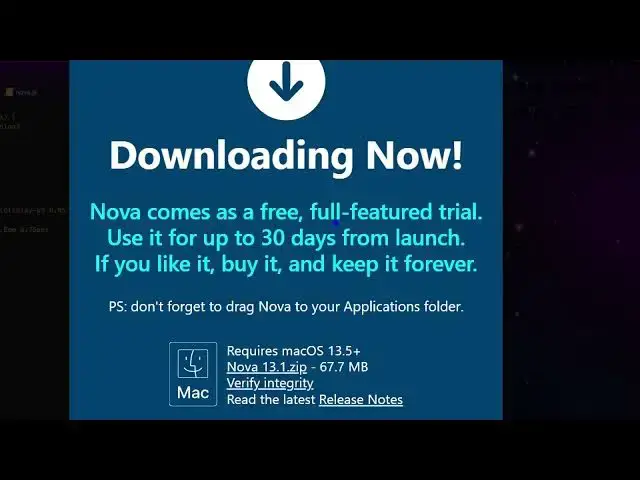
it basically comes as a free alternative 64 mgabytes. This is the zip file. You
1:50
64 mgabytes. This is the zip file. You
1:50
64 mgabytes. This is the zip file. You download this.
1:53
download this.
1:53
download this. So it gives you a fully featured trial
1:56
So it gives you a fully featured trial
1:56
So it gives you a fully featured trial up to 30 days from launch. If you like
1:59
up to 30 days from launch. If you like
1:59
up to 30 days from launch. If you like it, you can buy it and buy it for
2:03
it, you can buy it and buy it for
2:03
it, you can buy it and buy it for lifetime.
2:05
lifetime.
2:05
lifetime. So this is actually the zip file. You
2:07
So this is actually the zip file. You
2:07
So this is actually the zip file. You just need to extract it.
2:18
So as you can see now it is extracting
2:21
So as you can see now it is extracting
2:21
So as you can see now it is extracting all the files here. It will create this
2:23
all the files here. It will create this
2:23
all the files here. It will create this folder right here
2:26
folder right here
2:26
folder right here Nova 13.1.
2:37
As you can see I'm running Windows
2:38
As you can see I'm running Windows
2:38
As you can see I'm running Windows machine. So I can't show you to fully
2:41
machine. So I can't show you to fully
2:41
machine. So I can't show you to fully install this on a Mac. So if you have a
2:43
install this on a Mac. So if you have a
2:43
install this on a Mac. So if you have a Mac system, simply extract and get all
2:46
Mac system, simply extract and get all
2:46
Mac system, simply extract and get all this content and simply install this
2:49
this content and simply install this
2:50
this content and simply install this inside your Mac
2:52
inside your Mac
2:52
inside your Mac computer. So if you do want to buy this,
2:55
computer. So if you do want to buy this,
2:56
computer. So if you do want to buy this, you click the buy now button and I would
2:59
you click the buy now button and I would
2:59
you click the buy now button and I would like to buy Nova for just $99. You will
3:03
like to buy Nova for just $99. You will
3:03
like to buy Nova for just $99. You will see
3:04
see
3:04
see and you can click on pay now and then
3:07
and you can click on pay now and then
3:07
and you can click on pay now and then the check out window will come. So here
3:09
the check out window will come. So here
3:09
the check out window will come. So here you can enter your email address to buy
3:11
you can enter your email address to buy
3:11
you can enter your email address to buy this. So definitely try this. If you
3:15
this. So definitely try this. If you
3:15
this. So definitely try this. If you just type this on Google Nova Mac
3:18
just type this on Google Nova Mac
3:18
just type this on Google Nova Mac editor, this will be the first link
3:20
editor, this will be the first link
3:20
editor, this will be the first link which comes right here.
3:23
which comes right here.
3:23
which comes right here. Nova.app.
3:24
Nova.app.
3:24
Nova.app. So it has a bunch of extensions as well
3:26
So it has a bunch of extensions as well
3:26
So it has a bunch of extensions as well similar to VS code and uh you can search
3:30
similar to VS code and uh you can search
3:30
similar to VS code and uh you can search it
3:34
can see that. So it comes with these
3:37
can see that. So it comes with these
3:37
can see that. So it comes with these extensions. So definitely check out this
3:38
extensions. So definitely check out this
3:38
extensions. So definitely check out this if you are a Mac developer.
3:41
if you are a Mac developer.
3:41
if you are a Mac developer. This will be a great extension for you.
3:43
This will be a great extension for you.
3:43
This will be a great extension for you. And also check out my website
3:45
And also check out my website
3:45
And also check out my website freemediatools.com
3:46
freemediatools.com
3:46
freemediatools.com uh which contains thousands of tools.
#Freeware & Shareware