Up next in 10

INSANE FREE AI Coding Assistant for VS Code 🤯 Better Than Gemini & Claude RooCode Setup + Demo!
Jul 12, 2025

Get the full source code of application here:
Show More Show Less View Video Transcript
0:00
Uh hello guys, welcome to this video. So
0:02
in this video, I'll show you yet another
0:04
AI coding assistant for VS code which
0:07
directly runs inside the editor itself.
0:09
It's called as row code r.com.
0:14
This is their official website. And the
0:16
nice thing about this, it's completely
0:18
opensource.
0:21
It is not a paid solution. So if you go
0:24
to the extensions tab, just type here R
0:27
O C O D E. This is the plug-in here and
0:36
the very first extension which comes
0:38
simply click the install button to
0:40
install this extension
0:42
and uh once it is installed you will see
0:45
this
0:47
appearing in the sidebar section of the
0:50
screen here.
0:52
So just wait for it to install.
0:56
So once it is installed you will see
0:57
this appearing in the sidebar section
1:00
row code and just click it and after
1:03
that uh just need to
1:08
grant permission and you will now be
1:10
able to ask any sort of question right
1:12
here
1:15
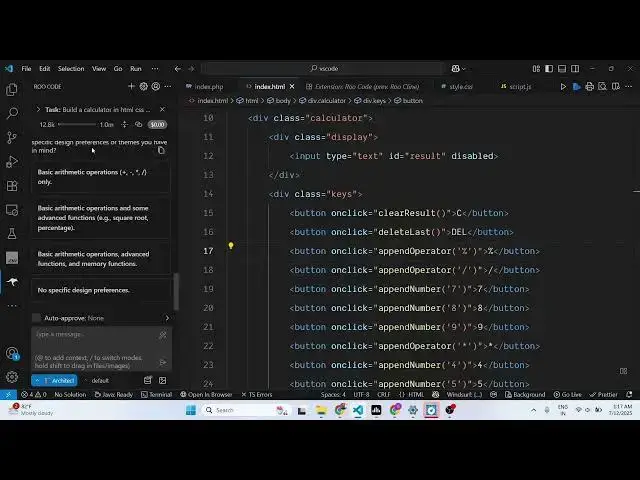
and here you can let's suppose I say
1:18
build a
1:20
calculator in HTML
1:26
So it will basically build out
1:30
the files here.
1:36
You just need to grant the permission.
1:38
So it will read the code, make the
1:40
necessary changes and make the API
1:43
request
1:45
and generate the code for you.
1:50
So it is asking you some questions here.
1:53
So you just need to provide the thing
1:56
because in calculator you need to have
1:58
basic automatic operations.
2:01
You just need to click approve.
2:05
So
2:29
after that it will basically
2:33
do the coding for you. You will see it
2:35
is doing it.
2:39
Can save the changes.
2:47
So it's a great AI coding editor. You
2:50
can definitely use it and you can even
2:53
install it by clicking this button as
2:56
well. So it redirect you to this
2:58
extension right here. So as you can see
3:00
it's used by almost 650,000
3:03
developers.
3:12
So if I try to open this.
3:16
So this is your calculator.
3:23
So you can install this extension guys
3:26
in VS code to actually use AI coding
3:29
assistant similar to many great
3:32
alternative open-source alternative to
3:36
claude chat GPT and Gemini and also
3:40
check out my website free mediatools.com
3:44
uh which contains thousands of tools
#Software
#Open Source