Up next in 10

🎙️ INSANE AI TTS! Dia 1.6B – Real Time Multi Speaker Voice AI by Nari Labs on Hugging Face!
Jul 20, 2025

Get the full source code of application here:
Show More Show Less View Video Transcript
0:00
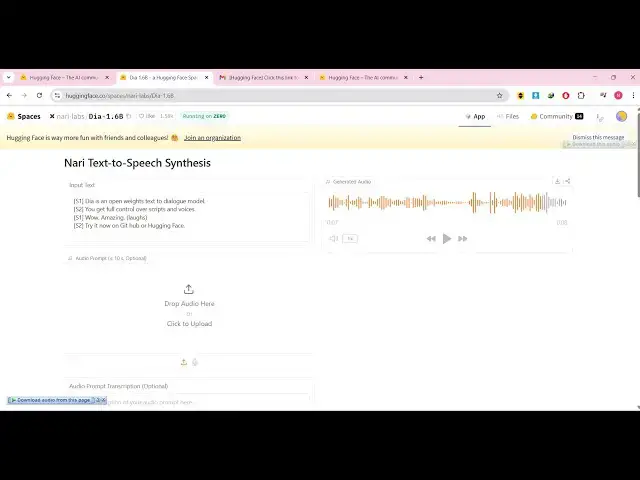
Uh hello guys, welcome to this video. So
0:02
in this video I'll show you a new TTS
0:05
platform texttospech AI platform
0:08
which actually generate voices. You can
0:11
actually write the text prompt and based
0:13
upon the text prompt it will generate
0:15
this MP3 voice. So I basically this is
0:18
the platform name here which is dia 1.6
0:22
billion. This is the name of the model
0:24
which is basically created by this
0:26
company huggingface.co.
0:29
I've given this link in the description
0:30
of the video. Simply go to the browser
0:33
and type this address and you can try
0:35
this model completely for free. It's an
0:38
open-source uh texttospech model where
0:41
you actually write your text whatever
0:43
text that you want to convert this into
0:45
audio. So now it will create this AI
0:48
voice. So let me just play the AI voice
0:50
here and just listen to the voice.
0:53
Is an open weights text to dialogue
0:55
model.
0:55
You get full control over scripts
0:56
voices.
0:57
Wow. Amazing.
0:59
Try it now on GitHub or hugging face.
1:02
So you can see that whatever text was
1:04
written, it actually created this MP3
1:07
audio file which sounds real and uh you
1:12
can't spot the difference between AI and
1:14
real. So this is a nice little platform
1:16
and you can try this for completely free
1:20
and they do also have the GitHub page as
1:23
well where they actually share the
1:25
source code as well. So,
1:28
so you can even see there are mult
1:30
multiple speakers out there. This is
1:32
speaker one, speaker two. So, in this
1:35
easy way, the first speaker speak those
1:38
words.
1:38
Is an open weights text to dialogue
1:40
model.
1:40
You get full control over scripts and
1:42
voice.
1:42
So now after the first sentence is over
1:45
there is a slide break and then comes
1:47
the second speaker. You can just see and
1:49
you can even add these uh sound effects
1:52
as well such as the laughter effect. So
1:55
once it occurs it actually have little
1:58
bit of laughter as well.
2:00
Amazing.
2:01
So as you can see inside this
2:05
as we written right here the bracket
2:07
laughs. So now the person literally
2:09
laughs at that moment of time.
2:12
Try it now on GitHub or
2:14
so then it also provides you with a
2:16
download button to download this MP3
2:18
file as well. So you can change the text
2:20
prompt accordingly and generate this
2:25
text to speech really easily using this
2:27
AIA
2:28
is an open weights text to dialogue.
2:32
So they do offer the pro plan as well.
2:35
So there is some kind of restriction in
2:37
the free plan. So you can just go to the
2:39
website simply just change this text
2:42
here. If I just change it.
2:59
So again click generate and you will get
3:02
this warning here uh quote exceeded. So
3:05
once you do this you need they also have
3:08
the pro plan which basically have uh all
3:11
the premium AI models which you will be
3:13
able to generate images as well
3:16
alongside with the audio as well. So you
3:19
can check out their platform the pro
3:20
plan starts from $9 per month and uh
3:26
so they do also have the GitHub page I
3:29
already told you. This is the name of
3:30
the model DR 1.6 billion. So I have
3:34
given this link in the description of
3:36
the video and also check out my website
3:39
freemediattools.com
3:42
which contains thousands of tools.
#Radio