Up next in 10

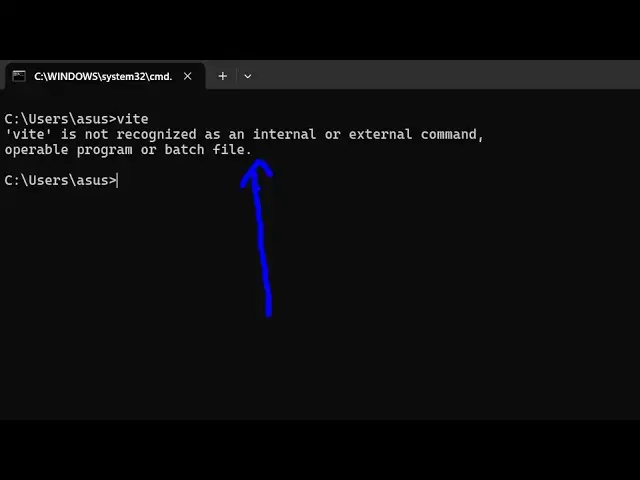
How to Fix vite is not recognized as an internal and external Command Error in Terminal
Jun 7, 2025

Buy the full source code of application here:
Show More Show Less View Video Transcript
0:00
uh hello guys uh welcome to this video
0:02
so in this video I'll show you if you're
0:04
getting a error message while you type
0:07
vit is not recognized as an internal or
0:10
external command vit is if you don't
0:12
know it's a very popular development
0:15
environment similar to
0:17
webpack it's used with almost every
0:21
front- end framework react view build
0:24
it's a build tool for the web
0:26
application so if you're getting this
0:30
error message I think you haven't
0:32
installed it correctly so for installing
0:35
globally you need to add the flag here
0:38
npmi - g for globally installing wheat
0:43
so just just execute this command this
0:45
will execute wheat globally inside your
0:48
system you will see it has added uh
0:51
these packages so if you execute the vit
0:57
command now you will see the version of
1:00
wheat which is installed
1:03
6.2.3 and for this you should have
1:05
nodejs installed so I'm using the latest
1:08
version of nodejs which is
1:11
23.7.0 if you just type vit it will
1:13
start the development
1:15
server and vit is a very popular build
1:19
environment you can just
1:24
create a simple React
1:28
project it actually takes very less time
1:32
this is the command
1:33
here
1:35
npm create V at the rate followed by
1:39
your app name so here it actually tells
1:42
you all the options which app you want
1:45
to create so it's a great build process
1:47
so in this way you can fix that error
1:49
message uh thank you very much for
1:52
watching this video also check out my
1:53
website
1:54
freemediatools.com which contains
1:57
thousands of tools
#Programming
#Software