0:00
uh Hello friends welcome to this video
0:02
so in this video I will show you how to
0:04
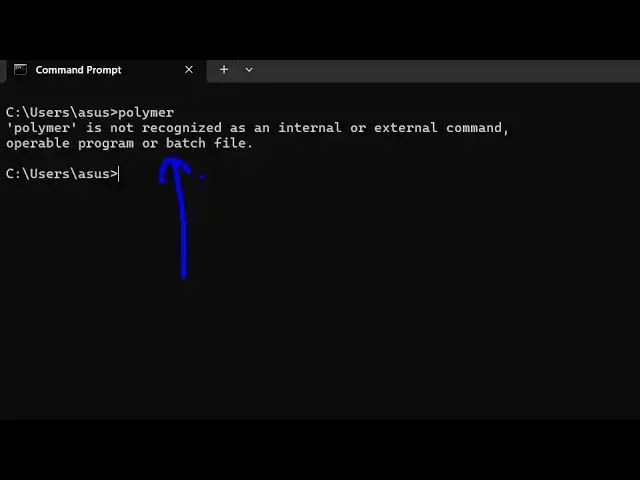
tackle this error message if you write
0:06
polymer inside terminal this message
0:09
comes polymer is not recognized as an
0:11
internal or external command so this
0:13
typically happens if you haven't
0:15
installed polymer inside your system so
0:17
polymer is a third party Library if you
0:20
just search on Google this website comes
0:23
Library so you need to install the CLI
0:26
version of polymer so for this you
0:29
should have nodejs install on your
0:31
system so I'm just using the latest
0:32
version of nodejs which is 22.13 one at
0:36
the time of recording this video and
0:38
also you should have NVM installed which
0:41
comes with node which is a node version
0:43
manage sorry node package manager sorry
0:47
npm should also have this as as well so
0:50
I'm just assuming that you have nodejs
0:53
installed on your system so after this
0:55
it's become very easy to install it so
0:59
just execute this command
1:01
npmi uh- G for globally installing
1:05
polymer inside your system so polymer
1:07
Das CLI so we are installing polymer CLI
1:11
inside the system so just execute this
1:13
command and this will install polymer
1:16
inside your system globally so that you
1:19
can access all the commands associated
1:21
with it inside the terminals so just
1:24
wait for the command to finish is
1:27
typically take 15 to 20 seconds to
1:36
package so on this official website they
1:39
have given this step bystep instruction
1:41
so you can just see npm install DG
1:48
CLI so they have given this command so
1:51
you just need to execute this command so
1:54
as soon as you do this you will see that
1:56
it will actually install these 12 85
2:01
packages so if you just type now polymer
2:04
you will see the command will be
2:05
successful so this is your polymer D CLI
2:09
the multi-tool for polymer projects so
2:11
in this way you can tackle that error
2:13
message and install this package and use
2:15
polymer CLI inside the terminal and
2:18
thank you very much for watching this
2:20
video and also check out my website as
2:23
well free mediat tools.com uh which
2:26
contains thousands of tools regarding
2:28
audio video and image
2:30
and I will be seeing you in the next