Up next in 10


Buy the full source code of application here:
Show More Show Less View Video Transcript
0:00
uh hello guys uh welcome to this video
0:02
so in this video I will show you uh how
0:04
to execute JavaScript code inside your
0:07
Python script and for this we will be
0:10
using it third part package here so you
0:13
just need to install this by executing
0:15
this command pip
0:17
install pi execute js this is actually
0:20
the package here py x e cj js so install
0:26
this package here by using this command
0:28
pip install and then I will just write a
0:32
simple Python script which will execute
0:35
JavaScript code from Python so for this
0:37
you just need to import this package
0:39
here first of all execute js so we
0:43
simply import this package by using the
0:46
import statement and then we specify the
0:49
JavaScript code that we need to execute
0:53
so right here we can specify a simple
0:57
function so which will add two numbers
1:00
and we basically write a simple function
1:02
for
1:03
this so if you
1:05
see this function actually adds two
1:09
numbers function add it takes two
1:12
numbers a b and it actually returns
1:16
the it adds these two numbers and return
1:19
this so this is actually the JavaScript
1:21
code and if you want to now execute this
1:25
JavaScript code from your Python script
1:27
we
1:28
actually make
1:31
this variable here context and
1:35
this module here which is execute JS it
1:38
actually contains this function which is
1:41
compile so here inside this compile
1:43
function you actually pass your
1:45
JavaScript code that we define here so
1:48
now it contains this function compile so
1:51
we are passing this JavaScript code so
1:53
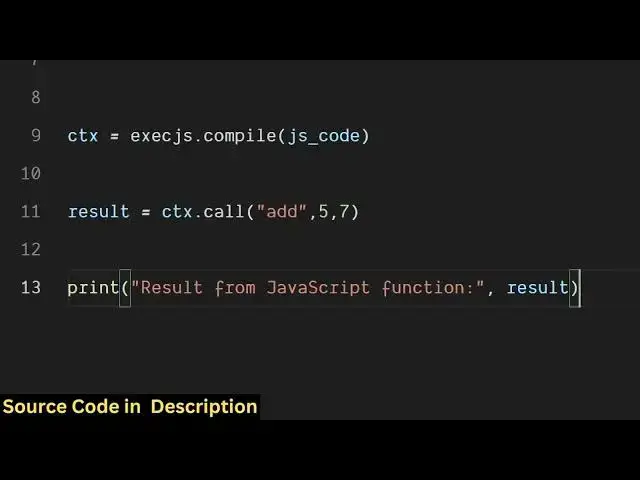
after doing this uh we
1:56
simply call this so context dot it
2:01
contains this call function and we
2:03
actually call this function that we
2:05
define here if you see we have defined
2:08
this add function so we are simply
2:09
calling this call function so here we
2:12
are specifying this function name which
2:14
is add and here we are specifying the
2:17
arguments here so I will say 5a 7 so it
2:21
will actually
2:22
pass 5 to a and 7 to b so it will return
2:27
the result 7 + 5 is equal to 12 so I
2:31
will now at the next step we will just
2:33
print out the result which will be
2:35
coming from this so result from
2:38
javascript function which will be result
2:42
so we are printing this value so if you
2:44
execute this Python script guys just
2:48
python app
2:50
py so now what happens you will see the
2:53
result coming from this function result
2:55
from javascript function is 12 so in
2:58
this easy way you can actually create a
3:01
javascript code here and call this from
3:04
your python script using this module
3:06
execute js and uh we can even define
3:09
multiple functions here let's suppose I
3:11
define a function again of
3:14
subtract which will subtract the two
3:16
numbers a minus b and instead of calling
3:20
the add function we can call the
3:22
subtract function so here we pass 8 and
3:26
7 so 8 minus 7 will be equal to 1 so if
3:30
I execute this now you will see result
3:34
from javascript function is 1 so you can
3:37
define here your JavaScript code guys
3:39
and then you can execute very simply
3:41
using this module that the Python
3:43
provides
3:44
you so it's a very popular module of
3:48
Python simply first of all install this
3:51
by using the pip command and then you
3:53
can actually write this function Python
3:56
script which will execute your
3:57
JavaScript code here so you can see that
3:59
this is the module here install this and
4:01
then write the Python script that I
4:03
showed you so thank you very much for
4:06
watching this video and also check out
4:08
my website here freemediatools.com
4:10
uh which contains thousands of tools
#Programming
#Software
#Scripting Languages