Up next in 10

Google Made Coding Forever by Making Gemini AI Code Assist FREE For Forever in VS Code!
Mar 2, 2025

Get the full source code of application here:
Watch My Visual Studio Code IDE Setup Video For Fonts,Themes & Extensions
https://youtu.be/Bon8Pm1gbX8
Hi Join the official discord server to resolve doubts here:
https://discord.gg/cRnjhk6nzW
Visit my Online Free Media Tool Website
https://freemediatools.com/
Buy Premium Scripts and Apps Here:
https://procodestore.com/
Show More Show Less View Video Transcript
0:00
uh hello guys welcome to this video so
0:02
in this video I will show you a vs code
0:04
extension which allows you to actually
0:07
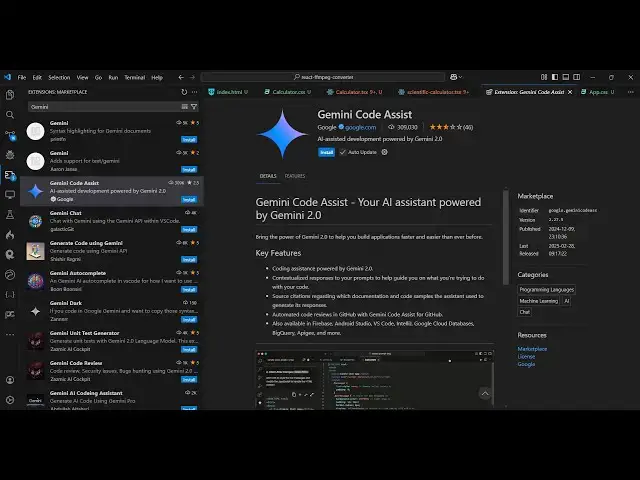
code automatically it's a Google Gemini
0:11
code assist it's developed by Google and
0:14
it's completely free open source so just
0:17
if you type here Gemini code assist
0:21
inside your extension
0:23
tab so this is actually the extension
0:25
which comes right here if you see that
0:28
it's developed by Google and and uh
0:31
Gemini is an AI model for Google here so
0:34
it it can generate code autocomplete
0:37
everything it can do and the nice thing
0:39
about that which differs from other AI
0:42
providers it's completely free you did
0:44
not have to pay anything click the
0:46
install button and just activate this
0:48
extension so after you activate this
0:50
extension you will see it
0:53
will get added inside the sidebar so
0:58
just wait for the installation to
1:04
this will take almost 15 20 seconds to
1:08
install so you can see it's having
1:09
almost 309,000 installs so as you
1:13
install this you will see it
1:15
will show up inside the sidebar like
1:19
this Gemini code
1:21
assist and if you open this uh now let's
1:26
suppose you just need to sign in with
1:28
your Google account if you opening it
1:30
for the very first time it will redirect
1:32
you to the select to your Google account
1:35
and uh then you just need to Grant the
1:37
permission
1:42
so so now the authentication is complete
1:45
so now you can return to your vs code so
1:48
it will fetch the
1:50
information and uh this will just take 5
1:53
to 10 seconds for the complete setup to
1:57
do so now you can start start using it
2:00
for completely free it's Limitless there
2:03
is no limit on using this so here you
2:05
can ask anything Gemini so at the rate
2:09
if you type right here and you will see
2:11
all these choices it will detect all the
2:13
files that are present right here so
2:16
let's suppose you can provide files here
2:19
provide them as a reference to this
2:27
AI we can just say modify this file to
2:31
make a react calculator using CDM and
2:39
browser so as you just uh give this so
2:44
it is now thinking and it will actually
2:47
provide you with this code that you
2:50
have so you can see it has created this
2:53
file here and
3:00
you can now open this index.html file
3:03
here and
3:08
uh so just copy this and paste it so
3:14
this is your react calculator if you
3:16
open this in the browser you will
3:20
actually see this is actually the
3:22
calculator it has created so it's a nice
3:25
little calculator you can see that
3:30
so similarly you can uh do this so this
3:34
is the first scenario
3:36
and now let's suppose if I
3:43
say build a vuejs calculator
3:51
similarly so you can just ask here and
3:53
it will just give you the code here that
3:55
you
3:56
want it's very simple and uh there
3:59
there's also a shortcut key as well if
4:01
you don't want to copy paste from here
4:05
so let me just show you this is actually
4:07
your view
4:09
calculator so you can see it is using
4:11
the CDN of
4:13
view and if I open this now you will see
4:17
that same calculator is now the design
4:19
is also the same but now it is using
4:21
vue.js so it is that easy guys you know
4:25
how to use this Gemini code assist it's
4:28
completely free no need to pay anything
4:31
just sign in with your Google account
4:32
and start using it and the next shortcut
4:35
key I was telling you can even just type
4:37
control I inside
4:40
your and here you can select the model
4:43
here either GPT or Cloud CLA is best for
4:46
programming so I will suggest that you
4:48
use this model which is Claud 3.5 and
4:52
here you can directly write the prompt
4:53
here so just I will say make a
5:00
view image to PDF app using
5:07
CDN so as you just write the prompt here
5:09
automatically it will generate the code
5:11
for you
5:18
so control I is the shortcut so you can
5:21
see it is actually writing the code here
5:32
so contr I is the shortcut control I is
5:35
a shortcut and here you can
5:39
actually please make a react image to
5:44
PDF app using
5:49
CDM so if you just enter it you will see
5:52
it
5:54
will is thinking here and it will
5:56
automatically paste the code here
6:04
so it is directly writing it in the
6:06
editor you don't need to copy paste
6:08
control I is the shortcut so now you can
6:11
either accept or decline it so we can
6:13
accept this code and try to see if this
6:17
working so here you can
6:19
select image so click this button you
6:23
will see it created this PDF file so you
6:26
can see we have created a image to PDF
6:28
converter very simply inside using this
6:31
code Gemini which is provided by Google
6:33
you can select multiple images as well I
6:36
think for this time we can only select a
6:40
single
6:41
image so what we can do is that we can
6:44
adjust this
6:50
code modify this code to
6:54
allow user to
6:57
select multiple images and then insert
7:01
them in PDF so you can actually also ask
7:05
counter questions as well so
7:07
that just adjust your output whatever
7:10
output that you need so it will now
7:12
modify this code
7:14
accordingly so that uh the user can
7:17
accept multiple
7:19
images so here you can accept
7:44
so in this way guys you can directly use
7:46
it inside vs code to build out great
7:48
tools and applications which is Gemini
7:51
code assist it's completely free you can
7:53
see it doesn't give me any sort of
7:55
warning that you have reached the limit
7:57
it doesn't use tokens or any kind of
7:59
limitation it's completely Limitless and
8:02
you can use it unlimited number of time
8:05
and uh recently Google has made this
8:08
tool for completely free previously it
8:11
was paid solution but now you can
8:14
actually uh use it for completely
8:17
free
8:19
so you can also see on their website uh
8:23
Gemini Cod assist is now completely free
8:26
so the recently previous month I think
8:29
they have made this a free version so
8:31
that's why I wanted to make this video
8:33
so that you can directly install this
8:35
extension and start using it inside vs
8:37
code so thank you very much for watching
8:39
this video and also check out my website
8:42
as well free mediat tools.com uh which
8:45
contains thousands of tools regarding
8:46
audio video and image and I will be
8:49
seeing you in the next video
#Programming
#Software
#Intelligent Personal Assistants
#Open Source