Up next in 10


Get the full source code of application here:
Show More Show Less View Video Transcript
0:00
Uh hello guys, welcome to this video. So
0:02
in this video, I'll show you a very
0:03
popular Chrome extension for developers
0:05
and programmers. This is called as user
0:07
agent switcher for Chrome. So if you
0:10
ever basically faced a problem where the
0:13
application wanted you to uh use a
0:16
different user agent, this extension
0:18
will solve a lot of problem. So it's
0:21
used by almost 1 million people. Simply
0:24
go to extension then search for this
0:26
extension user agent switcher for Chrome
0:29
and simply click add to Chrome. As soon
0:32
as you do this you will be able to use
0:34
this extension. So this will simply come
0:38
right here.
0:40
So simply activate this.
0:46
So now it will appear something like
0:48
this. You click on this and it has all
0:51
the agents, all the browsers which are
0:54
available. Chrome, Internet Explorer,
0:55
iOS, Android, Windows 4, Firefox,
0:59
Oporas, Safari. So if you just want to
1:02
use let's suppose the Android KitKat
1:05
just activate this.
1:11
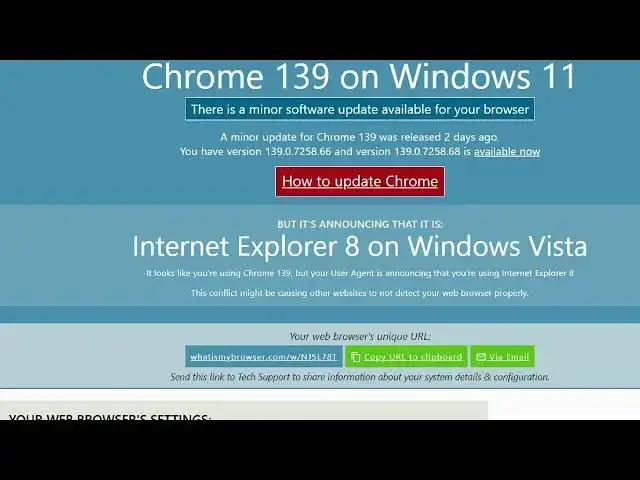
And now if you see what is my user agent
1:15
if you go to the website. So now it
1:18
clearly changed you what version you can
1:22
see you are on Android one. So it
1:25
clearly tell you that you are using
1:28
Linux Android 4.4.2.
1:31
So in this easy way you can change any
1:33
sort of user agent. Let's suppose you
1:34
want to activate Internet Explorer 8 and
1:38
you just activate this after you refresh
1:41
the page here. What is my user agent?
1:43
It's clearly tell you that.
1:49
So you can see that. So you can even say
1:52
what is my browser.
2:00
So this is the extension here.
2:02
Definitely use it. So if you again
2:05
refresh now, it will actually show you
2:08
the internet explorer view how it
2:10
appears like this. So with a s simple
2:12
extension you can even change to firefox
2:16
and again if you refresh now it will
2:19
display the UI which firefox have. So
2:23
with this single extension guys user
2:25
agent switcher for chrome it makes it
2:27
very much easy for you to use multiple
2:29
browser in our Google chrome. This can
2:32
switch to any kind of view windows.
2:36
Uh if you refresh now it will show like
2:38
this you will see that. So it's a very
2:41
useful extension. Some website doesn't
2:43
work with certain browsers. So that's
2:45
why this extension comes into the
2:46
picture. You can simply select here
2:49
Oprah here as well. Oprah browser you
2:52
will see that. So again it appears
2:53
something like this. Different browsers
2:56
have different UI. The Safari as well
2:58
you will see that.
3:02
So you can activate this extension. It's
3:05
totally free. There is no restriction.
3:07
You can do this unlimited number of
3:08
time.
3:10
And this is your Chrome browser which is
3:12
the default view.
3:20
Uh just click this and just switch to
3:22
any view.
3:25
You can see that. So definitely install
3:27
this extension users agent switcher for
3:29
Chrome. And uh also check out my website
3:33
freemediattools.com
3:34
uh which contains thousands of troops.
#Programming
#Internet Software