Up next in 10

👉 Google Chrome FREE Extension to Change Pitch & Speed Instantly of YOUTUBE Videos in Browser
Aug 20, 2025

Get the full source code of application here:
Show More Show Less View Video Transcript
0:00
Uh hello guys, welcome to this video. So
0:02
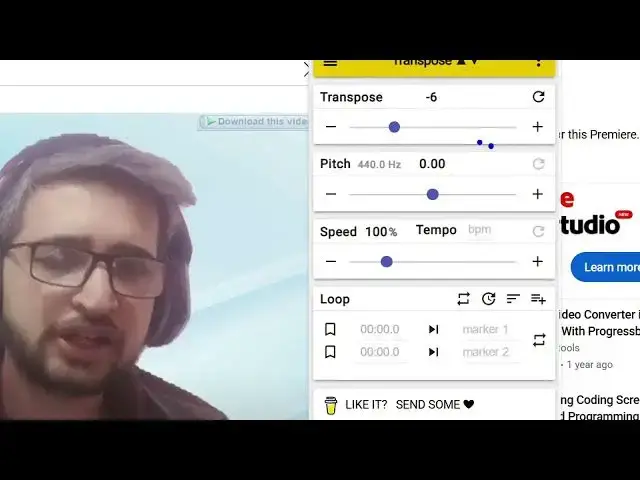
in this video, I'll show you a Chrome
0:04
extension which can actually change the
0:06
pitch and the speed of the audio that
0:10
you are listening. So this is the
0:12
original video of audio you can see
0:15
right here. So there is this extension
0:18
right here. You can actually see it has
0:21
these bunch of sliders out there. You
0:23
can adjust the pitch and the speed right
0:27
here instantly. So as I lower the pitch
0:29
here,
0:30
if you're watching it for the very first
0:31
time through my website
0:33
or you can increase the pitch as well.
0:35
So let me show you the Chrome extension,
0:37
you can use these sliders
0:39
freetools.com.
0:42
So if you go to the Chrome extensions
0:43
tab, just type here transpose pitch
0:47
speed.
0:48
Uh this is a very popular extension.
0:52
Almost 1 million people install this
0:54
extension. You will see that the name is
0:56
transpose pitch speed loop for videos.
0:59
So it basically work with any sort of
1:01
videos. It can be YouTube daily motion
1:03
or any sort of website that videos that
1:06
play inside the browser. So once you
1:08
install this this icon will appear right
1:11
here and after that you open any video
1:15
in the browser. simply play this or
1:17
through the YouTube channel and you can
1:19
adjust
1:20
is all about
1:21
building uh tools and services from
1:24
scratch in
1:25
different programming languages such as
1:28
so from these sliders you can actually
1:30
adjust the pitch and here you can adjust
1:34
the speed as well
1:35
PHP NodeJS
1:36
ReactJS VJS
1:39
angular all the front end frameworks
1:44
you see at the below
1:46
of this video there will be a red
1:48
subscribe button click it you will it's
1:51
a very useful extension I personally use
1:53
it to adjust the pitch and the speed of
1:56
YouTube videos or any sort of videos
1:58
that you play inside the browser you can
2:00
even loop as well and it's a fully
2:03
fledged free extension no need to pay
2:05
anything so once you install this the
2:07
icon will show right here
2:11
and you can go to any YouTube or play a
2:14
video and uh simply automatically this
2:18
will detect once the video plays these
2:20
interface will show and right from this
2:23
slider you can adjust the pitch and the
2:26
speed. So definitely install this
2:28
extension and start using it for
2:30
adjusting your pitch and the speed for
2:33
videos. So this is the overall extension
2:35
right here. So it has
2:39
the theme options also available. It
2:41
also has the dark theme as well. So you
2:43
can activate
2:45
the dark theme as well. You can even
2:47
play a file from your operating system.
2:50
So if you have a you can even browse the
2:53
file here. If you have a file MP3 file,
2:57
you can even play that as well and
2:58
adjust the
3:02
so it's an all-in-one extension to
3:04
adjust pitch and uh speed of the video.
3:07
So definitely install this. This is
3:08
their official website transpose. video.
3:12
So you can see it's completely free. So
3:14
there is no sort of subscription fees
3:17
you need to pay. So it's unlimited free
3:20
open-source extension. So definitely
3:22
install this