Up next in 10


Get the full source code of application here:
Show More Show Less View Video Transcript
0:00
Uh hey guys, welcome to this video. So
0:01
in this video I'll show you a Google
0:04
Chrome extension which can actually
0:05
remove background noise from a video uh
0:08
or a audio file. So this is a extension
0:11
right here background noise removal. So
0:13
if you just simply type this name in the
0:15
extensions tab. So this extension will
0:18
come right here various. So the very
0:20
first extension this one background
0:23
noise removal. So they do have their own
0:25
website as well. You can check out their
0:27
website background noise removal. It's a
0:29
freely free extension. So no need to pay
0:32
any sort of subscription fees. So as you
0:34
can see
0:36
uh simply click the add to chrome
0:38
button. So once you add this extension
0:40
the icon will appear. You just need to
0:43
activate this. So just pin this
0:45
extension uh from here. The icon will
0:49
appear something like this. You will see
0:50
that. So just simply click that. After
0:53
you click this you simply select what's
0:56
the type of the file. Either it's a
0:58
speech or a music with lyrics. So for
1:01
copy copyright issues, I can't just show
1:04
you the any song right here. But what
1:07
can I do right here? We can remove
1:09
background noise, speech improvement,
1:11
everything
1:13
or we can remove background noise and
1:14
improving speech. So here you can
1:16
actually drag and drop any local MP3
1:19
file that you do have. Maximum limit is
1:22
500 mgabytes
1:25
up to 30 minutes you can upload. And
1:27
these are the file types. MP3, double
1:30
AC, all these video files are also
1:32
supported. So here you can even put any
1:35
video that you own.
1:38
So let me just uh select any
1:43
video here. I simply upload the video
1:47
and just select the option.
1:53
So once the video gets uploaded, you
1:56
will get basically able to get remove
1:58
the background. So this is a
2:00
step-by-step process to install this.
2:03
Simply click on this icon and the
2:06
sidebar menu will appear. So here you
2:08
basically simply upload the file.
2:13
So just make sure the file is around
2:16
about 500 megabytes.
2:21
It also has the dark mode as well.
2:56
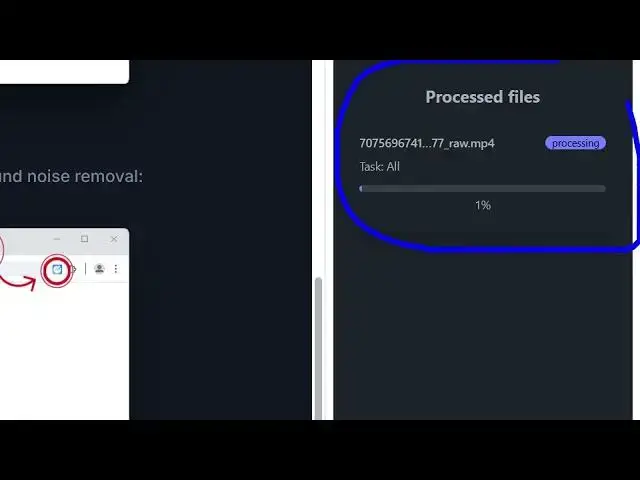
So once you install this you will be you
2:58
will see now it is processing.
3:05
So this is the way by which you can do
3:08
this. It's a free extension and you will
3:11
basically get this interface right here.
3:13
process files in progress. You can
3:16
enable me to download the file as well.
3:18
Enhance your
3:21
simply click on that and let me for
3:24
example simply take a sample
3:28
audio.
3:35
You simply download any sort of file
3:37
here.
3:41
Something
3:52
So here from just simply select.
3:59
So now you can see it is processing it.
4:05
So once it reaches 100%
4:09
you will be able to hear the output.
4:13
So now it is completed. Click on
4:15
download file.
4:30
So you can basically try with your own
4:31
audio file guys. It can be any music
4:34
file. It can be any. So once it is
4:36
completed you will get this interface.
4:39
So definitely try this extension
4:41
background noise removal.
#Music Equipment & Technology