Up next in 10


Get the full source code of application here:
Show More Show Less View Video Transcript
0:00
Uh hello guys, welcome to this video. So
0:02
in this video, I'll show you an ultimate
0:04
extension for WhatsApp privacy. Uh there
0:06
is a Google Chrome extension you can
0:08
definitely install. It's totally free.
0:10
If you go to the extensions tab, simply
0:12
search for this extension privacy
0:14
extension for WhatsApp privacy. So if
0:16
you want to hide contacts, stickers,
0:19
images, profile information, chatting,
0:21
screen inside your WhatsApp web, inside
0:25
your browser, you can use this
0:26
extension. and it's got almost 200,000
0:30
installs. So, the process is simple. You
0:33
click the add extension button and as
0:36
soon as it activates by default, if I
0:38
disable this
0:40
and don't use it.
0:44
So, once it activates basically it will
0:47
hide all your
0:49
uh numbers right here. So, it will
0:51
refresh.
0:53
So if you're using WhatsApp inside your
0:56
web browser Google Chrome then
0:59
automatically what this will do. So this
1:03
will hide all this information for you.
1:05
If you also want to hide this one as
1:07
well. So first of all once you activate
1:10
this extension this will come right here
1:12
privacy extension.
1:14
So simply this icon will appear like
1:18
this. Simply activate this and you will
1:20
see the screen right here. And by
1:23
default it blurs out all the messages
1:26
last messages preview all this. So if I
1:28
open this chat window you will see all
1:30
the messages will be hidden it will be
1:32
blurred. If you hover on the mouse here
1:35
then only it will be visible. So it's a
1:37
very good kind of an extension here.
1:40
Good for privacy here. So if I also want
1:43
to hide the profile picture group
1:45
usernames
1:47
you can toggle this as well. So now this
1:49
will also blur and hide the profile
1:51
picture as well. So in this easy way if
1:54
you just hover onto them then only it
1:56
will show and uh the group names also
2:00
you can even do that as well.
2:04
And uh same goes with contact
2:06
information everything. So it's very
2:08
useful extension here and you can even
2:12
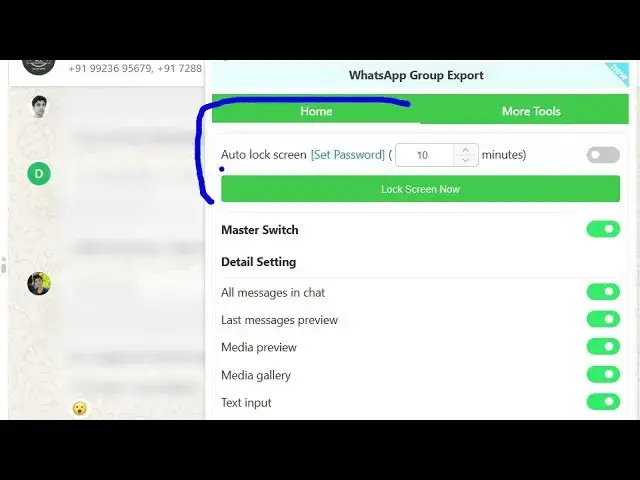
lock your screen as well by using a
2:14
autolock screen feature which is
2:16
available using this extension. You can
2:18
set a time period. After the time
2:20
period, automatically your screen will
2:22
be locked. If I set here 1 minute and if
2:25
I you can just put your password here
2:29
and click on change. So now what happens
2:31
after 1 minute the screen will
2:34
automatically get locked and for
2:38
you need to
2:41
so whenever the 1 minute is done your
2:44
screen will automatically get logged
2:46
out. So if I say log screen now, so you
2:49
will get this notification.
2:51
So
2:53
the user must enter the password to
2:56
enter the screen. So this is a very
2:57
useful feature that I uh find out using
3:00
WhatsApp web. So if accidentally you are
3:03
not there then it feature will hide your
3:06
messages. So now if you enter wrong
3:09
password it will say it will not open
3:12
and as long as you enter the correct
3:14
password then it will open right here.
3:16
So this is an ultimate extension for
3:18
WhatsApp privacy. If you are looking
3:19
forward to hide your messages, profile
3:22
picture, group names, contact names
3:24
inside your WhatsApp web, this is the
3:28
free extension for you. Privacy
3:30
extension for WhatsApp privacy. So
3:32
definitely install this extension and it
3:34
offers all these features for completely
3:36
free. So there is no subscription fees
3:39
available. So you can just see it does
3:41
the job for you
3:44
and simply you can enable this all these
3:47
feature in a matter of click here. So in
3:51
this easy way you can do this here. So
3:54
you can definitely install it
3:58
and also check out my website
4:00
freemediatools.com
4:02
uh which contains thousands of tools.