Up next in 10

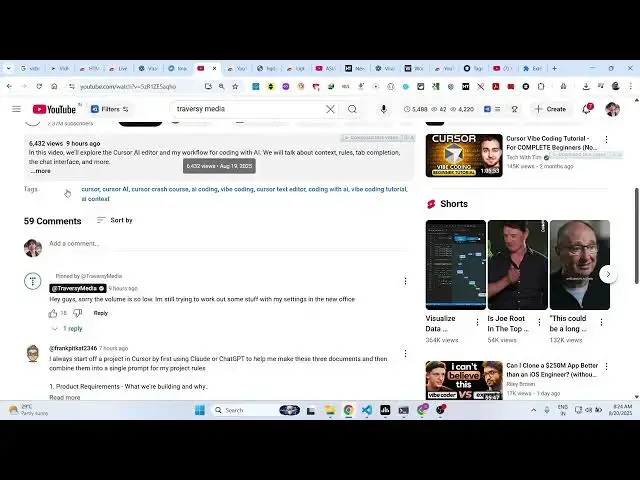
👉 Google Chrome Extension – Discover & Find YouTube Tags of ANY Video for Viral SEO Growth
Aug 20, 2025

Get the full source code of application here:
Show More Show Less View Video Transcript
0:00
Uh hello guys, welcome to this video. So
0:02
in this video, I'll show you a very
0:04
useful Google Chrome extension by which
0:06
you can extract the tags which are used
0:09
in a specific YouTube video. It's very
0:11
good for search engine optimizations.
0:13
If you are a content creator, if you
0:15
want to extract whatever tags that are
0:17
used by a video, you can install this
0:20
extension. It's used by almost 80,000
0:22
developers. So this is their official
0:25
website as well taxadon.com
0:28
and it's completely free to use this
0:31
extension.
0:33
So once you click uh the install button
0:36
add to chrome. So now once it is
0:40
installed here you just need to activate
0:43
this extension. So simply pin this
0:47
extension the icon will appear something
0:49
like this. Now if you go to any video
0:52
and just refresh after you activate this
0:59
now you basically see in the
1:02
if any tags are used in this video it
1:05
will show right here. So you can
1:06
basically
1:09
open any video for example.
1:21
So just open the video and here you will
1:23
see all the tags which are used in the
1:25
video. If if for if any tags are used
1:28
they will show right here at the bottom
1:30
section of the video. So here you can
1:32
actually copy all these tags.
1:36
Simply right click copy
1:38
and right here you will see all the tags
1:41
will be copied
1:43
one by one. So it's a very useful
1:45
extension. So it will extract all the
1:49
tags which are used by a specific
1:51
YouTube video. You come to the bottom
1:52
section right here. You will see all the
1:54
tags right here. So you will see that.
1:58
So this is the extension YouTube tags.
2:01
Just search for this extension. It's a
2:03
very popular extension. It will just
2:05
come at the first position. This is the
2:08
verified extension to view the tags
2:12
right at the bottom section of the
2:14
video. So definitely uh install this
2:17
extension.