Up next in 10

👉 Google Chrome Extension – Automatically Clear Browsing History & Stay Private
Aug 20, 2025

Get the full source code of application here:
Show More Show Less View Video Transcript
0:00
Uh hey guys, welcome to this video. So
0:02
in this video, I'll show you a very
0:03
useful Google Chrome extension which is
0:05
called as auto history wipe. And from a
0:08
single click, you will be able to clear
0:10
out your browsing data while you're
0:12
browsing Google Chrome. And if you just
0:14
type this auto history wipe.
0:19
So this is the
0:22
extension will come right here. It's
0:24
used by almost 8,000 developers. This is
0:26
their official website, Auto History
0:28
Wipe. It's a free app and once you
0:32
install this extension you will be
0:33
granted with this interface. So from a
0:37
single click you will be able to clear
0:40
out your browsing data. So simply pin
0:42
this extension and the icon will appear
0:44
something like this. Simply click on
0:46
that and you basically see this button
0:49
right here clear data now. So once you
0:52
click this button all your browsing data
0:54
such as uh which websites you visited
0:56
will be deleted uh cleared out and you
0:59
can even open settings as well. So after
1:01
you open settings you will be able to
1:03
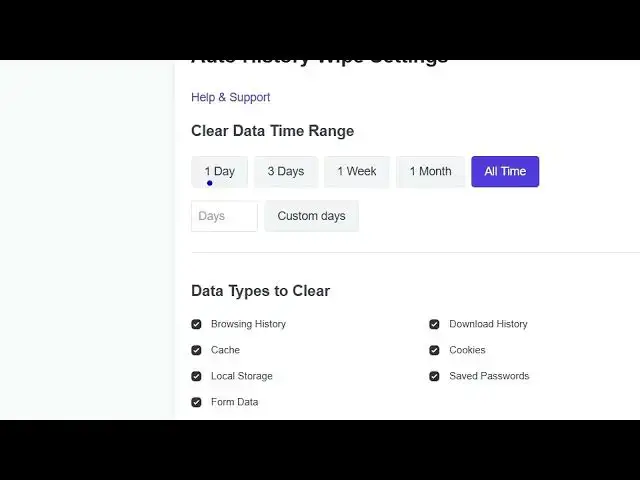
select the time period for 1 day 3 days
1:07
1 week 1 month all time but you can here
1:10
mention custom as well 4 days as well
1:13
and which things you want to delete
1:15
browsing history catch local storage
1:18
form data save passwords you can disable
1:20
this as well or cookies download history
1:23
so you can even disable some options if
1:27
you just want to delete your browsing
1:29
history you simply click on that. So
1:32
auto clear settings as well.
1:34
It will automatically clear out
1:38
wiping your history as well. So this you
1:40
can
1:42
click on save settings. So now your
1:44
settings are saved or you can clear data
1:46
now as well. So from a single button
1:48
this interface will come right here. You
1:50
will be able to click click this and now
1:53
your browsing data will be deleted. So
1:56
you no longer need to go to
1:59
again and again. Simply go to history
2:02
then go to this. So this is a very
2:05
useful Google Chrome extension which
2:07
allows you to clear out your browsing
2:09
data, cookies, any sort of uh browser
2:13
related information.
2:15
So definitely check out this auto
2:17
history wipe extension.
#Internet Software
#Freeware & Shareware