Up next in 10

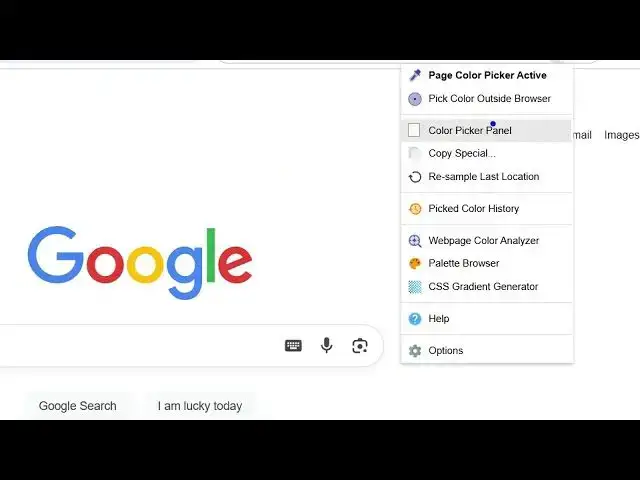
Google Chrome ColorZilla Extension is GENIUS – Grab Any Color from Any Website!
Aug 15, 2025

Get the full source code of application here:
Show More Show Less View Video Transcript
0:00
Uh hello guys, welcome to this video. So
0:02
in this video, I'll show you a very
0:03
popular Chrome extension uh which is
0:06
used to actually uh actually extract
0:10
colors from the web page. The extension
0:12
name is colorzilla. If you just search
0:16
it, this extension will count. So right
0:18
here it is used by almost 4 million
0:21
people. And this is their official
0:24
website. So it can extract the colors
0:26
from anything,
0:29
colors, gradients, anything it can do.
0:33
So it's a very important tool for web
0:35
developers and programmers if you are a
0:37
graphic designer. And if just click the
0:40
add to Chrome button and just activate
0:42
this extension and once it activates it
0:45
will you will see this extension will
0:49
show right here. And now if you visit
0:51
any web page right here and if you are
0:53
liking the design you can actually
0:56
extract the colors very easily. You
0:58
click this button. As soon as you do
1:01
this a bunch of options will come. So it
1:03
can actually
1:06
uh pick
1:09
page color. So right here you simply
1:13
uh hover onto this and automatically
1:15
this will show you the colors which are
1:17
used in the web page and automatically
1:20
the color code will be copied to
1:22
clipboard. So now you can paste it right
1:24
inside your VS code. So you can see that
1:27
so it gives you this unique hexadimal
1:30
code of that color. Again you do this.
1:35
So you simply tap on the element and
1:38
automatically
1:41
the color code will be copied.
1:47
So in the UI if you're liking some kind
1:49
of a color you can simply see the
1:52
hexadimal code of it color. Apart from
1:55
that it also have color picker panel as
1:58
well. So it also shows you the color
2:00
picker panel where you can actually
2:04
select any sort of code here.
2:13
So it's a very useful extension and it
2:15
also shows you the palette.
2:20
But the most important case is that you
2:22
can clearly select which colors are used
2:26
in the web page.
2:28
You can go to any web page here.
2:48
So you can see that. So definitely check
2:51
out this extension guides. I personally
2:53
use it. If you are a web developer, you
2:56
will find this extension to be very
2:58
useful. Simply install this. The name of
3:00
the extension is colorzilla. So they
3:03
have their own website as well which is
3:05
colorzilla.com. You can check out them
3:10
and also check out my website
3:12
freemediatools.com
3:13
uh which contains thousands of tools.
#Programming
#Internet Software