Up next in 10

Form-Data.com Create Fully Functional AI Forms from Text with Spam Protection & Integrations!
Aug 7, 2025

Get the full source code of application here:
Show More Show Less View Video Transcript
0:00
Uh hello guys, welcome to this video. So
0:02
in this video, I'll show you a website
0:04
which actually create forms, functional
0:06
forms using just an prompt here. Uh this
0:09
AI will create the actual forms. So just
0:13
go to the browser, simply type this
0:15
address form-data.com.
0:17
So this is an AI form builder. So right
0:20
in the prompt here, you can check out
0:22
their formstudio. So first of all,
0:25
simply loging in. You can sign in with
0:27
your Google account. It's totally free.
0:31
So it is just verifying that you are
0:34
human. So click on sign in with Google
0:37
and once you sign in
0:40
just sign in for from your Google
0:42
account.
0:46
So now you will be redirected to their
0:49
studio and right here you will be
0:52
created any sort of form.
0:57
So once you sign in you basically get
1:00
100 credits from which now you simply
1:04
click the button right here new form
1:07
and just you can name your form here.
1:11
So after you do this you will actually
1:14
see this the pro plan start with
1:18
you see this open form studio.
1:22
So once you open this you will see on
1:25
the left hand side you simply type what
1:27
sort of information which will be
1:29
available in the form. You simply edit
1:32
this file the success message here you
1:34
will type what sort of success match
1:36
message once the user submit the form
1:38
this message will show and you can even
1:42
assign a background color. So we can
1:44
even change this if I change it to let's
1:47
suppose.
1:49
So now you can see it changes to black.
1:52
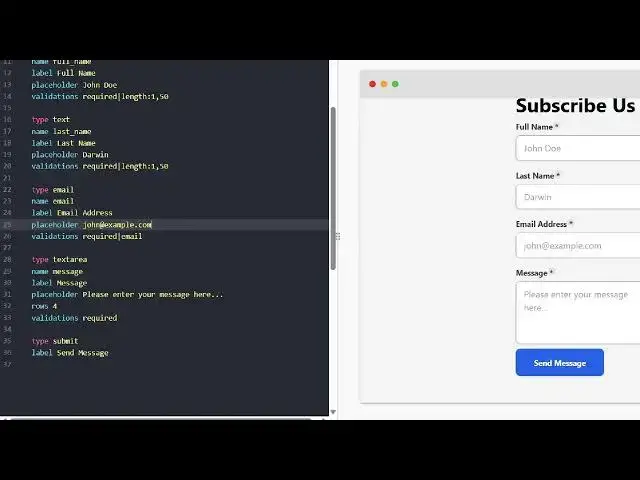
So side by side this is a actual form
1:54
editor. So right here you can edit all
1:57
these details. So let me say
2:00
subscribe
2:10
subscribers right here you actually can
2:13
add one more
2:16
field here. So if I paste it now it has
2:20
four things. So I will also get the last
2:22
name.
2:32
So in this easy way you can generate
2:34
forms and uh
2:43
all these things you can also put
2:45
validations as well required the length
2:48
150. Then we have also got email. Then
2:53
we have the text area. Then we have the
2:56
message. All these things. Once you
2:58
click the save button,
3:01
it will also show you how it will look
3:03
like in the mobile here and in the
3:06
desktop. So now your form is saved. You
3:09
basically get these snippets and a slot
3:12
of templates as well. So go to template
3:15
and you will be able to see all the
3:17
templates which are there. Simply if you
3:20
want to use any sort of template
3:26
you click on use template and the
3:29
template will be copied. So you also get
3:32
this publish button as well to actually
3:34
publish your form. Click on publish and
3:37
then your form will be published
3:40
and
3:45
in this easy way.
3:50
So this is
3:54
your form which is published here. You
3:56
can go to this uh you can access this
3:59
form right here. It gives you this
4:01
unique URL. So now the user can submit
4:04
their information right here and all
4:06
this information which will be coming
4:10
inside
4:12
you will
4:15
this is a great little solution. It
4:18
basically uses AI to design your forms
4:21
really easily.
4:24
So simply go to form-data.com.
4:27
This is the AI form builder for
4:28
developers and coders.
4:37
So it's a fully powered what form you'd
4:40
like to create. So right here you can
4:43
select
4:45
let's suppose create a form for
4:49
increasing
4:51
my website.
4:59
So you can select the tone here
5:02
professional click and now the AI will
5:06
actually create your form. So it will
5:09
take some time. So
5:11
inside the prompt you basically type
5:14
what sort of form you want to create.
5:15
And now you can see grow your website
5:17
visitors. So you can replace it with
5:20
your own image as well. So right here
5:22
you can type and then the the AI has
5:25
automatically generated these fields for
5:27
you. Filled in the form to join your
5:29
meetup full name, email address, phone
5:31
number, describe your target audience or
5:35
everything. Now you can edit this by
5:37
using this editor. So it's a complete
5:40
solution for creating and editing your
5:42
forms using the AI. Definitely check out
5:46
this and also check out my website
5:48
freemediatools.com.
5:51
uh which contains thousands of tools.