Up next in 10

Fontanello Google Chrome Extension – Inspect and Copy Font Styles with One Click
Aug 18, 2025

Get the full source code of application here:
Show More Show Less View Video Transcript
0:00
Uh hey guys, welcome to this video. So
0:02
in this video I'll show you a Google
0:03
Chrome extension which will extract all
0:05
the CSS properties of a particular font
0:08
in a website. The extension name is font
0:12
analog.
0:14
So simply search this extension. Go to
0:17
your extensions tab
0:22
and simply type this extension
0:25
and this is the extension right 60,000
0:28
installs. So once you add this
0:30
extension, it will be added and uh you
0:33
can basically
0:37
uh pin this extension. So right here you
0:41
can see this extension looks like
0:43
something like this. So now if you visit
0:45
any website and if you wanted to get so
0:49
you simply click on that
0:52
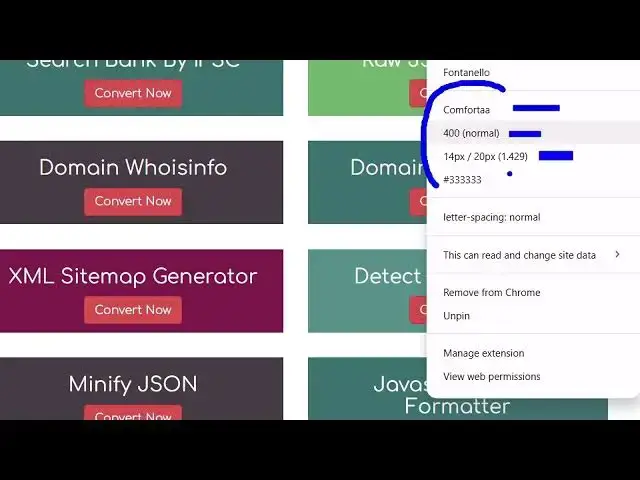
it exactly tells you the information.
0:56
So this is the phone family. This is the
0:58
size of the font, the color of the font.
1:01
So here you can even select this and
1:04
this option will come right here in the
1:07
context menu. So simply right click and
1:09
then it will show you the font name, the
1:12
CSS properties here. This is a font
1:14
family, the size,
1:16
color of the and all these properties,
1:18
letter spacing, everything. So you
1:20
simply select the text and simply right
1:22
click and then automatically this will
1:24
detect the font for you. And you can go
1:27
to any website here. Uh let me go to a
1:29
different website. And now if you are
1:32
wanting to
1:34
find out the font or any CSS properties,
1:37
right click.
1:39
And now it will show you this font name.
1:41
This is the size, the color of the text,
1:44
letter spacing, all these useful CSS
1:46
properties. So it's a great tool if you
1:48
are a developer or a programmer just
1:50
pointing out uh text information.
1:55
So this is a very useful extension.
1:57
Definitely try this.
#Programming
#Internet Software