Up next in 10

Font Picker Google Chrome Extension – Instantly Identify and Select Fonts on Webpages
Aug 18, 2025

Get the full source code of application here:
Show More Show Less View Video Transcript
0:00
Uh hello guys, welcome to this video. So
0:02
in this video, I'll show you how to
0:03
detect which font is using by a website.
0:06
So this Chrome extension allows you to
0:08
detect which website is using which
0:10
phones. So simply type phone picker
0:13
inside the extensions tab. This
0:15
extension will come right here. Simply
0:19
go to your Google Chrome extensions and
0:22
just search for this extension which is
0:24
font picker and the very first extension
0:27
which comes this is the extension right
0:29
here. It's got almost 80,000 installs
0:32
and simply add to Chrome and then it
0:35
will automatically show you which phone
0:37
is using by a website. So now it is
0:39
added. You just need to pin it. So this
0:42
icon will show right here. If you see
0:44
now if you visit any website uh you are
0:48
interested in finding out which font
0:50
this website is using, you simply click
0:52
on this extension
0:54
and you basically click rightclick phone
0:57
details.
1:04
So you just need to right click.
1:07
So this option will be added in the
1:09
context menu. So you select simply the
1:12
select the text and simply say phone
1:14
details and exactly it will tell you the
1:16
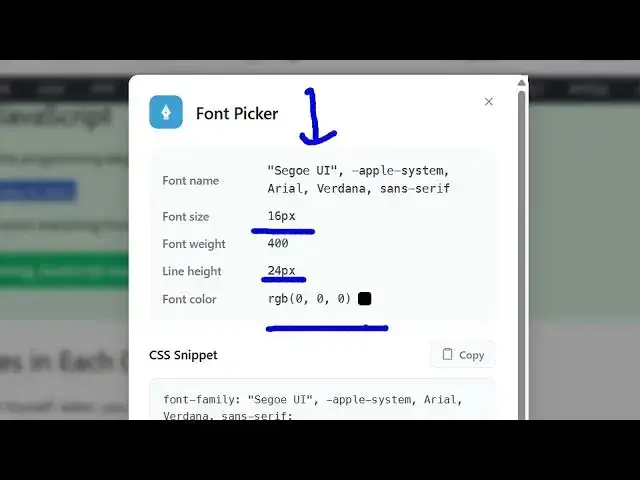
font which is it is using here. You can
1:18
see this is the font name, font size,
1:21
font weight, line height, font colors.
1:23
CSS snippet is also provides you. So
1:25
it's a very useful extension guys
1:27
because many a times in websites we do
1:29
need to find out which phone they are
1:31
using. So you can visit any website just
1:34
right click the text and you see this
1:36
option phone details. So once you have
1:38
installed this plug-in or extension so
1:41
then it will show you this uh phone
1:44
name. So let me just go to a different
1:46
website.
1:50
So now again you can see this is a
1:53
different font right here. So again if
1:56
you want to see which font it is you
1:58
simply right click phone details
2:01
and now it will exactly tell you this is
2:03
mandro font right here. So I personally
2:06
love this extension guys because uh you
2:09
get to know about different phones
2:11
through the websites and if you love the
2:14
font you can also use it inside your own
2:17
website as well. So it's a very useful
2:19
extension. You simply right click just
2:21
select the text phone details and
2:24
exactly tells you the font name right
2:26
here. So
2:29
you can see that. So
2:32
it's a very good uh uh tool for
2:36
programmers and developers because many
2:38
a times we are looking forward for
2:40
different fonts on the website. So this
2:42
extension solves a lot of problem. So
2:45
simply install this and simply select
2:48
the text and right click and this option
2:50
will be there for you. So definitely
2:51
check out this extension.
#Internet Software
#Freeware & Shareware