Up next in 10

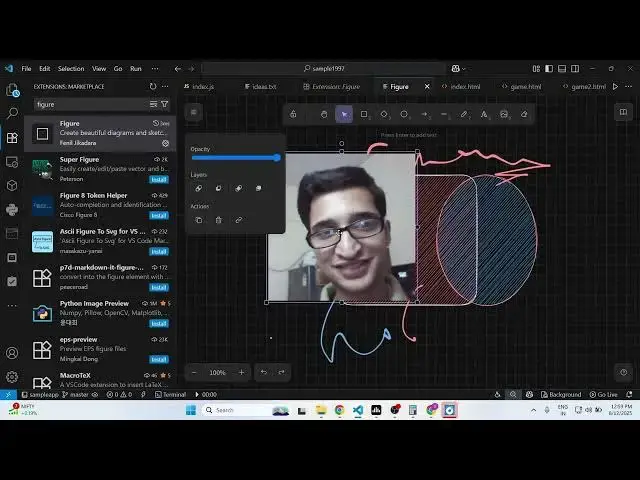
Figure Extension in VS Code Let Me Sketch Diagrams as Code—Claude & Cursor Wish They Could!
Aug 12, 2025

Get the full source code of application here:
Show More Show Less View Video Transcript
0:00
Uh hey guys, welcome to this video. So
0:01
in this video, I'll show you a very nice
0:04
little extension in VS Code. It's used
0:07
to draw diagrams or charts directly
0:09
inside VS Code. So if you go to the
0:11
extensions tab, just write here figure.
0:13
And the very first extension which
0:15
comes, this is the extension, it's got
0:17
almost 2,000 installs. So it allows you
0:20
to directly draw diagrams and sketches
0:23
directly in VS Code without leaving the
0:25
VS Code editor.
0:28
uh simply install this extension or then
0:31
after that need to go to the command
0:33
pallet and simply search for
0:37
create
0:40
diagram
0:42
right here sorry new figure sketch just
0:45
search here new figure search sketch so
0:50
once you select this option this window
0:52
will appear right here and you will be
0:54
able to draw diagrams simply Simply
0:57
select from a series of shapes right
0:59
here. You can see that
1:04
and you can basically change the
1:06
background, the text color, everything.
1:14
So here you can even change the
1:15
background as well. So you can easily
1:17
see just select
1:23
and we have the also the ability to draw
1:26
something.
1:28
You can see that. So you can change the
1:30
color of the text as well.
1:33
And then we also have the ability to
1:36
actually
1:38
after that we have this option
1:43
to insert image as well. So if you have
1:46
a image that you want to
1:56
you can even insert image as well like
1:58
this and then we also have the ability
2:01
to export this to a image.
2:09
So we or just have this you can resize
2:12
it and then simply click export image.
2:17
You can s in uh individually
2:21
click the canvas and then click export
2:23
image. So everything here will be
2:25
exported. You have the option to scale
2:28
export this to a PNG SVG. You simply
2:31
click PNG and all your work will be
2:35
exported. So it's a very useful VS code
2:38
extension guys where you can actually
2:39
make use of uh what sort of diagram
2:42
sketches you want to draw and after that
2:44
you can actually export your work to a
2:48
successful PNG file or SVG file.
2:53
So you can even scale this as well.
3:04
So you can just see.
3:10
So it al also have this eraser which you
3:13
can also click individually.
3:17
So here you can drag and drop
3:20
everything. All these shapes are there.
3:22
It's a fully fresh editor. So this is
3:25
the extension figure. Simply type and
3:27
simply activate this extension and
3:30
simply go to command pallet and simply
3:32
search here new figure sketch and this
3:34
window will appear. So here you'll be
3:36
able to draw sketches, diagrams,
3:38
anything related to your application
3:41
directly in VS code. So this is a very
3:44
useful extension. We also have shapes as
3:46
well
3:47
and here you can control the color as
3:50
well. So
3:53
definitely check out this extension and
3:56
uh also check out my website
3:59
freemediatools.com
4:02
uh which contains thousands of tools.
#Software